BoosterDose

World Plastic Surgery Day!

Wishing all the Plastic Surgeons over the globe a very Happy Plastic Surgery Day!

If you are a Surgeon reading this and are looking for a Software to manage your Plastic surgery consultations, appointments, Hospital and much more, MyOPD Clinic and Hospital Software can help.

Check out www.myopd.in for the details or download MyOPD ZIP Android app and start managing your patient photos with ease.

MyOPD ZIP Android app

World Plastic Surgery Day! Read More »

This Clinic Software feature will make you go Wow!!!

✅ Display Your Rx ➡ Patient’s Mobile

We’re excited to announce a new feature in MyOPD Clinic Software that makes managing prescriptions even easier: direct integration with the MyOPD™ For Patients app!

Now, you can securely share prescriptions, if you want to, directly with your patients’ mobile app. This offers several benefits for both you and your patients:

  • Improved Patient Convenience: Patients can access their prescriptions anytime, anywhere, directly on their phone. No more misplacing paper copies!
  • Enhanced Communication: Patients can review important medication information within the app and get timely reminders for follow-ups based on your settings.

Here’s a preview of how prescriptions will appear on the MyOPD™ For Patients app.

With MyOPD Clinic Software display Prescription on patient's mobile using

This feature is available to paid clients of MyOPD Windows based Clinic Software upon request.

Checkout the MyOPD For Patient apps on Google Playstore and App Store at

MyOPD For Patient iOS App

So are you ready to transform your Clinic and empower your patients?

  • Download a free trial of MyOPD Clinic Software today: www.myopd.in
  • Book a demo with our team to see how MyOPD can streamline your practice. Contact us via WhatsApp

This Clinic Software feature will make you go Wow!!! Read More »

MyOPD™ For Patients – Improve Patient Engagement

We’re excited to announce the launch of MyOPD™ For Patients, a new app designed to enhance communication and engagement between you and your patients.

Benefits for Patients:

  • Convenient Access: Patients can download the app from the Play Store or App Store for easy access to information and communication with you.
  • Latest Rx and Clinic Information: Patients can stay informed with their latest prescription and your clinic information, right within the app. This feature is available in the app today.
  • Improved Communication: 
    • Using MyOPD™ For Patients app, patients will soon start receive notifications for Follow-ups, Appointments etc directly to the app. This feature will be available for all the users of MyOPD Windows Version having an active AMC. In addition to your SMS and WhatsApp reminders, this will be an additional reminding method.
    • Doctors who are currently not sending SMS / WhatsApp reminders to patients for follow-ups can also benefit from this feature. Patients who have downloaded this app will see the reminder as a notification. While this method is less reliable as patients can disable the notifications from apps, we think that patients won’t disable such important notifications from Doctors Clinic / Hospital. It will definitely be better than not reminding at all.

MyOPD™ For Patients App Download links:

App Store (iOS) Version:

Play Store (Android) Version:

Google Play icon

Helping Patients Download the App:

  • MyOPD For Patients app is available to paid clients of MyOPD Windows Based Software.
  • Simply direct patients to your online webpage hosted on MyOPD website. You can do so by clicking the WhatsApp icon in the Patient’s visit section.
  • Use the Flyer that MyOPD team shares with you and set it up in your Clinic Waiting room. Patients can scan the QR code and download the app.

How is MyOPD™ For Patients app different?

  1. MyOPD For Patients is not a Doctor Discovery platform. We are not into the business of recommending Doctors to your patients.
  2. MyOPD For Patients app is app for your own patients which you have seen in your own clinic. As a result, Patients only see the Doctors they have visited and who are using MyOPD Clinic Software in their practice.
  3. MyOPD For Patients app is totally ad-free. We do not show any Advertisements to user nor endorse any products within the app.
  4. MyOPD For Patients app will only show notifications sent by the Doctors of those patients. In certain cases we may send technical updates. However, we do not send any promotional content to your patients.

Important Points for Optimal Use:

  1. MyOPD All In One App for Doctors Configuration: Ensure your MyOPD All In One app is correctly set up for your account. If you encounter any issues, please open a support ticket with our team for assistance.
  2. SMS Credits: SMS verification will be done for patient mobile numbers. Please ensure you have sufficient SMS credits in your account. SMS credit from your account will be used while verifying your patient.
  3. Clinic/Hospital Information: Double-check that your Clinic/Hospital information is accurately reflected on your online webpage. This information, including timings, will be displayed to patients within the app.

By encouraging your patients to use MyOPD For Patients, you can create a more streamlined and efficient communication experience for everyone.

Start your Free trial with MyOPD Windows Clinic Software by visiting our website homepage www.myopd.in

MyOPD™ For Patients – Improve Patient Engagement Read More »

Making the Switch: A Doctor’s Concern About Clinic Software (A True Story)

We recently spoke with Dr. Jain, a busy physician, about his hesitation regarding clinic software. His concerns are common among many doctors making the switch from paper charts or outdated software. Let’s explore Dr. Jain’s questions and see how MyOPD Clinic Software addressed them:

1. Getting Started: A Smooth Transition?

Dr. Jain was worried about the time it would take him and his staff to learn a new software. We assured him that with MyOPD, they could be up and running in just one day! Our team provides thorough initial training, and we’re happy to train new staff members as needed.

2. Scalability: Can it Handle My Growth?

Dr. Jain wondered if the software’s performance would degrade as his patient base grew. We put his mind at ease by sharing the story of a MyOPD user who has successfully managed over 25,000+ patients and 100,000+ visits. The software is built to handle high volumes, so the issues encountered with 1,000 patients are already addressed.

3. Technical Support: Help When I Need It?

Dr. Jain wanted to know what happens if he encounters technical difficulties. MyOPD offers a dedicated support team to ensure smooth operation. Initially, he can call our support number for immediate assistance. Later, he can easily submit support tickets through our user-friendly tracking website.

4. Adaptability: Keeping Up with the Medical Landscape?

Dr. Jain expressed concern that the software wouldn’t adapt to the evolving needs of the medical field. We explained that MyOPD prioritizes staying current. We release regular updates (roughly four times a year) based on doctor feedback and industry requirements. You can even view a comprehensive list of all updates on our website MyOPD Windows Releases – MyOPD™ Updates.

Why Choose MyOPD Clinic Software?

Here’s what truly sets MyOPD apart:

  • Doctor-Driven Development: Regular updates address doctor feedback and suggestions.
  • Reliable Support: Our dedicated team ensures smooth operation with multiple support options.
  • Offline Functionality: Work seamlessly even without an internet connection.
  • Mobile Access: View part of patient data on the go with our Windows PC software synced with MyOPD Android All In One app and MyOPD All In One iOS app.
  • Online Presence: Showcase your clinic details, timings, and services with your own webpage.
  • Automated Reminders: Increase patient follow-up rates with timely SMS/WhatsApp reminders.
  • Boost Reviews: Generate positive reviews by requesting feedback through SMS/WhatsApp.
  • Global Reach: MyOPD is trusted by doctors in India and beyond (Sri Lanka, Philippines, Oman, Jordan, etc.).

Making the switch to clinic management software can feel daunting, but it doesn’t have to be. MyOPD is designed to simplify your practice, improve patient care, and free up your time to focus on what matters most – your patients.

Ready to learn more? Download the free trial from www.myopd.in today!

Making the Switch: A Doctor’s Concern About Clinic Software (A True Story) Read More »

Streamlining Your Clinic with Budget-Friendly Clinic Software

Gone are the days of relying solely on paper charts and appointment books. Clinic software offers a wealth of benefits for doctors and patients alike, but the cost can be a barrier for some practices. Here, we’ll explore how affordable software can transform your clinic’s workflow and address a common concern – maintaining efficiency during patient consultations.

Boost Efficiency, Not Bills:

Many clinics hesitate to adopt software due to budget constraints. Thankfully, the market offers a variety of options designed for budget-conscious practices. These solutions prioritize core functionalities like appointment scheduling, electronic health records (EHR), and billing, ensuring you get the most essential features without breaking the bank. Check out the No. 1 Reason why Doctor’s do not use Clinic Software.

Focus on Your Patients, Not Software:

One of the biggest concerns doctors have with clinic software is the potential disruption to their patient interactions. However, user-friendly software streamlines tasks, not hinders them. Look for solutions that offer intuitive interfaces and quick data entry, allowing you to seamlessly integrate them into your existing workflow.

Here’s how budget-friendly clinic software empowers you to prioritize patient care:

  • Easy Staff Access: A software which is easy for the staff is very useful as it frees up your staff’s time and minimizes patient wait times. Watch these videos to see how your staff can Register Patients and Collect Payments. The staff also hears a Notification Sound when you call the next patient in the cabin.
  • Streamlined Record Keeping: EHRs eliminate the need for bulky paper charts, making patient information readily accessible and improving data accuracy.
  • Efficient Billing: Automated billing ensures timely and accurate claim submissions, reducing administrative burden and improving cash flow.

Beyond the Basics of Clinic Software:

While core features are crucial, budget-friendly software also offer additional functionalities. Look for options that cater to your specific needs, such as:

  • Share Patient Rx over WhatsApp: This allows for remote consultations, expanding your patient reach.
  • Patient App: MyOPD is shortly coming up with App for Patients of Doctors using MyOPD Clinic Software.
  • Inventory Management: Track essential medical supplies and medications.

Making the Switch to Clinic Software:

Transitioning to clinic software doesn’t have to be overwhelming. Choose a provider that offers comprehensive onboarding and training to ensure a smooth user experience for your entire team.

Investing in budget-friendly clinic software is an investment in your practice’s efficiency and patient care. By streamlining your workflow and minimizing administrative tasks, you can dedicate more time to what matters most – providing excellent care to your patients.

Download a free trial of MyOPD Clinic Software by visiting our website www.myopd.in

Streamlining Your Clinic with Budget-Friendly Clinic Software Read More »

Are Fake Prescriptions on the Rise?

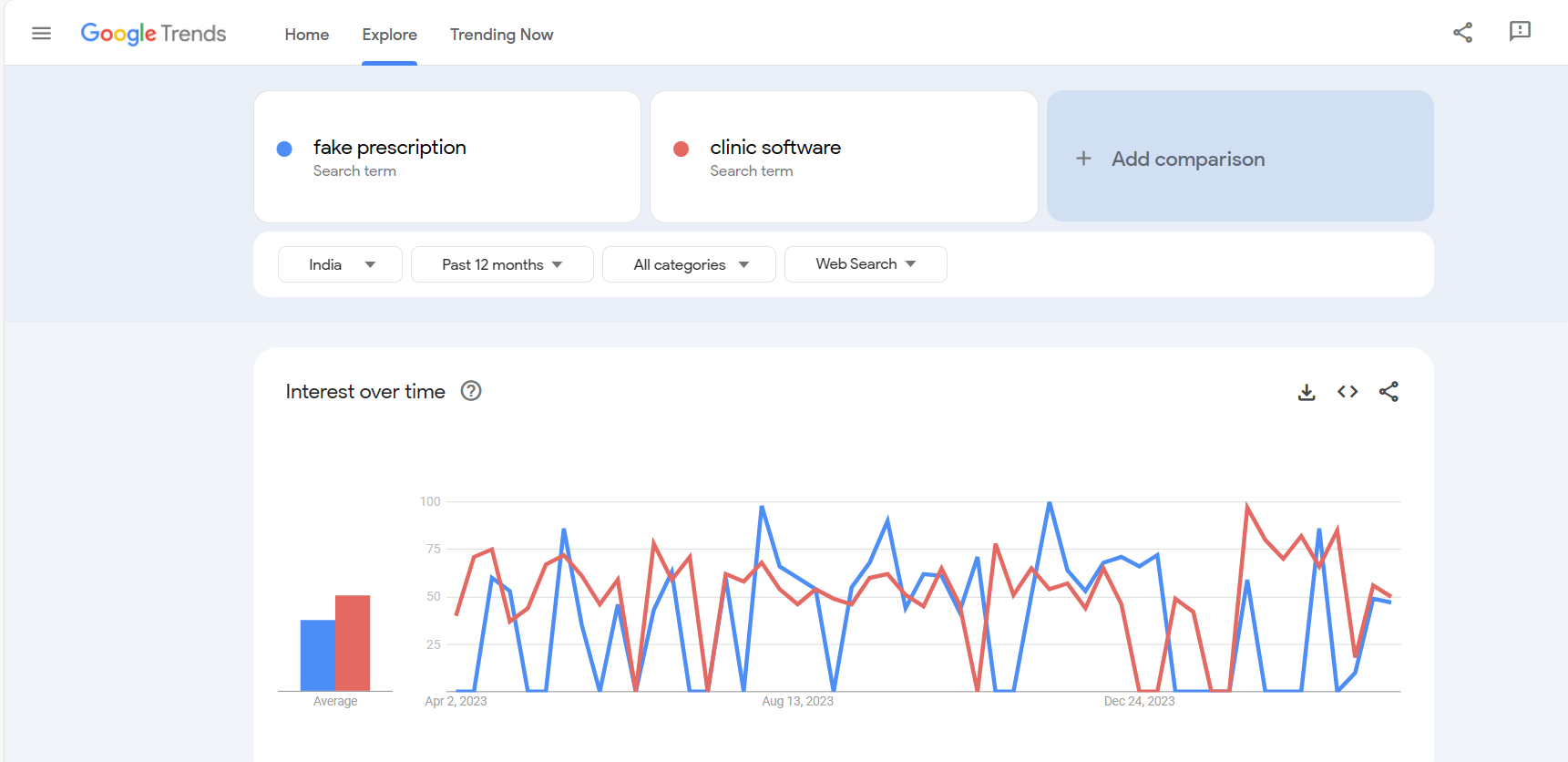
Let’s start with examining some statistics. The picture below shows the trends of Google Searches for “Fake Prescription” and “Clinic Software”.

You can view such trends at trends.google.com We ran this trend search for “fake prescription” and “clinic software” on 5th April 2024 keeping Geographical region as India. The data seen here is for the past 12 months. You can run the same Google Trends check for previous 12 months HERE

What do the results show?

  1. As seen, the number of searches done for Clinic Software are almost equal to the number of searches being done for Fake Prescriptions.
  2. There are people out there who want to create Fake Prescriptions and submit them at work or other places for medical reasons.

Should I as a Doctor be concerned about this?

If such a Fake Prescription is created by anyone using the name of the Doctor, then the Doctor would need a way to prove that the Rx is indeed not theirs. The good news is, if the Doctor is already using an EMR Software or a Clinic Software, proving is very easy. If this Rx does not appear in your software, it was not issued by you, simple.

How are Fake Prescriptions created?

Anyone with basic knowledge of using Word processor or Spreadsheet could create a Fake Prescription that can be printed and made to look legitimate. Plus, many software products, including MyOPD, offer free trial to Doctors. Anyone can download such a free version and create a printed prescription.

How can Doctors protect themselves?

Make sure you follow these best practices while using your Clinic Software in general:

  1. Your EMR Software already captures the digital record of your prescription. If you haven’t issued any prescription similar to the person creating a fake prescription, then it was simply not issued by you.
  2. Always make sure you stamp and sign the Prescription. It just makes it somewhat harder for the Fake prescription creator as they now need to have a stamp like your Clinic’s stamp.
  3. Sensitize the Pharmacy People to check back with you when they receive suspicious prescriptions under your name that don’t make sense.
  4. Always have a strong password with at least 15 characters with a mix of Special Characters and Upper and Lower cases while using EMR Software.
  5. Never tell your password to anyone. Never share the OTPs you receive on your apps with anyone.
  6. Always keep your OS patched up to latest versions. Use good quality Antivirus Softwares.
  7. Never click on any suspicious links received from known / unknown contacts. When you do so, hackers might be able to gain access of your devices remotely.
  8. Always keep the Software products to the latest versions that are released to the market. There are various issues that are fixed to keep the software up to date and current.

Interested in a Clinic Management Software for your clinic? Download the free trial of MyOPD Clinic and Hospital Software today.

Are Fake Prescriptions on the Rise? Read More »

Budget Friendly Clinic Software, Hospital Software

Are you looking for a Budget Friendly Clinic Software / Hospital Software?

Are you looking for a Clinic Software / Hospital Software that caters to your requirements without hurting your pocket?

Are you looking for a Clinic Software / Hospital Software that really works in the cases you plan to use in your Clinic / Hospital?

Budget Friendly MyOPD Clinic & Hospital Software

Checkout the budget friendly Pricing plans of MyOPD Clinic Software and Pricing Plans for MyOPD Hospital Software.

Want to use a lighter version of Clinic Software on your Android Phone / Tablet? Check MyOPD ZIP Android app.

Please note, MyOPD ZIP App works on Android Phones/Tablet and does not have the Hospital Module.

If you are interested to function with a Windows Desktop / Laptop or want to use the Hospital Module, choose MyOPD Clinic & Hospital Software Windows Version. Download Free trial of MyOPD Windows Version from our website www.myopd.in

Budget Friendly Clinic Software, Hospital Software Read More »

Appointment Booking solution for Clinic

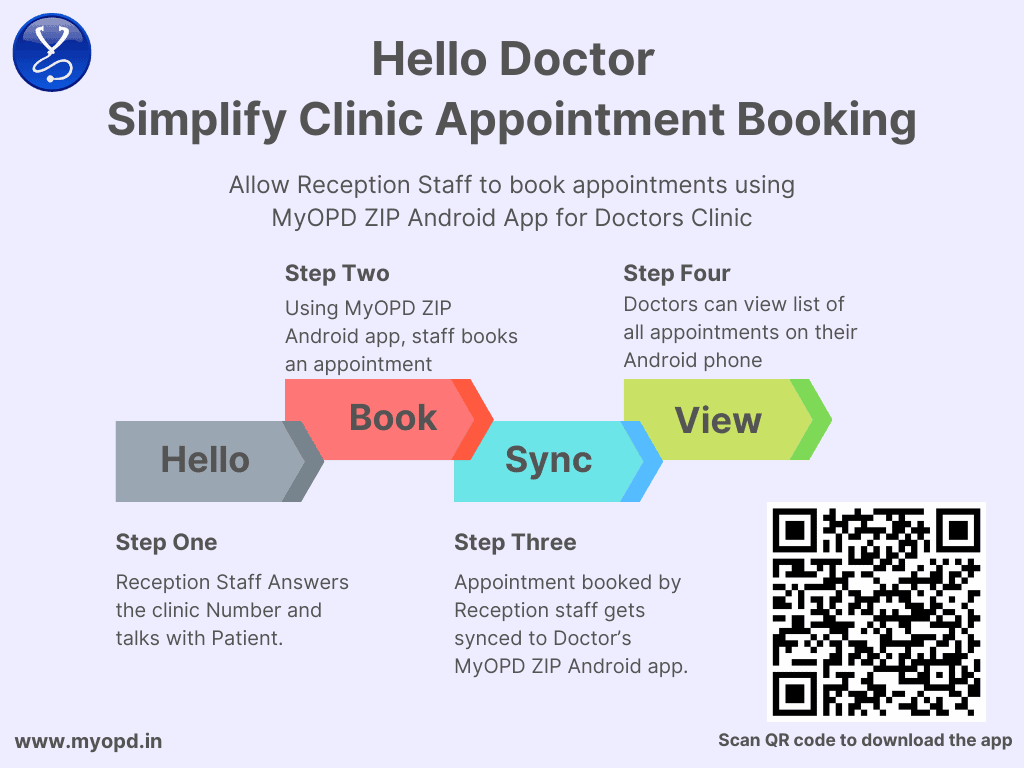
We developed MyOPD ZIP Android app for Doctors as a simple app for Clinic Management based on Android phones. Let’s see how Appointment Booking with MyOPD ZIP will assist Doctors to simplify the Appointment booking aspect of Clinic Management.

With MyOPD ZIP, Doctors can ask allow their reception staff to book appointments for patients who call their clinic number. The best part is, your staff can operate the app from their Android phone to book appointments.

How is MyOPD ZIP different for appointment booking?

  1. Works directly on reception staff’s Android phone. No need to buy another phone for your staff to start using it.
  2. Allows staff member to book the appointment even when they are offline. When the phone goes online, the booking will be uploaded to server.
  3. Allows the Doctor to see the list of appointments on Doctor’s Android device, no matter where the Doctor is.
  4. Allows the Doctor to provide a calling number and have the staff talk to patients before giving them the appointments. The staff can be anywhere and can receive the call in clinic times or otherwise.
  5. Comes at a price that won’t hurt your pocket.

Download the free trial of MyOPD ZIP Android app from Google Playstore.

Appointment Booking solution for Clinic Read More »

Prescription Printing with Generic Names

MyOPD Clinic Software allows Doctors to print a prescription by including their generic names / generic salts in the medicine. This article will show you a sample of one such prescription.

We have already covered many sample prescriptions at https://www.myopd.in/blog/sample-prescriptions-documents/

In case you want to view Prescriptions in different languages or with multiple formats or sections in the prescription, please view the above link.

Here is a sample of prescription with Generic Salts included

ColorRx-English-Logo-HTWT-Generics

This prescription can be printed on plain paper or your own letter head as well.

You can print the prescription with either Trade Name, Generic Name or Both.

Above prescription was printed using MyOPD Clinic Software’s Windows Version.

Want to print a similar prescription? Signup at https://www.myopd.in/ or Download the app on Google Play or Check Quick E-Prescription. Check the help articles of MyOPD Clinic Software. Have questions? WhatsApp Us.

Prescription Printing with Generic Names Read More »