
MyOPD Logo MyOPD™ - Software For Clinics and Hospitals

#hospitalmanagementsystem

Hospital Management Software for hospitals under 50 Beds

And why don’t we provide Hospital Management Software for hospitals with more than 50 Beds?

If you are looking for Hospital Management Software and your setup is anywhere between 5 Beds to 50 Beds, you have come at the right place. You are special for us and we have a product for you.

We get asked a lot many times by Doctors and Hospital Administrators – “Why do we provide software to only those Hospitals having less than 50 Beds?”

Hospitals have multiple sizes. From our experience, Hospital Beds is one of the best criteria to classify hospitals. So you could classify Hospital roughly under below categories based on their beds:

  1. 1 – 10 Beds
  2. 10 – 30 Beds
  3. 30 – 50 Beds
  4. 50 – 100 Beds
  5. 100 – 500 Beds
  6. 500+ Beds

As the Hospital Beds go on increasing, so does

  • The number of Doctors associated with the Hospital
  • The number of specialties that the Hospital Caters to
  • The staff working in the Hospital
  • The admissions that happen in the Hospital
  • The computerized systems that will be used in the Hospital
  • The compliances for the Hospital

So, when a Hospital Management Software caters to Hospitals, the requirements and expectations from the Hospital Management Software go on changing based on the category of the Hospital.

For example

  • Having a Pharmacy or Laboratory module along with Hospital Management Software
  • Having it installed on multiple systems in multiple departments
  • Reports required to give insights about the functioning of the Hospital
  • Total Cost of Ownership (TCO) of such a solution
  • Cloud based solution or On Premise solution
  • Internet Dependent Solution or an Offline option

As seen, there is fundamental difference in the way Hospitals get managed depending on the type of a Hospital. Hence, a Hospital Management System should assist the administrators as closely as possible with respect to their requirements.

At MyOPD, we have perfected the functioning of Hospitals under 50 Beds. So if you have a 5 bedded Hospital or a 50 Bedded Hospital, we got you covered. We have been working regularly with Doctors and administrators managing Hospitals of these sizes.

As a result

  • MyOPD Hospital Management Software covers the requirements for Hospitals under 50 Beds nicely.
  • Suites the budget of such Hospitals.
  • Has well equipped support staff to handle training and support of staff working in such Hospitals.

All this results in fantastic solution for Doctors who run such Hospitals at the prices they can afford. Refer to our pocket friendly hospital management software pricing plans to see it for yourself.

Feel free to download the free trial of the OPD portion of the Hospital Management Software from our Home Page. Book a demo with us if you want to see the entire solution.

You may also view the YouTube video tutorials at: https://www.youtube.com/playlist?list=PLvf4pA7qB-L5zSLtoXiuiO8bCPQrsiuiR

Hospital Management Software for hospitals under 50 Beds Read More »
Hospital Management Systems – 5 Points to help you choose right one

1. Size of the Hospital

This is the most important criteria while selecting a Hospital Management System (HMS). Hospitals are of multiple sizes. A good factor to gauge the size of the Hospital is to check the number of Beds in the Hospital. 

Why is size important? 

Size is important because it defines the complexity involved in running and managing a hospital. A hospital with 500 Beds is a completely different proposition than a hospital with 50 Beds than a hospital with 5 Beds. So requirements of a Hospital with 500 Beds are different than requirement of Hospital with 50 Beds. 

A Hospital Management System built for a 500 Bedded hospital may not necessarily be the right system for a 5 Bedded hospital

Why do we think so?

Because, a bigger Hospital has 

  • Many more Departments
  • Different compliances than a smaller hospital
  • Trained staff readily available for using the software
  • Higher budget than smaller hospitals

So to begin with, identify the size of your Hospital today and possibly for the next few years. 

2. Typical Usage in the Hospital

Hospital Management Systems come with multiple features. This article gives you an overview of those. Understand which features are important for your Hospital.

We have seen some people wanting to use HMS only for billing and nothing else. We have also seen some who want to use HMS also to calculate the staff attendance report and salary management. 

Here are some questions which will help you decide:

  • Who is going to use this system in my Hospital? Doctors, Reception Staff, Billing Staff, Laboratory Staff, Pharmacy Staff and so on.
  • Are Doctors going to operate the system for entering data like patient’s prescription?
  • Is my staff going to give appointments of Doctors via the software? Will patients take appointments online?
  • Do I need to give patients a neatly made, professional looking, Discharge Summary and Hospital bill for insurance claims or otherwise.

Pricing of the system will increase based on the number of features you choose. That is the reason why we mentioned in point # 1 that Hospital size is an important criteria. The features required by a bigger hospital will be more than those of a smaller hospital. If you are a 20 Bedded hospital, ask yourself, do you really need everything that a 200 Bedded hospital is going to use?

3. Cloud Based or On-Premise

Here is a table to differentiate the two options

Sr. No Cloud Based On-Premise
1. System is hosted on a cloud server. System works on a computer in the Hospital. 
2. Requires continous internet connection to operate. Does not require continous internet connection to operate.
3. Data is always with the cloud service provider. Data is on the computer in the Hospital.
4.  Data issues like data loss, corruption can happen only if there is an issue with the cloud service provider.  Data issues like data loss, corruption can happen if there is an issue with the computer in Hospital. 
5.  System can be accessed from anywhere.  Mainly designed to be accessed from within the hospital. However, some on premise systems give ways to access externally as well. 
6. Typically charged as yearly subscription plans. Typically charged as One-Time with Annual Maintenance Contracts. 
7. Using the system requires internet. So internet speed fluctuations can interfere with system performance.  Data is available locally. So these systems typically are faster to respond and operate with the right on premise configuration.
8. Management of Hardware and software is not much an issue as everything is taken care by the vendor. Hardware and software management has to be done locally. 
9. Access to data via software will be lost if you stop working with this vendor. Access to data via software may still continue if you stop working with this vendor.

4. Budget and Pricing

We will now talk about the 4th important point that will help you decide the right Hospital Management System. It is Budget and Pricing. 

Not all hospitals have same budget. Plus, as you add more features and requirements to the software the overall cost of the solution increases. 

Here we will see different ways in which providers charge you money. Based on your comfort level, you can decide which style of pricing woks best for your requirements:

Monthly/Yearly Subscription Model

In this model, you pay for the solution every month/year. If you do not pay, the service stops. So you get access to your data and the services of the vendor for the duration of your subscription. 

One-Time Payment plus AMC Model

In this model, you pay for the solution only once and use it for lifetime. What a lifetime of a software means depends from Vendor to Vendor. So make sure you understand that. Typically, the software can be used without support and updates. If you want support and updates, you have to pay the Annual Maintenance Charge (AMC). This is what we call as One-Time Payment plus AMC model. 

What you need to understand here is, what is the Total Cost of ownership (TCO) for this solution. How much are you going to spend over at least 3 years or 5 years on this solution. Understand that along with other items and decide.

5. Reports

The whole point of using the software is to understand how the entire hospital is functioning. See what kind of reports will you get from the HMS:

  • Patients Currently Admitted in the Hospital
  • Patients Discharged on a particular Day or duration giving details of Discharge (Discharged or Discharged against medical advice)
  • Daily Collection Report (OPD Collection, IPD Collection, Lab Collection, Pharmacy Collection)

And so on…

Reports generated from a Hospital Management System put the data created in the system to real use providing the owner with insights that can be used for better functioning of the Hospital. 

MyOPD Beds Hospital Software is one such Hospital Management System. Visit our Website https://www.myopd.in/

Hospital Management Systems – 5 Points to help you choose right one Read More »

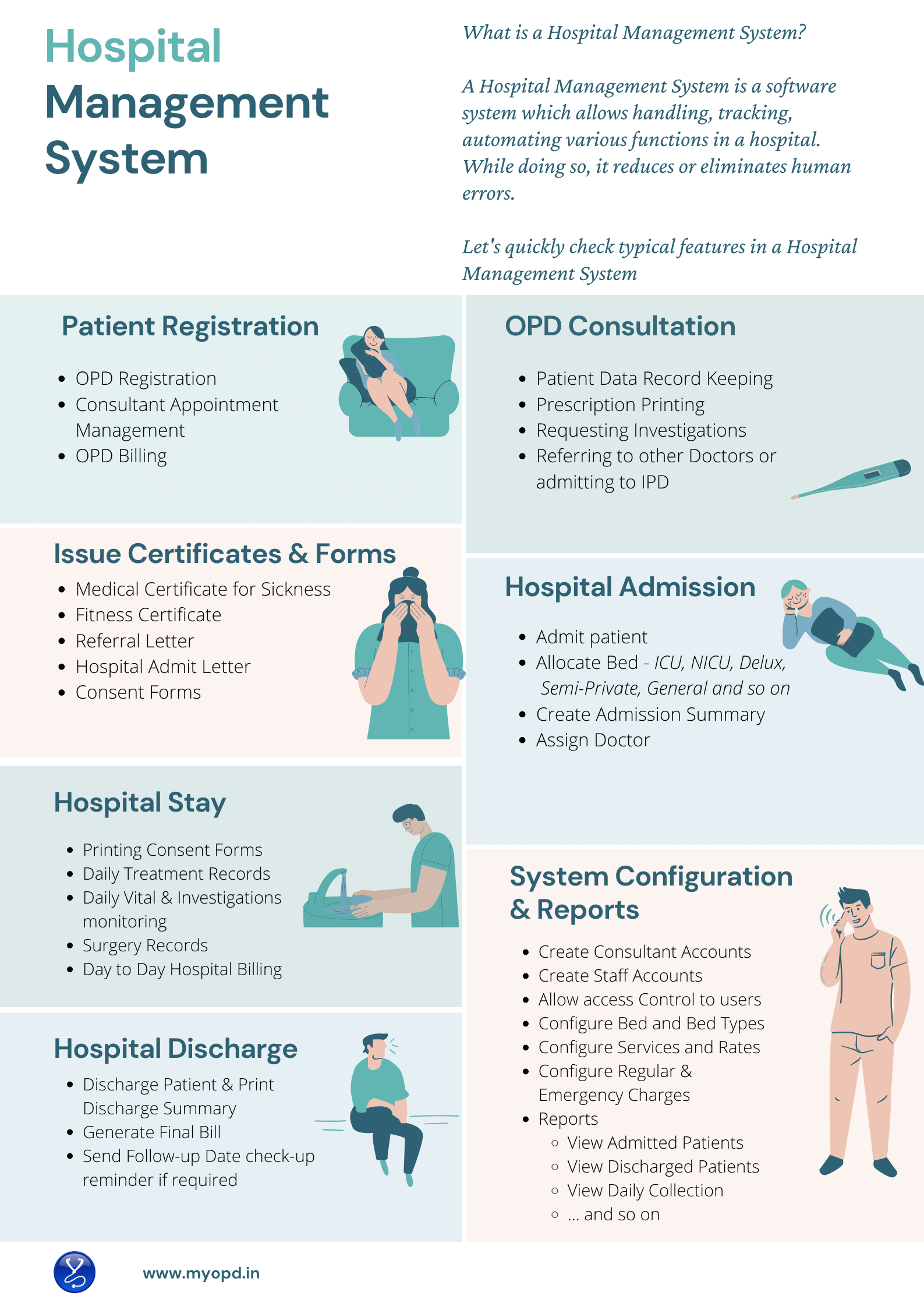
What is a Hospital Management System?

Hospital-Management-System

Hospital Management System

A Hospital Management System allows handling, tracking and automating various functions in a Hospital.
With regular use of a Hospital Management System, administration in the hospital relies less on paper and more on software. This reduces the need to preserve records in paper files and rely more and more on software system.

Patient Registration

Patient registration activity is usually done by the Reception staff or Frontdesk staff. Hospital Management Software should assist the Frontdesk staff to quickly register patients, book appointments for consultants and handle the OPD Billing. During registration, Hospital Management System should generate an Unique Hospital Identification ID also known as UHID. Searching of Patient in the software should be possible using this UHID.

OPD Consultation

Patient Visits a Doctor during OPD Consultation. Hospital Management System should allow Doctors to record the interaction with the patient and allow prescription printing.. Doctors should be able to lookup patient’s past record during follow-up even if the patient has not brought the case papers. At this stage, Doctors may refer the patient for further investigations or give a printed prescription. In case of severe condition of patient, the Patient may be admitted to the Hospital. Hospital Management software should allow quick transfer of Patient from OPD to IPD. 

Not all Doctors can type and enter patient’s case. In such cases, the OPD staff should be able to print a case paper with patient’s details so that the Doctor can then use the paper to make entry.

Medical Certificate, Fitness Certificate, Consent Forms

During the course of OPD Consultation, patients may require Medical Certificate for leave of absence, Fitness Certificate for Job or Surgery or a competition or various consent forms. A software system should allow Doctors to print these certificates and forms with ease.  

Hospital Admission

When the patient is to be admitted, Hospital Management System should capture the condition of the patient correctly. In case the patient admission is a medico legal case, entry of such details during patient admission should be possible. The staff should be able to allocate an available bed based on the patient’s preference. Doctor under which the patient will be admitted should be captured.

Daily Treatment Notes & Daily Vital Monitoring

During the hospital stay of patient, Doctors visit the patient regularly. Nursing staff attend to the patient at regular intervals. Hospital Management Software should allow entry and review of Daily Treatment given by Doctor and Daily vital monitoring done by the nursing staff. 

Hospital Billing

Financial transactions keep on happening during the stay of the patient. Patient or their relatives give advances whereas Hospital offers services. The important part here is to track how much the patient is paying and how much the hospital is charging. A good Hospital Management System allows tracking of both. Charges may differ based on the Bed or the type of service – Emergency, Regular. Plus, their could be discounts that the Hospital may offer. A transparent bill highlighting all the services, their rates go a long way to explain patients the charges they incurred during their hospital stay. The Final Hospital Bill given by the Hospital is also used by Insurance companies while settling the claims of the patients.

Handle Discharge Process

It is important for the patient to have a clearly written Discharge summary which will explain the reason for Hospitalization. Hospital Management Systems should ensure that Doctors do not miss important information while generating these final Discharge Summaries. These Discharge Summaries are also used by Insurance Companies for claim settlements. Once the patient is discharged, the allocated bed would become available again for the next patient. 

Lab Software Integration

If the Hospital also has an in house Laboratory, the Hospital Management System would also integrate with the Lab Management System. This allows integrated view of data from the Laboratory to  the Hospital.  

Pharmacy Software Integration

If the Hospital has an attached pharmacy, integration with pharmacy also allows Doctors and staff to see live stock of medicines while prescribing.

Interested in Hospital Management System?

MyOPD Software provides a Hospital Management System for small and midsize hospitals of around 5 Beds – 40 Beds. You may also read our article5 points to help you choose the right Hospital Management System . Furthermore, if your hospital fits in the size of Hospitals we service, please check Why MyOPD Hospital Software could be the best choice for your Hospital?

Want a Demo of Hospital Management System?

View All Demo Videos of MyOPD Beds Hospital Management System on YouTube and View Pricing Plans.

Interested in online demo with our team? Contact us via WhatsApp or Email us at [email protected]

What is a Hospital Management System? Read More »