MyOPD Logo MyOPD™ - Software For Clinics and Hospitals

Clinic Management Tips

Patient Queue Display Software: Turn Your Waiting Room Into a Zero-Confusion Zone

MyOPD’s patient queue display software shows patients real-time token status on any waiting room TV — cutting front-desk interruptions and improving patient experience. Live now in Version 9.2.
Patient Queue Display software details

“Doctor, How Much Longer?” — Your Front Desk Hears This All Day

Ask any clinic manager what interrupts their staff most, and it’s rarely billing or paperwork — it’s the constant stream of patients leaning over the counter to ask where they stand in line. Your receptionist stops mid-task, checks the queue, answers, and starts again. Multiply that by every patient, every hour, every day.

It’s not a staffing problem. It’s a visibility problem — and patient queue display software solves it.

MyOPD’s Live Token Screen is here, and it’s already live for clinics running Version 9.2.


Give Your Staff Their Focus Back

Every “how much longer” is a small tax on your front desk’s attention. It breaks their flow on registration, billing, and phone calls — and it adds up to real lost productivity over a full clinic day.

A visible queue screen answers that question before it’s even asked. Patients glance up, see their token number, and sit back down. Your staff stays heads-down on the work that actually needs them.


How Patient Queue Display Software Changes the Waiting Room Experience

Instead of patients guessing their place in line, your waiting room TV shows it — automatically, in real time:

  • Current token being consulted
  • Total patients waiting
  • Live updates the second your reception team moves someone through

No manual refresh. No shouting names. No “let me check for you.” The screen does the talking, so your front desk doesn’t have to.

A visible queue does something quiet but powerful: it changes how patients experience waiting. An uncertain wait feels far longer than a known wait. A patient who can see “Token #1 is with the doctor, 3 waiting” relaxes. A patient staring at a blank room, wondering if they’ve been forgotten, doesn’t.

The result: calmer staff, calmer patients, and a clinic that feels more organized — because it is.


Why Patient Queue Display Software Matters More Than It Sounds

For a clinic or small hospital, a live queue screen translates directly into:

  • Fewer interruptions at your reception counter
  • Better patient satisfaction and word-of-mouth
  • A more professional, hospital-grade first impression — for the cost of a spare monitor

Setting Up Your Patient Queue Display: 4 Simple Steps

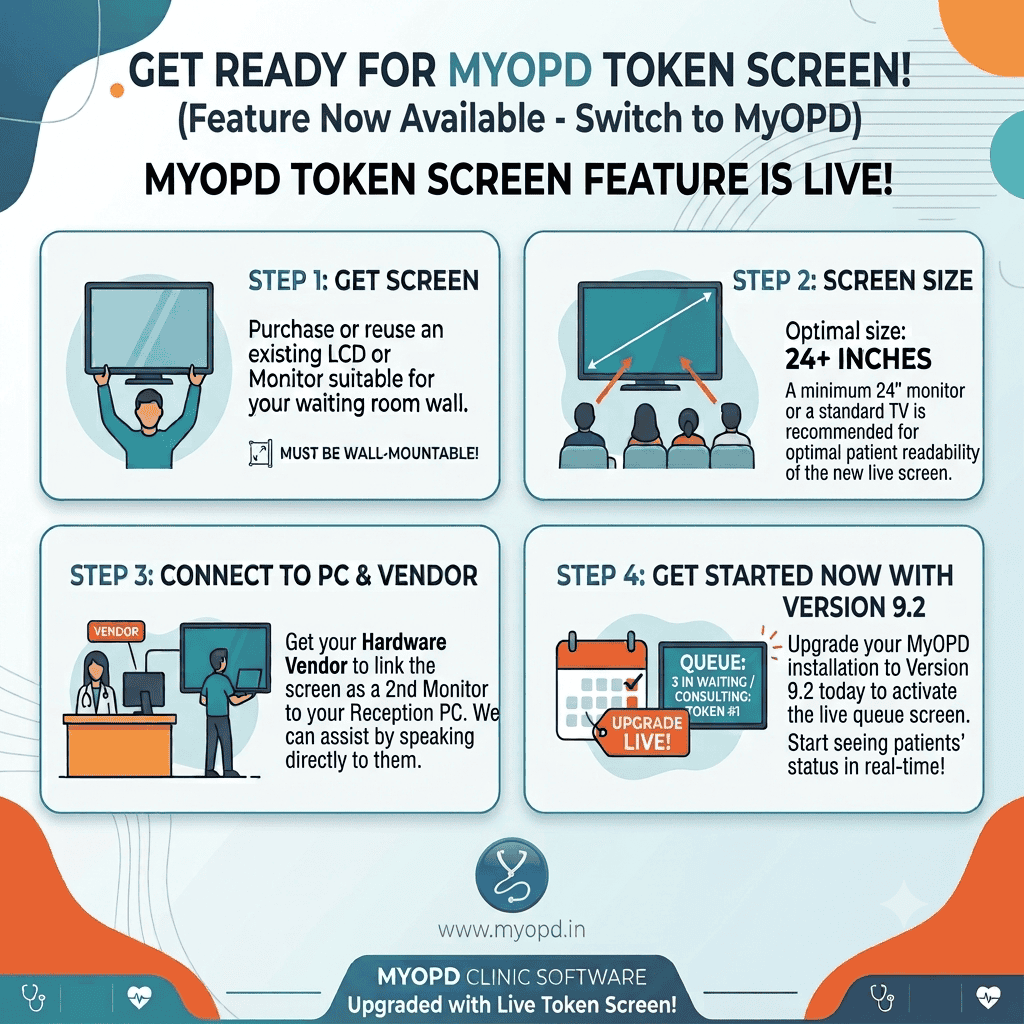
You don’t need new hardware, complex IT work, or a vendor visit. Here’s the whole setup:

Step 1 — Get a screen. Reuse an existing LCD/monitor or TV — anything wall-mountable works.

Step 2 — Size it right. A 24″+ display is the sweet spot for patients to read comfortably from across the room.

Step 3 — Connect it. Have your hardware vendor link the screen as a second monitor to your reception PC. If they need guidance, our team is happy to walk them through it directly.

Step 4 — Upgrade to Version 9.2. That’s what switches the live queue screen on. From that moment, your waiting room reflects real-time status automatically.


Already Using MyOPD? You’re One Upgrade Away

If you’re currently running MyOPD, this patient queue display software is included — no separate purchase, no add-on fee. Just upgrade to Version 9.2 and connect a second screen whenever you’re ready.

It’s a small hardware step that visibly changes how your clinic feels to walk into — for your staff and your patients alike.

Ready to activate it? Reach out to our team and we’ll help you get the second screen connected — often the same day.

👉 www.myopd.in


MyOPD Clinic & Hospital Management Software — built for the way Indian clinics actually run.

Patient Queue Display Software: Turn Your Waiting Room Into a Zero-Confusion Zone Read More »
How to Select Clinic Software for Your Practice

Every doctor reaches a point where paper registers, prescription pads, and manual appointment books just don’t keep up. You miss follow-ups. Prescriptions get misplaced. Billing takes too long. That’s when clinic software becomes not just helpful — but essential.

But with so many options available, how do you choose? This guide breaks down the three main types of clinic software — Online, Offline, and Hybrid — and shows you clearly why thousands of Indian doctors have made MyOPD their trusted practice management solution.

The First Question to Ask: Internet or No Internet?

Before anything else, think about your clinic’s internet reliability. This single factor will determine which type of software actually works for you — not just on paper, but in your day-to-day practice.

Option 1: Online Clinic Software (Cloud-Based)

Cloud-based software runs entirely on the internet. Your data lives on a vendor’s server, and you access it through a browser or app.

Sounds convenient — but here’s the reality for most Indian clinics:

  • If your internet is slow, your software is slow. If internet is down, you cannot work.
  • You pay a recurring subscription per year — every year, without fail.
  • Stop paying? Many vendors restrict or block access to your own patient data.
  • You are dependent on the vendor’s servers — if they go down, your clinic stops.
  • You also bear internet charges on top of the subscription fee.

Online software makes sense for large multi-location hospital chains with dedicated IT teams and guaranteed high-speed internet. For most independent doctors and small clinics in India, it creates more problems than it solves.

Option 2: Offline Clinic Software (Desktop-Based)

Offline software is installed directly on your computer. No internet needed — ever.

It sounds safe, but there are real risks:

  • Your data lives only on your computer. If your hard drive fails or your laptop is stolen, your entire patient database could be gone.
  • USB and external drive backups can also fail — and most doctors forget to back up regularly.
  • SMS appointment reminders require purchasing and setting up a separate device.
  • No access from your phone or from outside the clinic.

Offline software is a step up from paper — but it leaves your valuable patient data exposed to hardware failure, with no easy recovery path.

Option 3: Hybrid Clinic Software — The MyOPD Advantage

What if you didn’t have to choose between the speed of offline and the safety of cloud? That’s exactly what MyOPD delivers with its Hybrid approach — and it’s why MyOPD has become the preferred clinic software for doctors across India.

How to select the best clinic software for Indian doctors

Here is how MyOPD works differently:

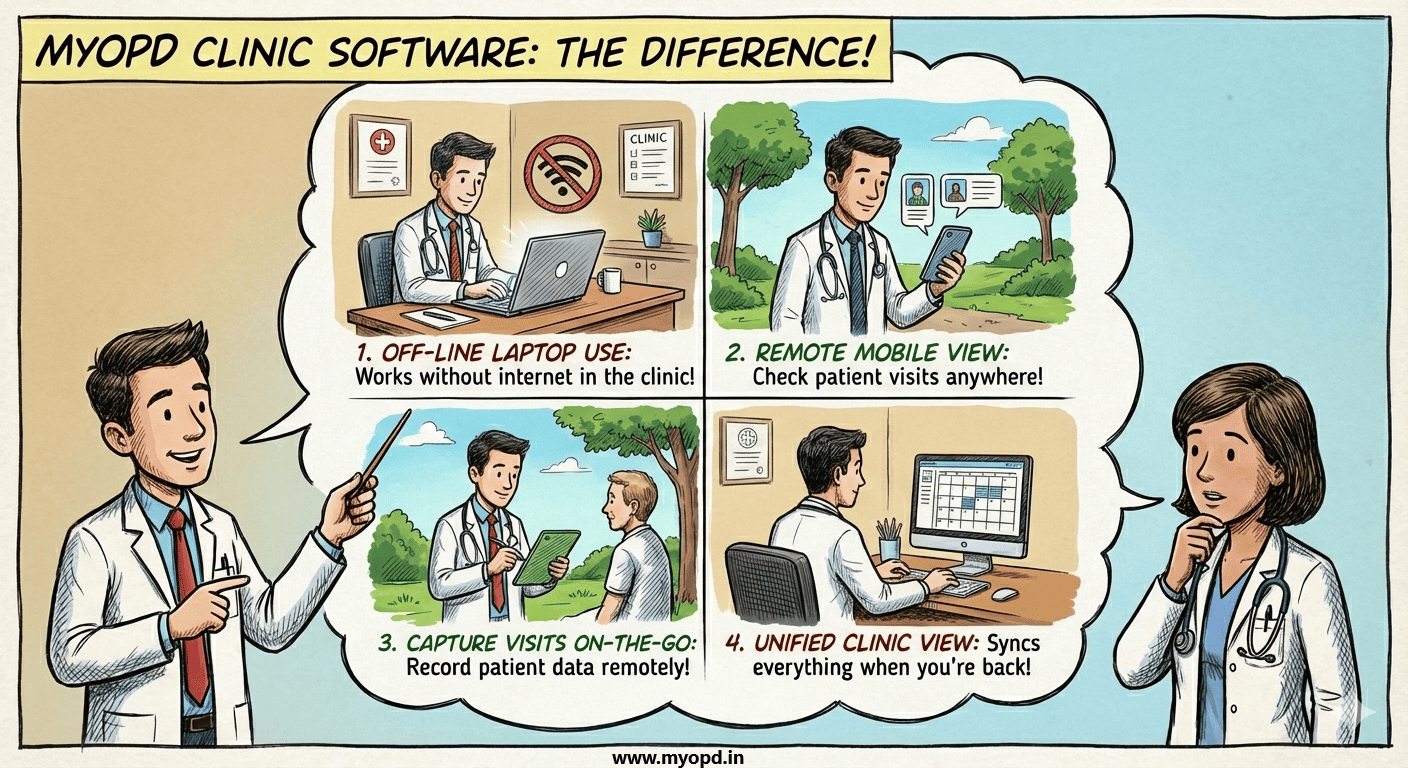
  • Installed on your Windows laptop — runs fast locally, just like offline software. No lag, no internet dependency for daily use.
  • Works completely without internet during your OPD. Connect once a day — from home or hospital — and MyOPD automatically syncs and backs up your data to the cloud. Your data is always safe.
  • MyOPD All In One App available on Android and iOS lets you check patient details, appointment history, and records on your phone — even without internet.
  • Appointment reminders and follow-ups are sent automatically via SMS or WhatsApp from MyOPD’s cloud server. No extra device needed.
  • Stop the AMC? Your installed software keeps working and all your data stays with you. No one holds your data hostage.
  • Professional prescriptions printed in 13 languages: English, Hindi, Marathi, Gujarati, Kannada, Tamil, Telugu, Punjabi, Bengali, Odia, Malayalam, Urdu, and Arabic — clear enough for any patient to understand.

Why Thousands of Indian Doctors Choose MyOPD

MyOPD is built specifically for the realities of Indian medical practice — not adapted from a foreign product:

  • Designed for high patient volumes — ideal for Physicians, Pediatricians, Gynecologists, and ENT specialists who see 50–100+ patients a day.
  • Works reliably even in cities and towns with inconsistent internet.
  • No risk of losing your patient data — ever. Daily automatic cloud backup protects you.
  • Affordable annual maintenance — and you’re never locked out if you stop.
  • Trusted by doctors across India for years, with a track record of stability and continuous improvement.
  • Local language support means your patients — including elderly ones — can read and follow prescriptions without confusion.

Online vs Offline vs Hybrid (MyOPD) — At a Glance

[TIP: In WordPress, replace this table by inserting a Table block or use TablePress for better mobile display]

FeatureOnline (Cloud)Offline (Desktop)Hybrid (MyOPD ✓)
Internet RequiredAlways neededNever neededOptional — sync once/day
SpeedDepends on internetFast (local)Fast (installed locally)
Works During Outage❌ No✅ Yes✅ Yes
Data SafetyCloud (vendor holds it)Risk if PC crashesDaily auto cloud backup
Data OwnershipVendor controlsYou own itYou own it — always
Multi-device AccessYes (any device)NoLaptop + Android app
SMS RemindersAuto from cloudNeeds extra deviceAuto from cloud
Multilingual PrintVaries by vendorVaries by vendor13 Indian languages ✓
Stop Paying?May lose accessSoftware still worksSoftware still works
Best ForMulti-location clinicsLow-internet areasMost Indian clinics ✓

Also Consider: Which MyOPD Product Should You Use?

Beyond the software type, your device matters. MyOPD runs on Windows laptops and PCs, with an Android app for mobile access. If you’re deciding between devices for your clinic, our detailed product selection guide will help you choose the right hardware alongside your software.

Ready to Run a Smarter Clinic?

You’ve worked hard to build your practice. Your clinic software should protect it, not create new problems. MyOPD gives you the speed of offline software, the safety of cloud backup, and the convenience of mobile access — at a price that makes sense for Indian doctors.

Join thousands of doctors who have already made the switch.

Have questions before you decide? View our sample prescriptions in multiple languages, or contact us — we’re happy to walk you through the software before you commit.

How to Select Clinic Software for Your Practice Read More »