
OPD Improvements
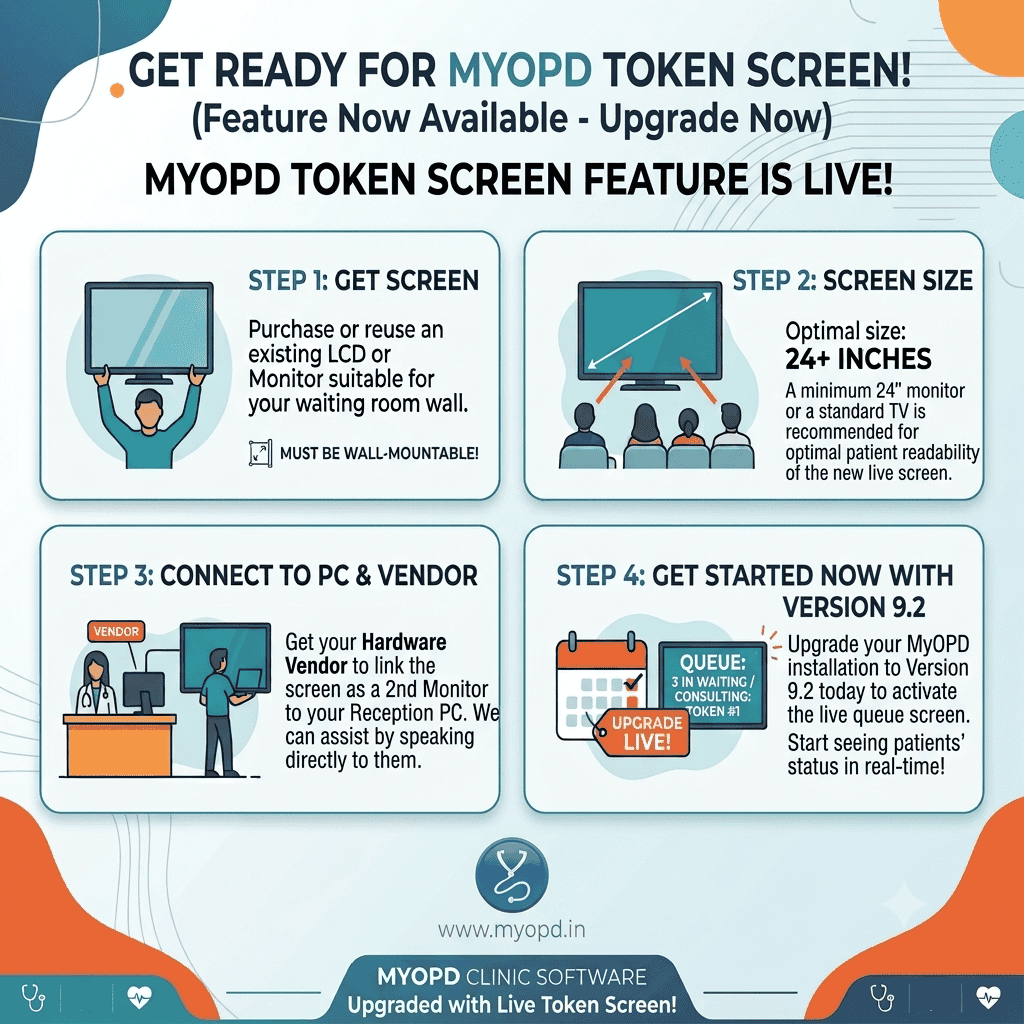
- Token Screen – Take your Clinic / Hospital to Next Level
- Show patients their next in Queue details using a Token screen
- Check above image for setting up the token screen in your Clinic / Polyclinic / Hospital.
- Whenever Reception staff clicks the “Send In” link at their end in the Patient Queue, that patient will be shown as “Consulting”. The next 2 will be displayed as the next ones in line to see the Doctor.
- Since MyOPD allows creation of multiple Queues based on the Doctors added in MyOPD, the screen can display up to 4 Doctor Queues at a time.
- We think, this feature will elevate the patient satisfaction of your setup. Reception staff will get less troubled often with patients asking when their number would come next.
- Please open support ticket if you need help in getting started with this feature. MyOPD Support team will guide you further.
- Templates for Chief Complaints and Clinical Findings
- This feature avoid writing the repeated complaints and clinical findings for common Diagnosis.
- You can now create templates for Chief Complaints and Clinic Findings the same way they are created for Prescription, Advice etc.
- This is particularly a time saving feature.
- Status of WhatsApp message
- This feature was released in 9.1. However, it did not work as expected. We have fixed the working in 9.2 Release.
- This feature will benefit users who are using WhatsApp Reminders for Follow-ups, Appointments, Clinic / Hospital Reviews and so on.This feature is specifically for users who are sending reminders via WhatsApp message
- MyOPD now shows the status of messages sent via WhatsApp i.e. Sent, Read etc depending on whether the end user has Received the message or Read the message. This depends on the User’s WhatsApp delivery status setting though.
- However, for users who allow showing Seen messages, the status would be updated to Read.
- You can check this under the “View Details” section in the right bottom corner of the main application.
- New Printer setting
- A new Prescription Printer setting is introduced as – “Print Investigations with Notes as Investigations Done”
- When this setting is turned on, any Investigation having Notes will be printed under the Investigations Done header.
- This feature is useful for those Doctors who want to print Investigations Recommended separately from already done Investigations.
- This settings is present at Settings -> Printer Preferences
- Improved Receipt with Medicine Batch Number and Expiry Date
- Medicine Batch number and Expiry date are now printed on the Receipt for dispensed medicines
- Bug Fixes
- On continuing the same day visit for reentry, BMI was not getting displayed. The same is fixed.
- On continuing the same day visit for reentry, previous visit details need to be copied on using Copy Last option. Prior to 9.2, current visit medicines were getting copied which was of no use. The same is fixed.
- In very rare cases, the Name of the patient show on Tab does not match the actual patient whose case is being viewed. The name shown in the Visit section is different than the tab heading. The same is fixed.
- Fixes for errors reported in certain cases while opening Patient’s Past Visit.
IPD Improvements
- Bed Category Renaming
- New bed creation required help from server after renaming bed categories.
- Bed Category renaming should work smoothly after 9.2 Release.
- Consent Form Templates UI update
- Form Templates can now be created for multiple languages.
- You can set translations for English and other languages for the form.
- Printing Consent Forms will consider the current Rx language of patient while printing the Consent Form.
- Bug Fixes
- Certain issues related to working of IPD were fixed.
If you have any issues with getting any of the feature to work, please open a Support ticket request


