BoosterDose

What is a Hospital Management System?
Hospital-Management-System

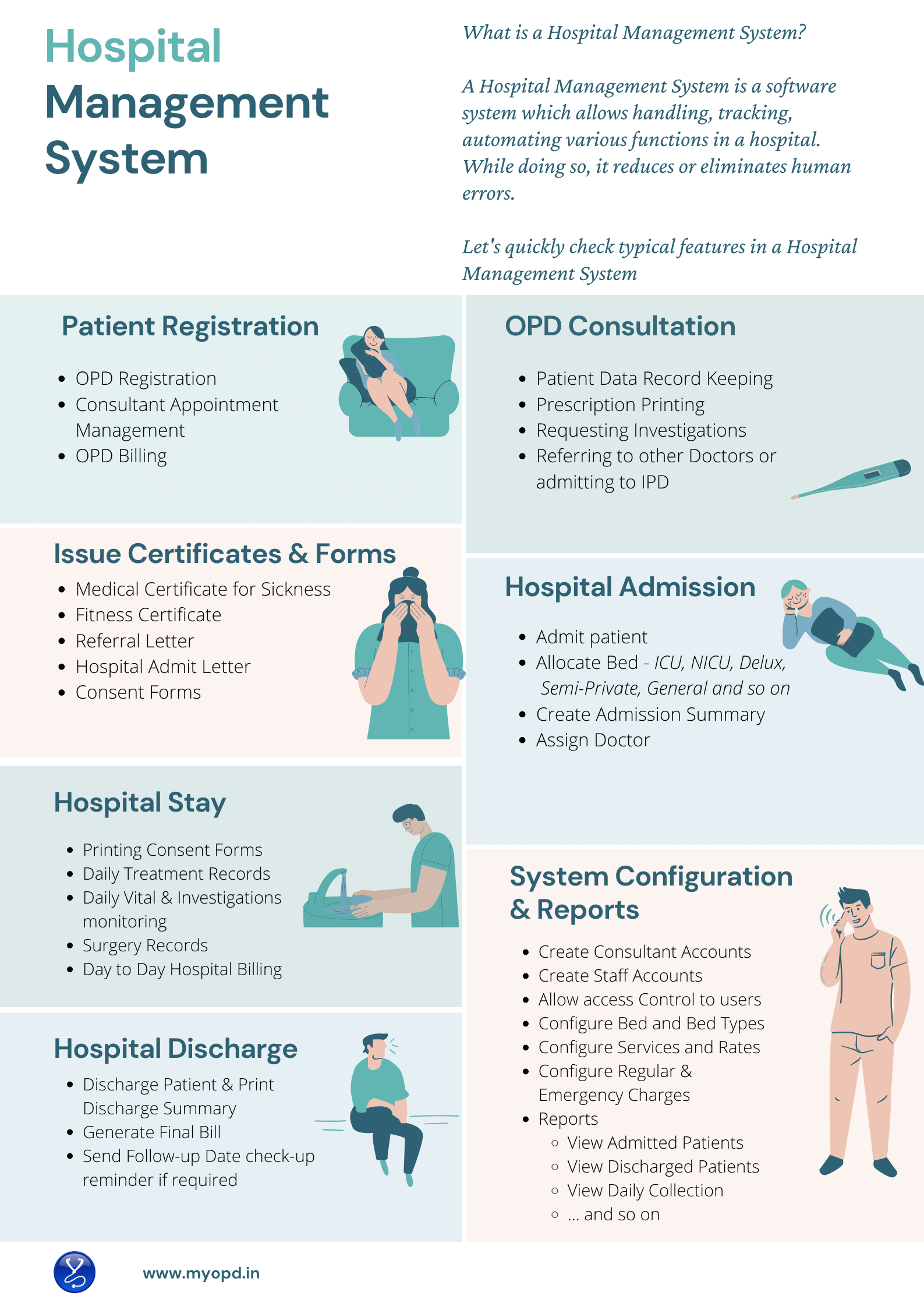
Hospital Management System

A Hospital Management System allows handling, tracking and automating various functions in a Hospital.
With regular use of a Hospital Management System, administration in the hospital relies less on paper and more on software. This reduces the need to preserve records in paper files and rely more and more on software system.

Patient Registration

Patient registration activity is usually done by the Reception staff or Frontdesk staff. Hospital Management Software should assist the Frontdesk staff to quickly register patients, book appointments for consultants and handle the OPD Billing. During registration, Hospital Management System should generate an Unique Hospital Identification ID also known as UHID. Searching of Patient in the software should be possible using this UHID.

OPD Consultation

Patient Visits a Doctor during OPD Consultation. Hospital Management System should allow Doctors to record the interaction with the patient and allow prescription printing.. Doctors should be able to lookup patient’s past record during follow-up even if the patient has not brought the case papers. At this stage, Doctors may refer the patient for further investigations or give a printed prescription. In case of severe condition of patient, the Patient may be admitted to the Hospital. Hospital Management software should allow quick transfer of Patient from OPD to IPD. 

Not all Doctors can type and enter patient’s case. In such cases, the OPD staff should be able to print a case paper with patient’s details so that the Doctor can then use the paper to make entry.

Medical Certificate, Fitness Certificate, Consent Forms

During the course of OPD Consultation, patients may require Medical Certificate for leave of absence, Fitness Certificate for Job or Surgery or a competition or various consent forms. A software system should allow Doctors to print these certificates and forms with ease.  

Hospital Admission

When the patient is to be admitted, Hospital Management System should capture the condition of the patient correctly. In case the patient admission is a medico legal case, entry of such details during patient admission should be possible. The staff should be able to allocate an available bed based on the patient’s preference. Doctor under which the patient will be admitted should be captured.

Daily Treatment Notes & Daily Vital Monitoring

During the hospital stay of patient, Doctors visit the patient regularly. Nursing staff attend to the patient at regular intervals. Hospital Management Software should allow entry and review of Daily Treatment given by Doctor and Daily vital monitoring done by the nursing staff. 

Hospital Billing

Financial transactions keep on happening during the stay of the patient. Patient or their relatives give advances whereas Hospital offers services. The important part here is to track how much the patient is paying and how much the hospital is charging. A good Hospital Management System allows tracking of both. Charges may differ based on the Bed or the type of service – Emergency, Regular. Plus, their could be discounts that the Hospital may offer. A transparent bill highlighting all the services, their rates go a long way to explain patients the charges they incurred during their hospital stay. The Final Hospital Bill given by the Hospital is also used by Insurance companies while settling the claims of the patients.

Handle Discharge Process

It is important for the patient to have a clearly written Discharge summary which will explain the reason for Hospitalization. Hospital Management Systems should ensure that Doctors do not miss important information while generating these final Discharge Summaries. These Discharge Summaries are also used by Insurance Companies for claim settlements. Once the patient is discharged, the allocated bed would become available again for the next patient. 

Lab Software Integration

If the Hospital also has an in house Laboratory, the Hospital Management System would also integrate with the Lab Management System. This allows integrated view of data from the Laboratory to  the Hospital.  

Pharmacy Software Integration

If the Hospital has an attached pharmacy, integration with pharmacy also allows Doctors and staff to see live stock of medicines while prescribing.

Interested in Hospital Management System?

MyOPD Software provides a Hospital Management System for small and midsize hospitals of around 5 Beds – 40 Beds. You may also read our article5 points to help you choose the right Hospital Management System . Furthermore, if your hospital fits in the size of Hospitals we service, please check Why MyOPD Hospital Software could be the best choice for your Hospital?

Want a Demo of Hospital Management System?

View All Demo Videos of MyOPD Beds Hospital Management System on YouTube and View Pricing Plans.

Interested in online demo with our team? Contact us via WhatsApp or Email us at [email protected]

What is a Hospital Management System? Read More »
Clinic Software Pricing

Here are the different plans we have for MyOPD Windows based Clinic Software. This software also comes with MyOPD All In One Android / iOS app. Interested in Hospital Software instead? Check Hospital Software pricing HERE

Option 1: One-Time Option

One-Time Plan with Optional Yearly AMC

One-Time Plan OptionsFirst Year PriceOptional AMC from Next Year
MyOPD Clinic Version Rs. 17,700 (Click to Pay)Rs. 5,100/year
All prices include 18% GST.
  • With One-Time plans, the software keeps working without any yearly charge. First year Annual Maintenance Charge (AMC) is covered in the cost.
  • Yearly payment after the first year is only required if you are interested in AMC. AMC is required if you want
    • MyOPD Software updates
    • Remote Support
    • MyOPD All In One Android app and MyOPD All IN One iOS app
    • SMS / WhatsApp Services. These services are available currently in select countries only. Please check with MyOPD team regarding this feature. 500 SMS or 100 WhatsApp are added to your account when you purchase the product or renew the AMC. These credits are valid for 1 year.
    • Cloud Backup
  • The basic difference between One-Time and Subscription plan is that OPD version works for lifetime with the One-Time Plan. Read more about the comparisons at https://www.myopd.in/blog/myopd-one-time-vs-subscription/

With One-Time plans, the Windows Software keeps working without any yearly charge. First year Annual Maintenance Charge (AMC) is covered in the cost. Yearly payment after the first year is only required if you are interested in AMC.

What happens if you do not renew AMC for a very long time?

If you do not renew MyOPD Software AMC for a long time i.e. 3 years between the time of your last renewal date and today’s date, then you will have to purchase the full product all over again. Read the below points to understand this in detail.

  1. Let’s say your AMC has got over on 1st May 2021. This means, your AMC renewal was done in May 2020.
  2. Let’s say the date is 10 May 2024 and you decide to renew the AMC.
  3. So there is a gap of more than 3 years between the time you renewed the AMC i.e. May 2020 and today’s date.
  4. In such cases, you will have to purchase the full product again.

However, if you renew the AMC anytime before May 2023, then you can renew the AMC by just paying the prevalent yearly AMC charge.

Option 2: Subscription Plan

  • Subscription plan allows you to start using the Clinic software with less initial investment and an yearly charge.

Subscription Plan Charge

Subscription Plan OptionsPer Year Pricing
MyOPD Clinic Version Rs. 8,000/year (Click to Pay)
All prices include 18% GST.
  • With Subscription plan, you get all the benefits of the software at a reduced yearly charge.
  • Yearly payment is necessary to keep using the software.
  • Subscription plan includes the AMC charge for each year too!

Get in touch with us today to understand what will work best for you. Be assured that we will suggest you an option that will work the best for you. In case our solution does not fit your requirements, we will tell you so.

Book you free online demo with us to understand how MyOPD Windows based Clinic Software works. Click here to Contact us.

About MyOPD: MyOPD is a Software for Doctors. Start your FREE Trial today! You can download the software directly from http://www.myopd.in/ or Google Playstore at https://play.google.com/store/apps/details?id=in.myopd.android. Drop a mail to [email protected] and we will be happy to help.

Clinic Software Pricing Read More »

Hospital Software Pricing

MyOPD’s Hospital Management Software includes OPD as well as IPD software. In this post we explain the pricing of MyOPD Hospital Management Software. MyOPD Software works best for Hospitals having 5 Beds to 50 Beds. It involves modules like OPD Registration with UHID, IPD Admission, Discharge, IPD Billing and so on.

Here are the different plans we have for Hospital Management Software.

Option 1: Unlimited Plan / One-Time Plan

One-Time Plan with Optional Yearly AMC

Unlimited PlanOne-Time PriceOptional AMC from Next Year
No limit on Patient or Years or useRs. 55,980 (Click to Pay)Rs. 6,700 for 1 year
All prices include 18% GST
  • With One-Time plans, the software keeps working without any yearly charge. First year Annual Maintenance Charge (AMC) is covered in the cost.
  • Yearly payment after the first year is only required if you are interested in AMC. AMC is required if you want
    • MyOPD Software updates
    • Remote Support
    • MyOPD All In One Android app and MyOPD All IN One iOS app
    • SMS / WhatsApp Services. These services are available currently in select countries only. Please check with MyOPD team regarding this feature. 1000 SMS are added to your account when you purchase the product or renew the AMC. These credits are valid for 1 year.
    • Cloud Backup

With One-Time plans, the Windows Software keeps working without any yearly charge. First year Annual Maintenance Charge (AMC) is covered in the cost. Yearly payment after the first year is only required if you are interested in AMC.

What happens if you do not renew AMC for a very long time?

If you do not renew MyOPD Software AMC for a long time i.e. 3 years between the time of your last renewal date and today’s date, then you will have to purchase the full product all over again. Read the below points to understand this in detail.

  1. Let’s say your AMC has got over on 1st May 2021. This means, your AMC renewal was done in May 2020.
  2. Let’s say the date is 10 May 2024 and you decide to renew the AMC.
  3. So there is a gap of more than 3 years between the time you renewed the AMC i.e. May 2020 and today’s date.
  4. In such cases, you will have to purchase the full product again.

However, if you renew the AMC anytime before May 2023, then you can renew the AMC by just paying the prevalent yearly AMC charge.

Option 2: Pay As You Go Plan

  • In Pay As You Go Plan, the OPD portion of the software keeps working without any yearly charge. However, you have to pay yearly charge to use the IPD portion.
  • So the basic difference between Pay As You Go and One-Time plan is that yearly payment is required to use the IPD part of software in case of Pay As You Go. With one-time version, there is no requirement of compulsory yearly payment.

Pay As You Go Plan Rate

Pay As You Go Plan OptionFirst Year PriceAMC from Next Year
250 Admissions for 1 yearRs. 28,000 (Click to Pay)Rs. 9,000/year
All prices include 18% GST
  • With Pay As You Go Plan, you get all the benefits of the software (OPD + IPD) at a fixed yearly charge which you need to pay if you want to continue using the IPD portion of the software.
  • You are free to change your yearly quota during the next AMC recharge. Any unused quota of admissions from last year will be carried forward after the recharge.
  • OPD portion of the software keeps working without the yearly charge.

Get in touch with us today to understand what will work best for you. Be assured that we will suggest you an option that will work the best for you. In case our solution does not fit your requirements, we will tell you so.

Book you free online demo with us to understand how MyOPD Beds Hospital Management Software Works. Click here to Contact us.

You may also watch a full demo of MyOPD Hospital Software on YouTube at

Here is a link to various Hospital Software functionality shows part by part:

https://www.youtube.com/playlist?list=PLvf4pA7qB-L5zSLtoXiuiO8bCPQrsiuiR

About MyOPD: MyOPD is a Software for Doctors. Start your FREE Trial today! You can download the software directly from http://www.myopd.in/ or Google Playstore at https://play.google.com/store/apps/details?id=in.myopd.android. Drop a mail to [email protected] and we will be happy to help.

Hospital Software Pricing Read More »

Laboratory Software, Pathology Laboratory Software

Hospitals often have a in-house Laboratory as well. One of the issues with finding a solution is to find a solution that manages your OPD, IPD and Laboratory together.

With MyOPD Laboratory Software, we solve this critical piece of problem. Here are some quick benefits of using an integrated solution:

  • All data in one place, whether your patients visit OPD or IPD or Lab along with Billing
  • Patients get a common UHID using which they can be searched
  • Use from existing list of ready made Laboratory tests provided by us or Add your new tests
  • You don’t need to run around multiple vendors for solution. We are your one place point of contact
  • Leave your staff training to us. We will handle all the details to get your Hospital trained and up to speed
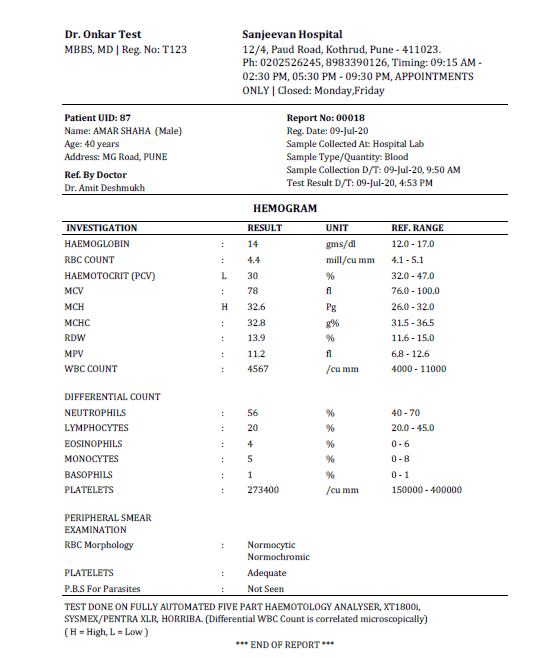
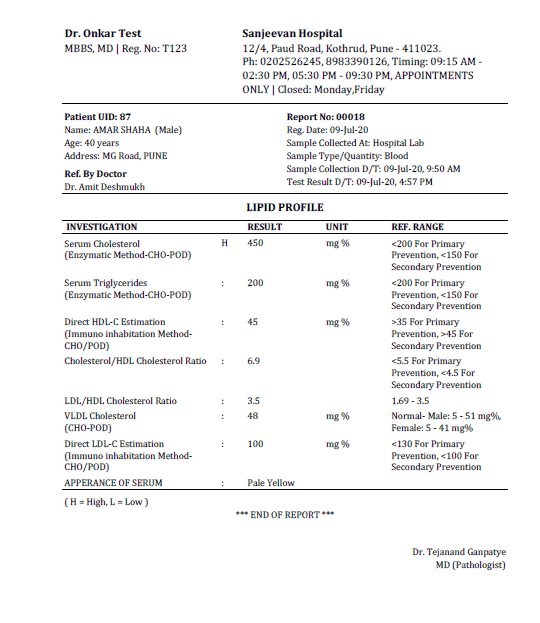
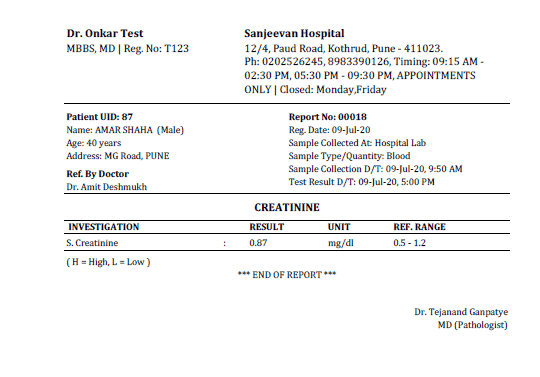
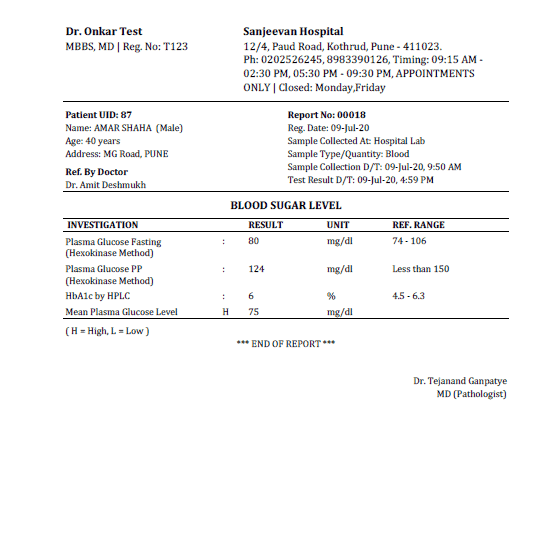
  • Here are some sample reports printed using MyOPD Laboratory Software.

    Sample Blood Sugar Level


    Blood Sugar Sample report

    Sample Hemogram / CBC


    Hemogram Sample Report

    Sample Lipid Profile


    Sample Lipid Profile

    Sample Creatinine


    Sample Creatinine

    Are you interested in MyOPD Clinic Software? The software is free to try.
    Signup at https://www.myopd.in/

    Laboratory Software, Pathology Laboratory Software Read More »

    Hospital Management Software – Train Yourself

    One of the important aspects of any Hospital Management Software is the support available for training while using the software.

    At MyOPD, we are continuously improving our videos to help you understand the functionality of the software. You can check these while using the software as well as share with your staff so that it is easier for your staff to use it.

    Here is a link to our YouTube Tutorials: https://youtube.com/playlist?list=PLvf4pA7qB-L5zSLtoXiuiO8bCPQrsiuiR

    Get in touch with us if you are interested! Drop a mail to [email protected]

    Hospital Management Software – Train Yourself Read More »

    MyOPD One-Time Plan vs Subscription Plan

    Introducing MyOPD Subscriptions for Windows Version

    The past year has been really hard on everyone. In these testing times, we are offering you MyOPD Software in a way that was never offered before, ever!

    We are glad to announce MyOPD Subscription for Doctors who feel the one time price is a very high investment to begin with.

    Read through questions below to understand subscription plan and how it compares with one-time option:

    • What is the price I have to pay to start using the MyOPD Windows software with all features and support?
      • Under MyOPD Subscription plan, you will pay
        • An yearly charge for MyOPD Clinic Software. Check the pricing of one-time and subscription plans.
    • Don’t I have to pay the one-time charges to begin with?
      • No. Those are one-time plans. You can pay those charges if you are interested in one-time purchase.
    • What is the difference between one-time purchase and subscription plans?
      • With One-Time Purchase –
        • Your first year Annual Maintenance Cost (AMC) is included in the price of software.
        • After first year, even if you do not pay your AMC, the Windows version of the software keeps working. There is no compulsion to purchase the AMC. You will not receive any software updates or support for the software unless you have active AMC.
      • With Subscription Plan –
        • Your AMC is covered for the year you use the software
        • If you do not renew the AMC, you cannot use the software
    • So what is the benefit with subscription?
      • You get top notch software which is already being used in India, Kenya, Jordon, Oman and Iraq with all its features provided in your region
      • You get regular updates of the software for the duration of your subscription period
      • You are covered under support plan provided by MyOPD Support team
      • You get to use MyOPD Windows companion Android app and iOS app along with this Windows version
      • Your initial investment to start is less for clinic based version. You don’t have to spend a higher amount upfront to just get started with software.
    • Can we convert the subscription plan to one-time later?
      • Yes. However, you will have to purchase the one-time plan in full when you do so.
    • Will I get SMS as a part of subscription?
      • Yes. 500 SMS valid for 1 year will be offered as a part of the package.
    • How do I get started?
    • Are there subscription plans for MyOPD Beds Hospital version as well?

    Are you interested in MyOPD Clinic Software? The software is free to try.
    Signup at https://www.myopd.in/

    Photo by jaikishan patel on Unsplash

    MyOPD One-Time Plan vs Subscription Plan Read More »

    MyOPD ZIP Clinic Software with Dark Mode Theme

    Introducing MyOPD ZIP with Dark Mode

    What is Dark Mode?

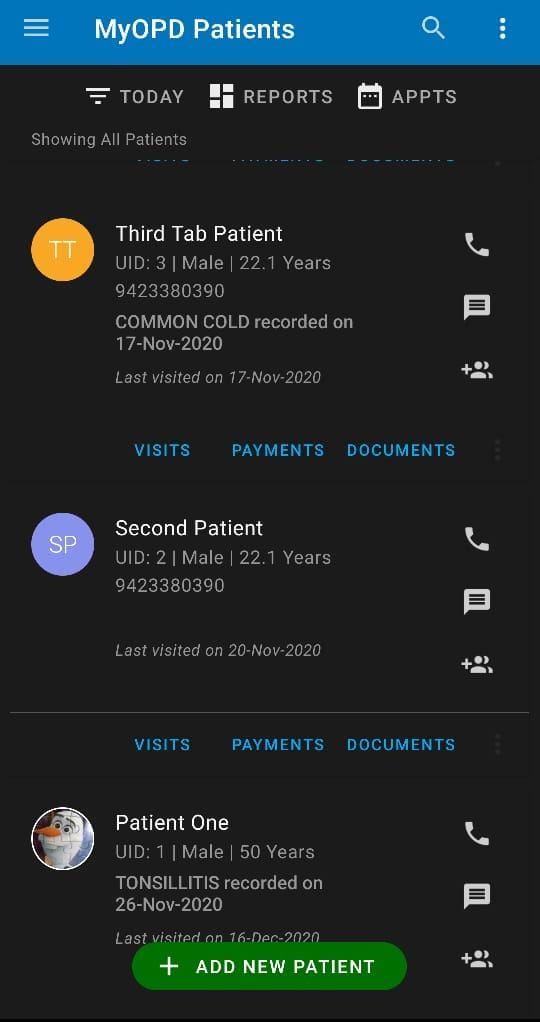
    Doctors using MyOPD ZIP for their practice spend most of their time working with MyOPD ZIP app. Looking for long hours at the phone screen could cause strain on eyes.

    MyOPD ZIP now uses the support provided by Android OS to allow Dark Mode in app.

    Using Dark Mode gives less strain on eyes, plus it would save your phone battery while working as major part of screen remains dark without any illumination.

    How to enable Dark Mode on your Android phone?

    1. Open phone Settings
    2. Search for Dark Theme or Dark Mode
    3. You will see this setting under the Display section
    4. Toggle it to Enable / Disable Dark Mode
    5. Once Dark Theme is set for the phone, MyOPD ZIP automatically picks it up and uses it in the app

    MyOPD ZIP Dark Mode – Because we care for your eyes…

    If you haven’t yet tried MyOPD ZIP, download the free trial from Google Playstore at: MyOPD ZIP for Doctors and Clinics

    MyOPD ZIP Clinic Software with Dark Mode Theme Read More »

    Choosing the Right Hospital Software or Clinic Software

    Choosing the Right Hospital Software or Clinic Software can be a tricky task.

    There are many thoughts Doctors have in mind about their practice:

    1. I’m comfortable practicing on a PC / Laptop
    2. I am looking for a Basic Clinic / OPD Version. No IPD / Hospital version required.
    3. I’m comfortable practicing on my Android Phone / Tablet or iPAD
    4. Can we both, husband and wife practice using the same software?
    5. Can I practice along with other Doctors in the clinic? Are there extra charges for this?
    6. Will this same version work for my Hospital?
    7. Will this same software work on Laptop as well as mobile?

    Such thoughts can leave you confused

    To simplify the decision making, we have created a tool which will guide you quickly to the type of product you are looking for and the available options we have with us. Based on your selection, it will guide you to the right product in our catalog.

    Give it a try right here at MyOPD Product Selection Form

    Photo by Javier Allegue Barros on Unsplash

    Choosing the Right Hospital Software or Clinic Software Read More »

    Do I really need Product Support?

    Many Doctors have doubts in their mind about product support. Based on our years of product support, since 2012, we have compiled a list of common support call requests.

    Here are top 5 reasons for having product support:

    1. Handling computer updates and Change of computers:

    2. First there was Windows XP then came Windows 7 then Windows 8 then Windows 8.1 and now Windows 10. Usually software updates from vendors take care of changes in operating system. However, support teams take care of smoothly transitioning you from one OS to another so that you can focus on your work. This is the top most reason we have seen for our customer support.

    3. Computer Crash and Format of computer:

    4. Computer crashes happen randomly. These can be because of issues with operating system upgrades, faulty hardware and so on. Our teams handles such issues so that Doctors can focus on their work while we make sure their software works fine. This is the 2nd most reason for which we get support requests.

    5. Teach me how to use a particular feature:

    6. This is the 3rd top reason we receive requests for. You keep on using the software on a regular basis. Then you want to start using a new feature present in software. Say for e.g: Contactless Payments. The support team explains you the feature so that you can start using it.

    7. Feature not working as expected:

    8. There are situations where things don’t work as expected. In such cases, you need a team to hear your concern and address it. MyOPD Support team talks to Doctors, understands their concerns an provides resolution so that they can move on and keep using software effectively.

    9. Suggesting new Ideas that come to your mind:

    10. In changing world, as you keep on practicing, you get new ideas to be done via software. MyOPD has a way to collect these ideas and implement them in software. To give example: During the COVID Pandemic initial stage of lockdown, we introduced WhatsApp Share feature. This allowed clients to share a PDF Rx via WhatsApp so that patients can get their prescriptions directly on phone, via WhatsApp.

    With MyOPD, you have a team which is dedicated to support the product while you keep practicing with peace of mind. MyOPD’s product support plan is like insurance, you may not need it always. More so, it is better to not need it at all. However, if there is a need, you better be covered!

    Photo by Shane Rounce on Unsplash

    Do I really need Product Support? Read More »

    Using MyOPD ZIP for Android on Windows PC or Mac

    MyOPD-Contactless-Payments-Online-Payments

    Please follow below steps to use MyOPD ZIP for Android on Windows PC or Mac:

    1. You need a Windows 7, 8 or 10 PC with at least Intel i3 @ 2 GHz+ or AMD equivalent processor and at least a minimum of 4 GB RAM. For Mac, make sure you have MacOS 10.13 (High Sierra or above) with 4 GB RAM.

    2. Download Bluestacks Android emulator from https://www.bluestacks.com/ for the version of your choice – Windows or Mac

    3. Install the Bluestacks Android emulator on your Windows PC or Mac

    4. Sign-in to your Google Account

    5. Download MyOPD ZIP app from Google Play

    6. Sign-in to MyOPD ZIP app and start using on Windows PC along with Phone / Tablet.

    You can also check detailed Recommended System Requirements for Bluestacks

    This type of working suites those Doctors who are comfortable in using PC or Mac in front of patients and still want their data on mobile while they are away from the clinic.

    To print the Rx from Windows PC or Mac, you would require PrinterShare app from Google Playstore.

    Please note, the printershare app is paid. You can try it for free and then use the paid version.

    The best part is, you don’t have to pay any additional charge for MyOPD ZIP to be used in this way!

    If you haven’t tried MyOPD ZIP yet, try it now. It is free to try. Download from Google Playstore at: https://play.google.com/store/apps/details?id=in.myopd.android

    Should you have any questions, feel free to write us an email at [email protected]

    Photo by Luis Villasmil on Unsplash

    Using MyOPD ZIP for Android on Windows PC or Mac Read More »