MyOPD Logo MyOPD™ - Software For Clinics and Hospitals

BoosterDose

EMR for Doctors and medical clinics

MyOPD ZIP – Android based EMR for Doctors

If you are a Doctor and are looking for Electronic Medical Records – EMR application, then you have reached the right place. In this article we introduce you to MyOPD ZIP. MyOPD ZIP is an Android Based EMR application for Doctors. This simple app on your Android device can transform your phone into a powerhouse of clinic management solution with EMR. It works offline as well as online. So you do not need continuous internet connection while entering patient records.

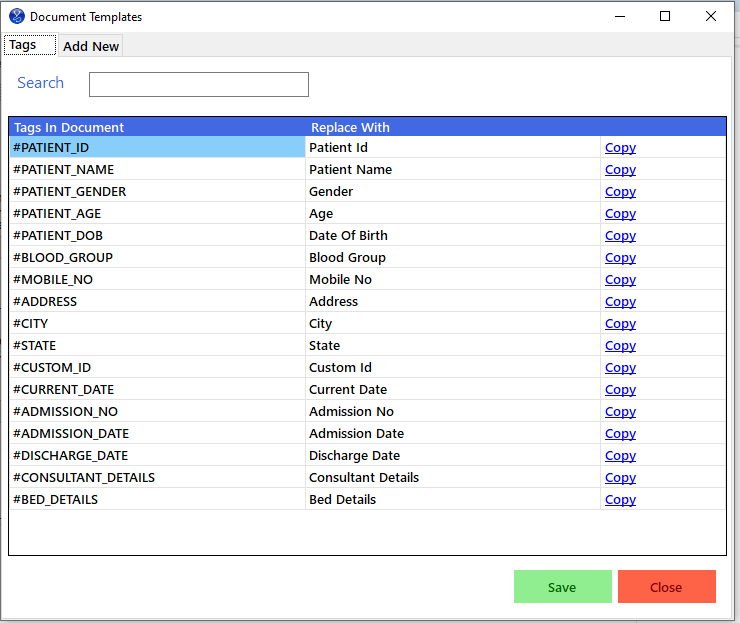
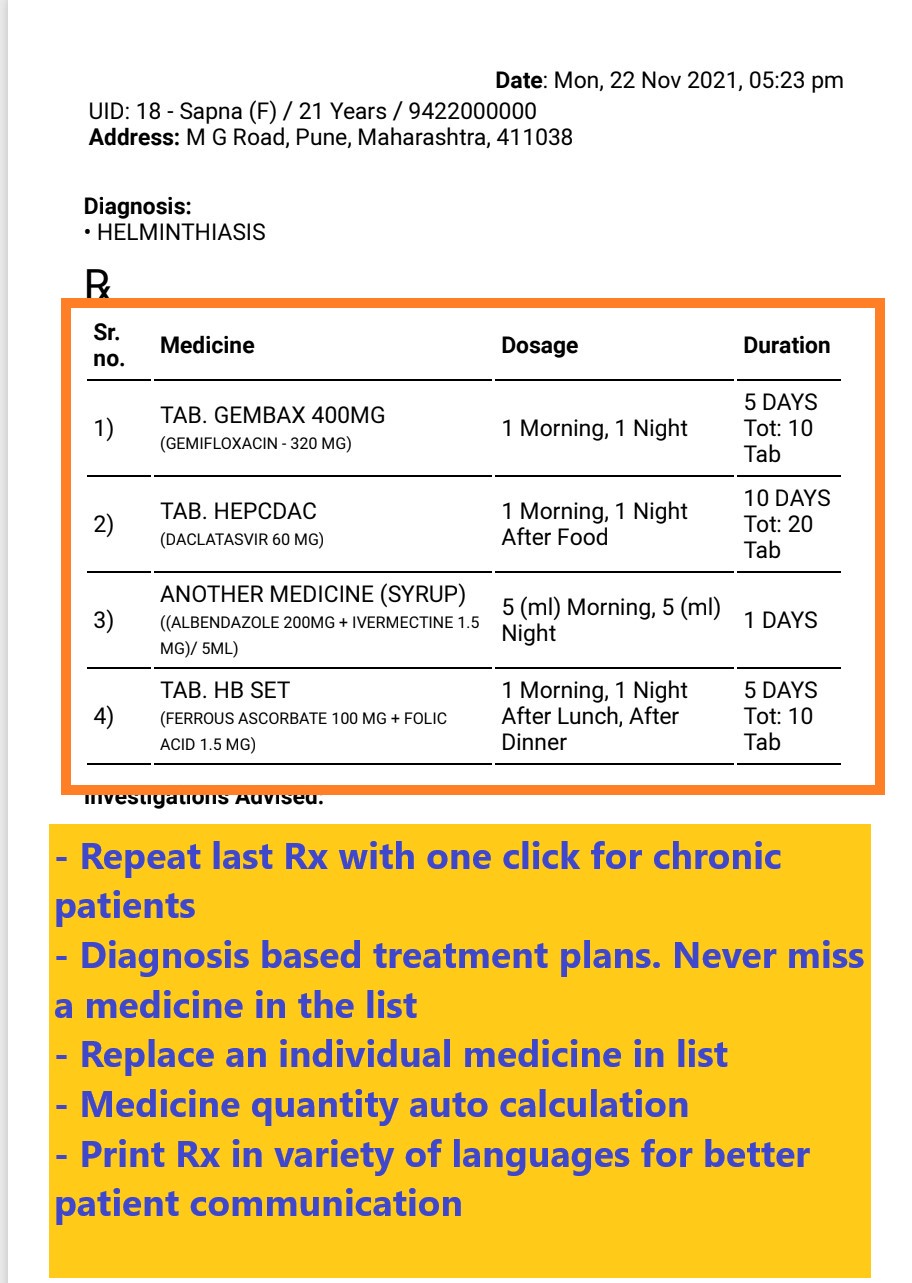
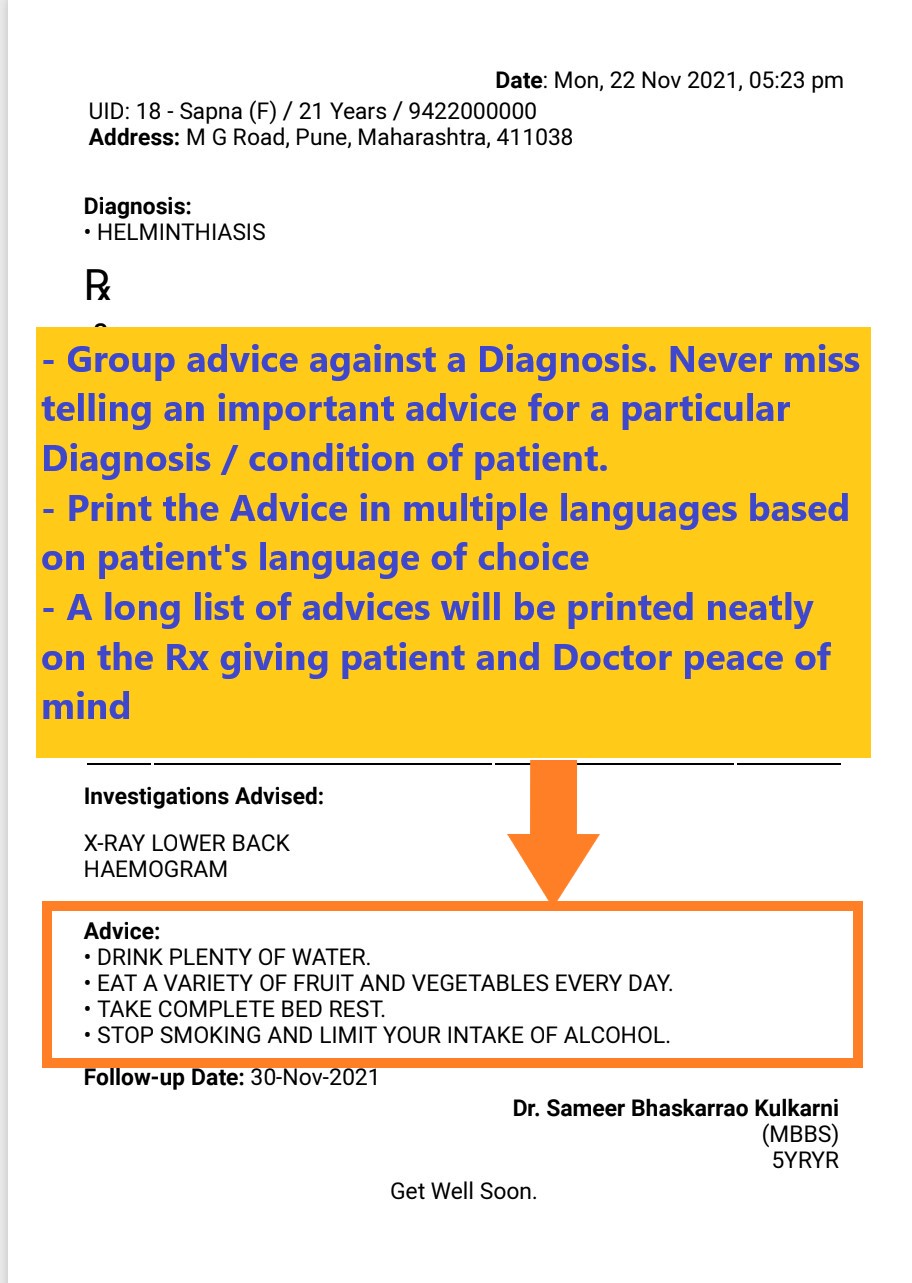
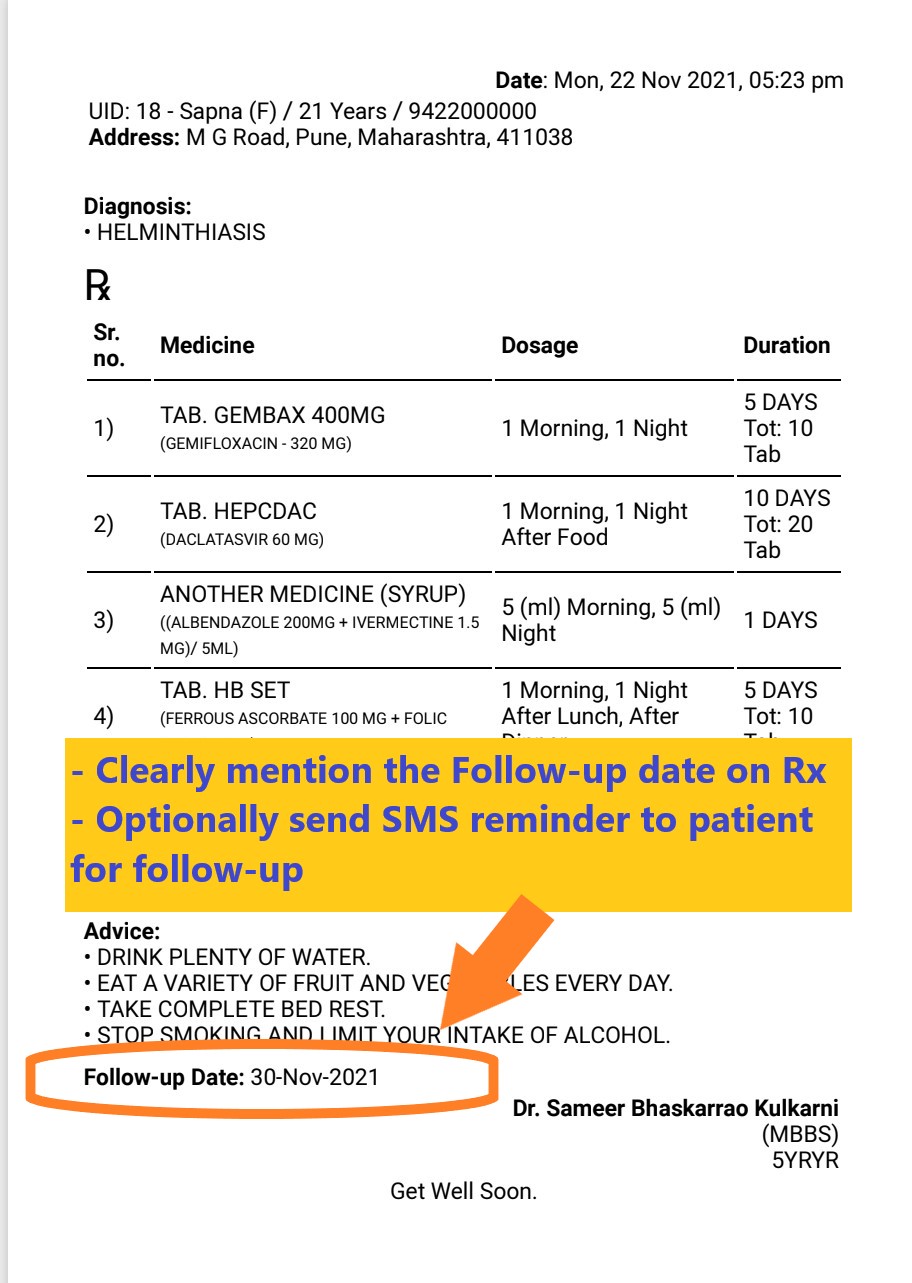
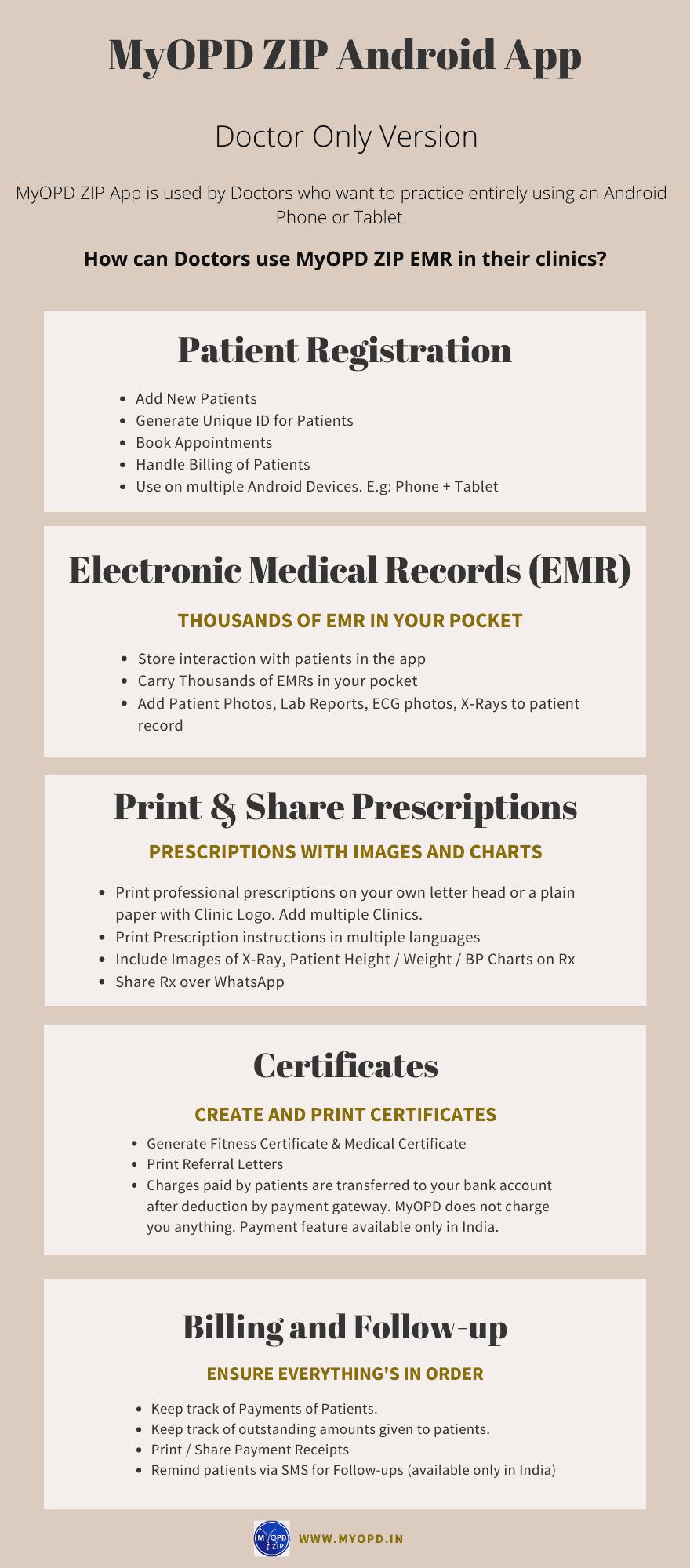
Here is a quick view of features of MyOPD ZIP EMR Solution

MyOPD-ZIP-EMR-Doctor-only-Version-Features-1
MyOPD ZIP Android based EMR Solution for Doctors

MyOPD ZIP EMR is designed keeping in mind the requirements of individual Doctors practicing in their clinics or visiting hospitals.

Choice of Versions

  • As a EMR solution with Clinic Management and Billing by choosing the Doctor only package as explained in this article. This version works entirely offline if used from a single Android device.
  • If yu are looking to practice along with Reception staff then choose the Reception Staff and Patient Online Appointments package. This package also comes with online appointment booking facility where patients can book online appointments with the Doctor. This version requires online connectivity for co-ordination with reception staff.

Download the free trial of MyOPD ZIP Android based EMR app today from Google Playstore. The app is currently used by Doctors in India, Sri Lanka, Pakistan, Philippines and Indonesia.

EMR for Doctors and medical clinics Read More »

MyOPD EMR Software – Customer reviews

Electronic Medical Records (EMR) for Global Clients

MyOPD Software Reviews from clients Globally

What Doctors say about using MyOPD Clinic Software for Electronic Medical Records (EMR)
Here are #reviews from our clients across countries. And yes, they all are still our active customers!

Looking for an #EMR that is pocket friendly and still gives you the best?

We are happy that what some of our clients have said 3 years back about our after sales support, still holds true for a review done by our client 2 weeks back!

Download the free trial of MyOPD Clinic Software Today at www.myopd.in

MyOPD EMR Software – Customer reviews Read More »

Doctor Web Page

Each Doctor associated with MyOPD Software gets an Online Web Page. Checkout a sample webpage for Dr. Sample Test Doctor.

This webpage is useful to:

  • Display name and Practice details
  • Display clinic timings
  • Accept Teleconsultation appointment bookings
  • Show Services provided in the Clinic
  • Allow patients to email you directly from the web page

With this, you really don’t need a website for showing basic details to your patients. The information displayed on this page can be edited by Doctors by managing their web profile through a login.

Team MyOPD works behind the scene to ensure the smooth functioning of your web page.

How many times was your page viewed?

MyOPD also gives you a monthly report of how times was your page viewed. Helps you to understand how many people are actively seeking information about you using myopd.in website.

Doctor Web Page Read More »

Subscription Plan Price Revision

Subscription Plan Price Change for Windows plus Android version

Hello,

Please note, prices of our MyOPD Windows version Subscription plans have increased. These include MyOPD Doctor only version and Doctor plus Reception version for OPD purpose.

Our existing prices along with various pricing options are available at:

Interested in Old Price?

You can still take benefit of old prices using the below links to purchase the subscription plan.

Doctor only version old price for current year: https://rzp.io/l/KpHJSix

Doctor plus Reception version old price for current year: https://rzp.io/l/HR4vRG3w

Please note: Old price will be available only for current year. From the next year, changed price will be applicable.

Compare the benefits of Subscription Plan vs One Time Plan MyOPD One-Time Plan vs Subscription Plan

Interested in Free trial of MyOPD Clinic Software? Try Before you buy. Visit www.myopd.in to download your free trial.

Subscription Plan Price Revision Read More »

Teleconsultation Appointment Booking with MyOPD

MyOPD allows Doctors to accept teleconsultation appointment booking on our website. Read why Doctors should be aware of 5 Reasons to use Teleconsultation in the clinic.

With MyOPD, Doctors can

  • Configure availability for teleconsultation
  • Set charges for teleconsultation
  • Share their webpage link with Patients

Patients then use the booking link to schedule time with the Doctor. Doctors see a list of patients waiting to be teleconsulted on a particular day. Doctors then use either WhatsApp video Call, Skype of Google Duo to provide teleconsultation.

Using MyOPD Software, Doctors can create a great looking teleconsultation prescription which can be shared with the patient over WhatsApp.

Images below explain the process for both Doctors and patients.

To get an idea of how this feature works, watch the appointment booking feature in action at Sample Test Doctor

Interested? Get in touch

Teleconsultation Appointment Booking with MyOPD Read More »

Teleconsultation – 5 Reasons you need to start doing it.

Teleconsultation has now become an important tool in the Doctor’s Practice.

Here are 5 important reasons why Doctors should employ Teleconsultation as a part of their practice:

Reason # 1: Chronic Patients reports follow-up

Chronic patients often have to show investigations reports to Doctors regularly. With cities going into lockdowns and coming out of lockdowns, it becomes difficult for patients to travel to the Doctor’s clinic merely to show reports and get their opinion on continuation of the same treatment or change in treatment. A quick teleconsultation call can help the patient share the reports with Doctor and save time for both, the Doctor and the patient.

Reason # 2: Out station patients’ visits

Many specialist Doctors in metro often cater to out station patients. With travel restrictions in place and in view of patient safety, if teleconsultation can be an option to review the case of such chronic patients, why not consider this option? It is again a timesaver for both the Doctor and the patient.

Reason # 3: Avoid senior citizen patients at clinic

Unless and otherwise required to see in person, aged patients who fall under the chronic patient category would love the teleconsultation option. They won’t have to book a cab or auto or drive to the Doctor’s clinic and risk being exposed under the pandemic situation.

Reason # 4: Entertaining queries from patients in free time

Many of your existing patients also have queries which if their own Doctor can answer can help them. Having a talk with them via teleconsultation in your free time helps them get the right answers to their questions rather than relying on random information over the internet.

Reason # 5: The ease of doing teleconsultation in today’s times

Gone are the days when Doctors had to worry and think about how they would do teleconsultation and how would the patients pay. Multiple companies now provide Doctors with options to teleconsultation quite effectively. We at MyOPD also allow Doctors to accept appointment bookings from patients who want to engage in teleconsultation with the Doctor. If you want more information, feel free to Contact Us.

Teleconsultation – 5 Reasons you need to start doing it. Read More »

Dr. Aniruddha Bhuiyan in news

We are happy to see Dr. Aniruddha Bhuiyan, Doctor associated with MyOPD and using MyOPD Clinic Software in their clinic’s practice in the news.

Here is an article of his work in Times Of India 3rd June edition:
Covid clots now causing intestinal gangrene | India News – Times of India (indiatimes.com)

The entire team MyOPD wishes Dr. Aniruddha Bhuiyan the very best for the future.

Dr. Aniruddha Bhuiyan in news Read More »

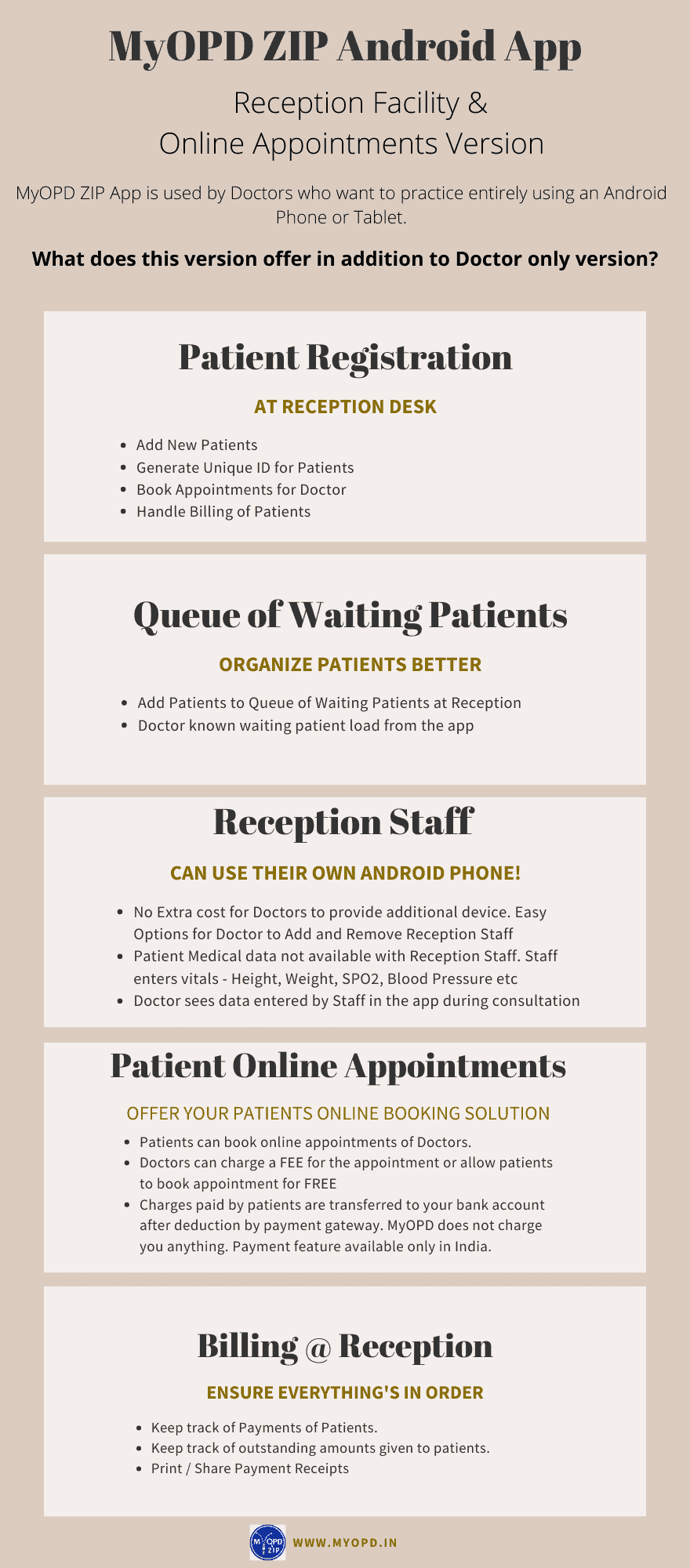
MyOPD ZIP clinic software with Reception

Are you looking for a mobile or Tablet based Clinic Management Software with occasional use on PC? Your search ends here. Read the features of MyOPD ZIP Practice Management App. 

MyOPD ZIP Clinic Management System with Reception Staff support

With Reception version you can do the following:

  1. Save Time as many functions can be handled by your Reception staff.
  2. Invite a Reception staff member to manage your patients and billing
  3. The Reception Staff member can Add Patient, Add initial vital details (Height, Weight, SPO2 etc), Create Appointments and add patients to a queue of waiting patients. No need for an additional device. Reception staff can install the app on their existing Android phone.
  4. Patient health data, like details in Visit, will not be shown to Reception staff.
  5. Flexibility to Add / Remove Reception staff accounts.

Watch this quick video to get started

See how Reception Staff can create Queue of Waiting Patients

Frequently Asked Questions:

  1. Is there a free trial available?
    Yes. MyOPD ZIP with Reception version is available under free trial. You can upgrade and use it for free for the trial period mentioned in the app.
  2. Can the Reception staff work from anywhere?
    Yes. Reception staff can work using their own device from their home, your clinic, basically anywhere where they have access to internet. Reception staff can co-ordinate the job of creating queue of waiting patients in your clinic which you see in real time from anywhere.
  3. I already have paid for Yearly Doctor only plan and have used it for just 2 months. How does the pricing of Reception version affect me?
    Nothing to worry. You can upgrade to Doctor with Reception version at any time during your existing subscription. Let’s say you have just used 2 months of 12 months of Doctor only subscription. So when you subscribe for Doctor with Reception, your remaining amount will be consumed as per the rate of Doctor plus Reception. Once your remaining amount is used up, you will be charged for the Doctor plus Reception amount. So basically, you don’t need to pay anything today until your money on existing plan is utilized.
  4. I have already paid for one-time option. How can I start using Doctor with Reception version?
    When we introduced the app it was introduced as Doctor only version. Since you have already paid one-time charge for Doctor only version, you will be charged less for Reception version than those who subscribe for Doctor plus Reception plan together. Plus, you can use the free trial to decide if Reception version suites your practice.
  5.  Can I downgrade from Reception version to Doctor only version?
    You are free to downgrade at any time. In that case, your plan will be converted to Doctor only version. The amount you have paid will be utilized towards Doctor only version at rates of Doctor only version and will last you longer than your original plan of Doctor plus Reception version giving you complete flexibility.
  6. Is there a Limit on number of Reception Staff members that can be added?
    At the moment, we do not have any such limit. You can add or remove your staff as you practice. However, make sure you add staff members judiciously.
  7. Can this facility be used on iPhone?
    No. This facility is currently available only on Android devices.

Download the free trial today from Google Play https://play.google.com/store/apps/details?id=in.myopd.android

MyOPD ZIP clinic software with Reception Read More »

Hospital Management Systems – 5 Points to help you choose right one

1. Size of the Hospital

This is the most important criteria while selecting a Hospital Management System (HMS). Hospitals are of multiple sizes. A good factor to gauge the size of the Hospital is to check the number of Beds in the Hospital. 

Why is size important? 

Size is important because it defines the complexity involved in running and managing a hospital. A hospital with 500 Beds is a completely different proposition than a hospital with 50 Beds than a hospital with 5 Beds. So requirements of a Hospital with 500 Beds are different than requirement of Hospital with 50 Beds. 

A Hospital Management System built for a 500 Bedded hospital may not necessarily be the right system for a 5 Bedded hospital

Why do we think so?

Because, a bigger Hospital has 

  • Many more Departments
  • Different compliances than a smaller hospital
  • Trained staff readily available for using the software
  • Higher budget than smaller hospitals

So to begin with, identify the size of your Hospital today and possibly for the next few years. 

2. Typical Usage in the Hospital

Hospital Management Systems come with multiple features. This article gives you an overview of those. Understand which features are important for your Hospital.

We have seen some people wanting to use HMS only for billing and nothing else. We have also seen some who want to use HMS also to calculate the staff attendance report and salary management. 

Here are some questions which will help you decide:

  • Who is going to use this system in my Hospital? Doctors, Reception Staff, Billing Staff, Laboratory Staff, Pharmacy Staff and so on.
  • Are Doctors going to operate the system for entering data like patient’s prescription?
  • Is my staff going to give appointments of Doctors via the software? Will patients take appointments online?
  • Do I need to give patients a neatly made, professional looking, Discharge Summary and Hospital bill for insurance claims or otherwise.

Pricing of the system will increase based on the number of features you choose. That is the reason why we mentioned in point # 1 that Hospital size is an important criteria. The features required by a bigger hospital will be more than those of a smaller hospital. If you are a 20 Bedded hospital, ask yourself, do you really need everything that a 200 Bedded hospital is going to use?

3. Cloud Based or On-Premise

Here is a table to differentiate the two options

Sr. No Cloud Based On-Premise
1. System is hosted on a cloud server. System works on a computer in the Hospital. 
2. Requires continous internet connection to operate. Does not require continous internet connection to operate.
3. Data is always with the cloud service provider. Data is on the computer in the Hospital.
4.  Data issues like data loss, corruption can happen only if there is an issue with the cloud service provider.  Data issues like data loss, corruption can happen if there is an issue with the computer in Hospital. 
5.  System can be accessed from anywhere.  Mainly designed to be accessed from within the hospital. However, some on premise systems give ways to access externally as well. 
6. Typically charged as yearly subscription plans. Typically charged as One-Time with Annual Maintenance Contracts. 
7. Using the system requires internet. So internet speed fluctuations can interfere with system performance.  Data is available locally. So these systems typically are faster to respond and operate with the right on premise configuration.
8. Management of Hardware and software is not much an issue as everything is taken care by the vendor. Hardware and software management has to be done locally. 
9. Access to data via software will be lost if you stop working with this vendor. Access to data via software may still continue if you stop working with this vendor.

4. Budget and Pricing

We will now talk about the 4th important point that will help you decide the right Hospital Management System. It is Budget and Pricing. 

Not all hospitals have same budget. Plus, as you add more features and requirements to the software the overall cost of the solution increases. 

Here we will see different ways in which providers charge you money. Based on your comfort level, you can decide which style of pricing woks best for your requirements:

Monthly/Yearly Subscription Model

In this model, you pay for the solution every month/year. If you do not pay, the service stops. So you get access to your data and the services of the vendor for the duration of your subscription. 

One-Time Payment plus AMC Model

In this model, you pay for the solution only once and use it for lifetime. What a lifetime of a software means depends from Vendor to Vendor. So make sure you understand that. Typically, the software can be used without support and updates. If you want support and updates, you have to pay the Annual Maintenance Charge (AMC). This is what we call as One-Time Payment plus AMC model. 

What you need to understand here is, what is the Total Cost of ownership (TCO) for this solution. How much are you going to spend over at least 3 years or 5 years on this solution. Understand that along with other items and decide.

5. Reports

The whole point of using the software is to understand how the entire hospital is functioning. See what kind of reports will you get from the HMS:

  • Patients Currently Admitted in the Hospital
  • Patients Discharged on a particular Day or duration giving details of Discharge (Discharged or Discharged against medical advice)
  • Daily Collection Report (OPD Collection, IPD Collection, Lab Collection, Pharmacy Collection)

And so on…

Reports generated from a Hospital Management System put the data created in the system to real use providing the owner with insights that can be used for better functioning of the Hospital. 

MyOPD Beds Hospital Software is one such Hospital Management System. Visit our Website https://www.myopd.in/

Hospital Management Systems – 5 Points to help you choose right one Read More »