MyOPD Logo MyOPD™ - Software For Clinics and Hospitals

#clinicsoftware

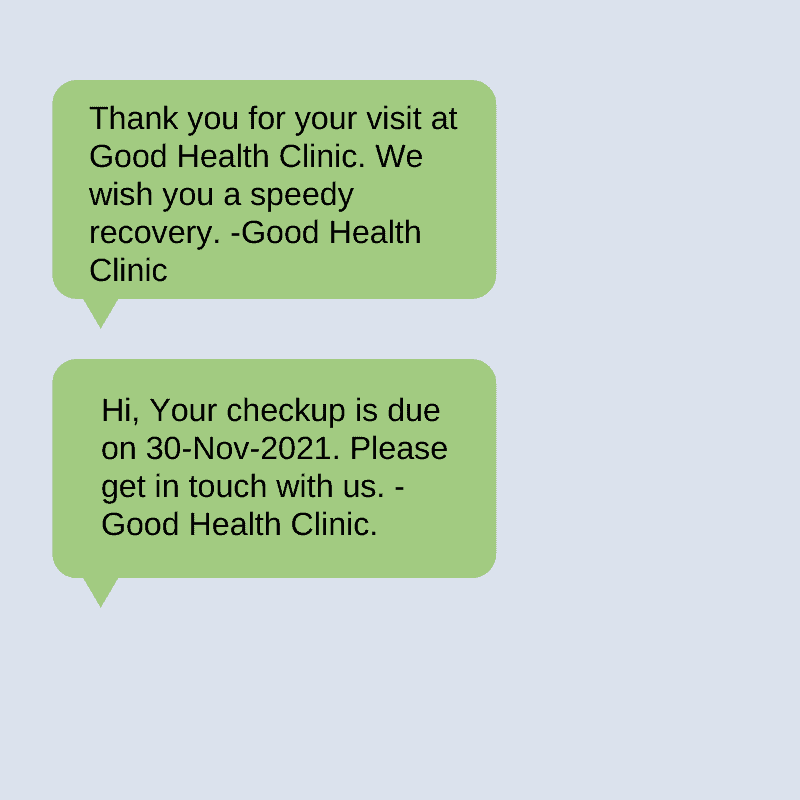
Types of SMS for Patients using MyOPD Clinic Management Software
SMS-Reminders-MyOPD-Clinic-Software
Automated SMS Reminders for Patients with MyOPD Clinic Management Software

Which type of SMS can be sent?

Following different types of SMS can be sent via MyOPD Software

Welcome SMS

When the patient is registered in the clinic for the first time, a welcome SMS is sent. Welcome SMS project a tech savvy image of the clinic giving patients the confidence that their case is handled by the clinic with the help of a computerized system.

Follow-up reminder SMS

Some patients require follow-up consultation. It is a well known fact that patients tend to forget the date of follow-up told to them by their Doctor.

Follow-ups can be requested by Doctors for multiple reasons:

  • Follow-ups for Vaccination reminders
  • Follow-ups for Ultrasound reminders in case of pregnant women
  • Appointment reminder SMS for a scheduled appointment
  • Follow-ups after a recent Discharge from the Hospital
  • Follow-up check-up in case of chronically ill patients having Diabetes, Cardiac conditions, High Blood Pressure, Chronic Kidney Disease etc requiring regular check-ups

A reminder to the patient in advance helps patient to stick to the recommended follow-up routine as suggested by the Doctor.

Appointment Booking SMS

Appointment booking SMS are sent when the appointment for the patient is booked. These SMS help patients to commute in case of lockdowns so that they can show the SMS to officers on duty and thereby arrive at the Doctor’s clinic.

Clinic Review SMS

Doctors can request reviews from patients by sending review SMS. Reviews help Doctors build a good online presence as many new patients these days check clinic reviews on Google and other platforms before visiting the Doctor. MyOPD allows you to enter the review link for any platform which you prefer.

Important Announcements

Many a times there are important announcements to be made to the patients.
For Example:

  • Doctor Available in the Clinic on certain dates
  • Doctor not available in the clinic on certain dates
  • Doctor available in a certain city on certain dates
  • Clinic Timing updates
  • Clinic Address changed
  • and so on…

Such messages if relayed in time help the patients to get the right information at right time thereby helping them to get better service.

Are non English SMS really required?

Patients who do not understand English will get the right message if the SMS was delivered in the language that they understand best. So if you stay in a region where patients understand a different language, you can set that language as the default language for SMS. Please check with our team if the language is supported for SMS. MyOPD smartly identifies the best language for patient and sends SMS in English or regional language as required. So you could have a case where 2 patients get the SMS in two different languages. You don’t have to worry about it.

Will SMS be delivered to DND numbers?

Except Announcement Messages which are bulk SMS in nature, all other SMS will be delivered to DND numbers as well.

Which countries is this facility available in?

SMS facility is currently available only in India and Sri Lanka. We are working to add more countries to the list of available countries for SMS.

Why aren’t the SMS given for free?

SMS gateway charges MyOPD Software for sending SMS. We pass on the charges to the Doctor. We include cost of limited SMS in the cost of our product, its subscription or the AMC. Doctors who are interested in additional SMS can purchase them separately based on their need.

MyOPD also allows Doctors to use the phone numbers to send Important Announcement SMS – explained above, using their choice of SMS gateway so that they can directly purchase SMS from their vendor. Talk to our team to know more about this.

Have you started the free trial of MyOPD Software? If not, download your free trial at www.myopd.in or download MyOPD ZIP Clinic Management Android app at https://play.google.com/store/apps/details?id=in.myopd.android

Types of SMS for Patients using MyOPD Clinic Management Software Read More »
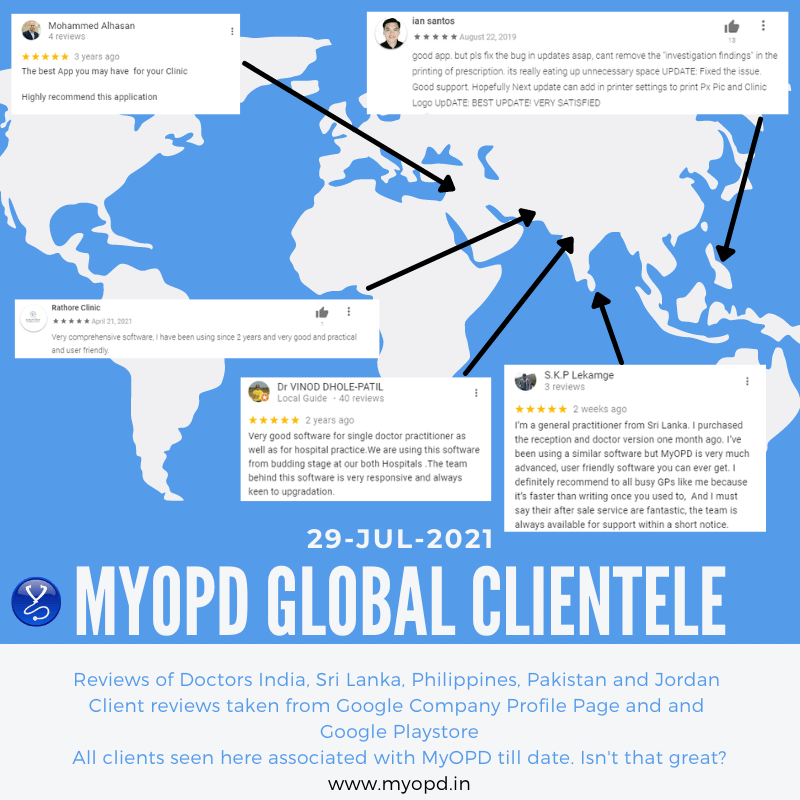
MyOPD EMR Software – Customer reviews

Electronic Medical Records (EMR) for Global Clients

MyOPD Software Reviews from clients Globally

What Doctors say about using MyOPD Clinic Software for Electronic Medical Records (EMR)
Here are #reviews from our clients across countries. And yes, they all are still our active customers!

Looking for an #EMR that is pocket friendly and still gives you the best?

We are happy that what some of our clients have said 3 years back about our after sales support, still holds true for a review done by our client 2 weeks back!

Download the free trial of MyOPD Clinic Software Today at www.myopd.in

MyOPD EMR Software – Customer reviews Read More »

Should I start using a Clinic Management System?

If you are looking for a Clinic Management System and are confused whether you should start using one or wait, you have come at the right place. 

In our working with Doctors since the year 2012, we have seen ample reasons why Doctors hesitate to decide if they should start using a Clinic Management System.

Common reasons of apprehension include:

#1: Will I be able to use it?

The moment someone mentions software, Doctors think that they cannot use because of patient load. However, a clinic management system has many features that simplify the functioning of your clinic. Use by Doctor is one part of it. You can still implement the system and reap benefits of it by

  • Having your staff handle registration and appointments
  • Having your staff handle payments
  • Tracking outstanding amounts from patients
  • Let the system send automated reminders for follow-up checkups
  • Print visit papers with Patient Name, ID on which you can write the prescription
  • View scheduled appointments on the mobile app
  • See reports of patients visited during particular days. 

As seen, you can use it for many other functions by just being a silent spectator and let your staff use it.

#2: Don’t have enough Patients so don’t need now

Many Doctors think that if they don’t have a lot of patients, there is little use of the system. In fact, this is probably the best time to start learning a new system and getting used to it. Will you practice driving on a crowded street or on a road which doesn’t have traffic? Clinic Management Systems offer far more advantages to you and your clinic in the long term. The earlier you invest on your clinic, the better it is. For e.g: Without a Clinic Management System, it will be extremely difficult to inform your patients of change in the timings of the clinic once your clinic’s patient load improves with time. 

#3: Clinic Management Systems are expensive

Well, this is a thing of past. There are multiple choices now available for you from choose from. For e.g: MyOPD Clinic Management System costs less than a price of an average pizza on a monthly basis. Wouldn’t you spend that much for better functioning of the clinic?

#4: No trained staff to operate

What we have seen is, if the Doctor is willing to install the system, the staff will learn and get used to it. These days, vendors of clinic management systems have made tremedous effort to improve the usability of the system. They also provide sufficient training to you and your staff. What matters is, are you really willing to get started?

#5: I have many requirements of my own which a software cannot handle

You will be surprised that these softwares have now got advanced to such an extent that most of your requirements would be covered. Just ask for a demo or download their free trial to get started. You will be able to compare what you want and what these softwares have already.

Conclusion

To conclude, we would say, in today’s world of digitization, if you are not using technology in your clinic, you are at a huge disadvantage. No matter you are an established Doctor or an upcoming one, a small investment on a clinic management system to keep your clinic in order is a must. 

Wish you Good Luck. 

Photo by Jake Young on Unsplash

Should I start using a Clinic Management System? Read More »

Clinic Software Pricing

Here are the different plans we have for MyOPD Windows based Clinic Software. This software also comes with MyOPD All In One Android / iOS app. Interested in Hospital Software instead? Check Hospital Software pricing HERE

Option 1: One-Time Option

One-Time Plan with Optional Yearly AMC

One-Time Plan OptionsFirst Year PriceOptional AMC from Next Year
MyOPD Clinic Version Rs. 17,700 (Click to Pay)Rs. 5,100/year
All prices include 18% GST.
  • With One-Time plans, the software keeps working without any yearly charge. First year Annual Maintenance Charge (AMC) is covered in the cost.
  • Yearly payment after the first year is only required if you are interested in AMC. AMC is required if you want
    • MyOPD Software updates
    • Remote Support
    • MyOPD All In One Android app and MyOPD All IN One iOS app
    • SMS / WhatsApp Services. These services are available currently in select countries only. Please check with MyOPD team regarding this feature. 500 SMS or 100 WhatsApp are added to your account when you purchase the product or renew the AMC. These credits are valid for 1 year.
    • Cloud Backup
  • The basic difference between One-Time and Subscription plan is that OPD version works for lifetime with the One-Time Plan. Read more about the comparisons at https://www.myopd.in/blog/myopd-one-time-vs-subscription/

With One-Time plans, the Windows Software keeps working without any yearly charge. First year Annual Maintenance Charge (AMC) is covered in the cost. Yearly payment after the first year is only required if you are interested in AMC.

What happens if you do not renew AMC for a very long time?

If you do not renew MyOPD Software AMC for a long time i.e. 3 years between the time of your last renewal date and today’s date, then you will have to purchase the full product all over again. Read the below points to understand this in detail.

  1. Let’s say your AMC has got over on 1st May 2021. This means, your AMC renewal was done in May 2020.
  2. Let’s say the date is 10 May 2024 and you decide to renew the AMC.
  3. So there is a gap of more than 3 years between the time you renewed the AMC i.e. May 2020 and today’s date.
  4. In such cases, you will have to purchase the full product again.

However, if you renew the AMC anytime before May 2023, then you can renew the AMC by just paying the prevalent yearly AMC charge.

Option 2: Subscription Plan

  • Subscription plan allows you to start using the Clinic software with less initial investment and an yearly charge.

Subscription Plan Charge

Subscription Plan OptionsPer Year Pricing
MyOPD Clinic Version Rs. 8,000/year (Click to Pay)
All prices include 18% GST.
  • With Subscription plan, you get all the benefits of the software at a reduced yearly charge.
  • Yearly payment is necessary to keep using the software.
  • Subscription plan includes the AMC charge for each year too!

Get in touch with us today to understand what will work best for you. Be assured that we will suggest you an option that will work the best for you. In case our solution does not fit your requirements, we will tell you so.

Book you free online demo with us to understand how MyOPD Windows based Clinic Software works. Click here to Contact us.

About MyOPD: MyOPD is a Software for Doctors. Start your FREE Trial today! You can download the software directly from http://www.myopd.in/ or Google Playstore at https://play.google.com/store/apps/details?id=in.myopd.android. Drop a mail to [email protected] and we will be happy to help.

Clinic Software Pricing Read More »

MyOPD ZIP Clinic Software with Dark Mode Theme

Introducing MyOPD ZIP with Dark Mode

What is Dark Mode?

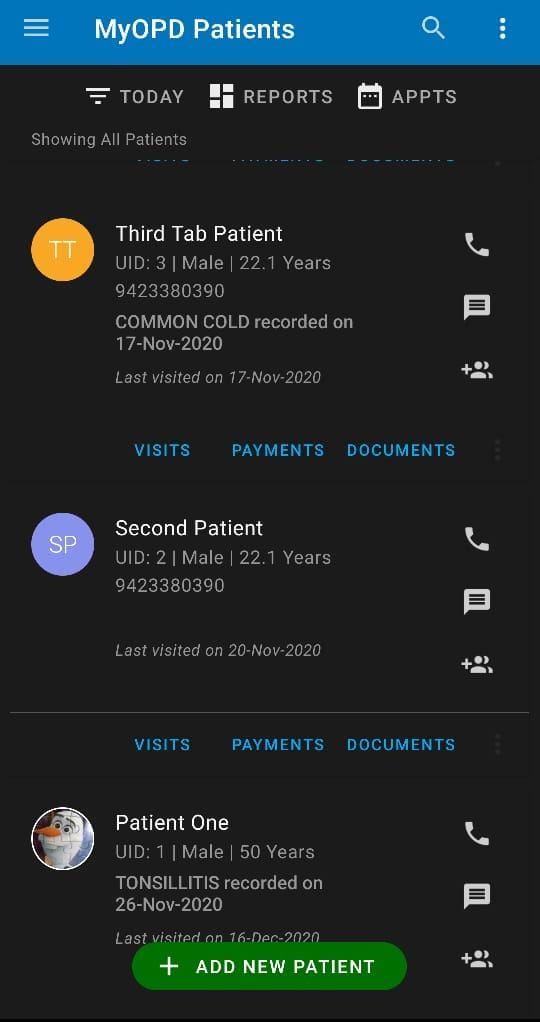
Doctors using MyOPD ZIP for their practice spend most of their time working with MyOPD ZIP app. Looking for long hours at the phone screen could cause strain on eyes.

MyOPD ZIP now uses the support provided by Android OS to allow Dark Mode in app.

Using Dark Mode gives less strain on eyes, plus it would save your phone battery while working as major part of screen remains dark without any illumination.

How to enable Dark Mode on your Android phone?

  1. Open phone Settings
  2. Search for Dark Theme or Dark Mode
  3. You will see this setting under the Display section
  4. Toggle it to Enable / Disable Dark Mode
  5. Once Dark Theme is set for the phone, MyOPD ZIP automatically picks it up and uses it in the app

MyOPD ZIP Dark Mode – Because we care for your eyes…

If you haven’t yet tried MyOPD ZIP, download the free trial from Google Playstore at: MyOPD ZIP for Doctors and Clinics

MyOPD ZIP Clinic Software with Dark Mode Theme Read More »

Sample Prescriptions and other Documents

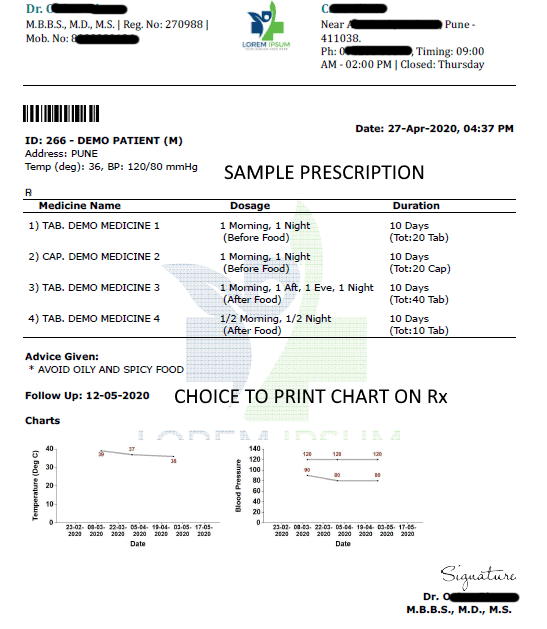
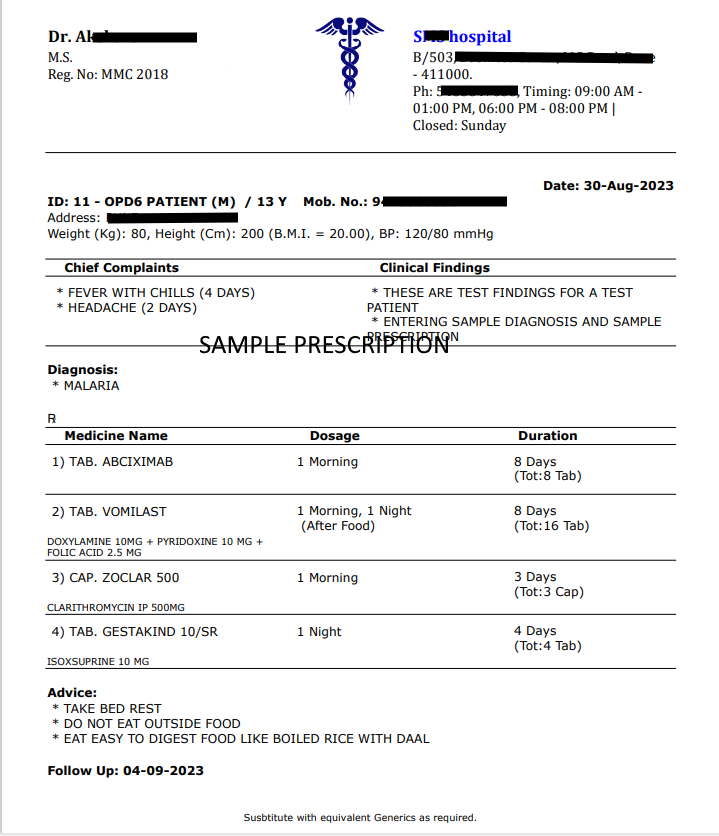
Prescription format is important when it comes to using a Clinic Management System because printed prescription is the most important output of such a system. MyOPD Clinic Management Software supports a variety of prescription format giving Doctors flexibility to print the prescription in a variety of different ways.

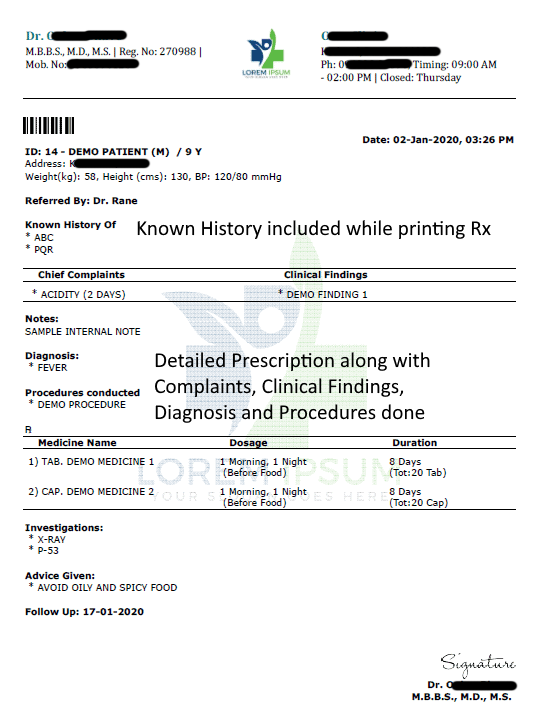
Below are Sample Prescriptions printed via MyOPD Windows Version Software. Prescriptions in MyOPD are highly configurable giving you choice of including / excluding sections while printing. You may choose to include/exclude

  • Diagnosis, Complaints, Clinical Findings, Vitals, Investigation, Advice, Patient Barcode
  • Trade Names with or without Generic Names
  • UPI Payment Code
  • Clinic Logo, Clinic Name, Doctor Name, 2nd Doctor Name
  • Doctor’s signature
  • Print style 1-0-1 or a detailed style like given below and much more…
  • Scroll to end to view Medical Certificate and Fitness Certificate

Sample Prescription English

Prescription Format English Rx
Want to print a similar prescription? Signup at https://www.myopd.in/ or Download the app on Google Play or Check Quick E-Prescription. Check the help articles of MyOPD Clinic Software. Have questions? WhatsApp Us.

Sample Prescription English – With Generics

ColorRx-English-Logo-HTWT-Generics


Want to print a similar prescription? Signup at https://www.myopd.in/ or Download the app on Google Play or Check Quick E-Prescription. Check the help articles of MyOPD Clinic Software. Have questions? WhatsApp Us.

Sample Prescription English – Detailed

Prescription Format English Detailed Rx
Want to print a similar prescription? Signup at https://www.myopd.in/ or Download the app on Google Play or Check Quick E-Prescription. Check the help articles of MyOPD Clinic Software. Have questions? WhatsApp Us.

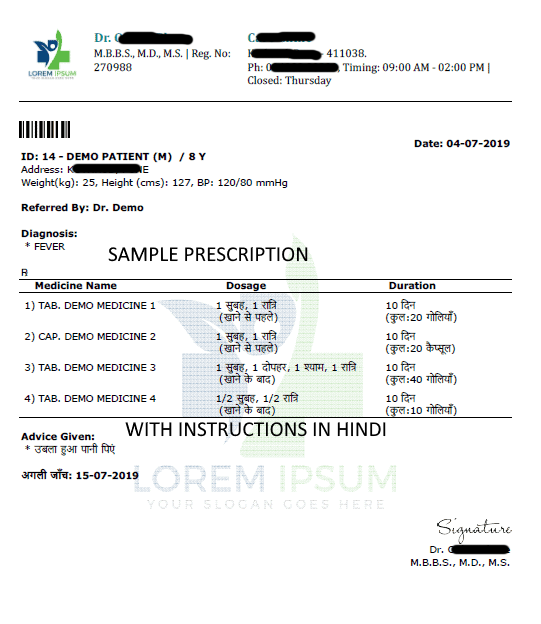
Sample Prescription Hindi

Prescription Format Hindi Rx
Want to print a similar Hindi prescription? Signup at https://www.myopd.in/ or Download the app on Google Play or Check Quick E-Prescription. Check the help articles of MyOPD Clinic Software. Have questions? WhatsApp Us.

These prescriptions can be created in 2 Minutes using MyOPD Software. Don’t believe us? Watch the demo video below.

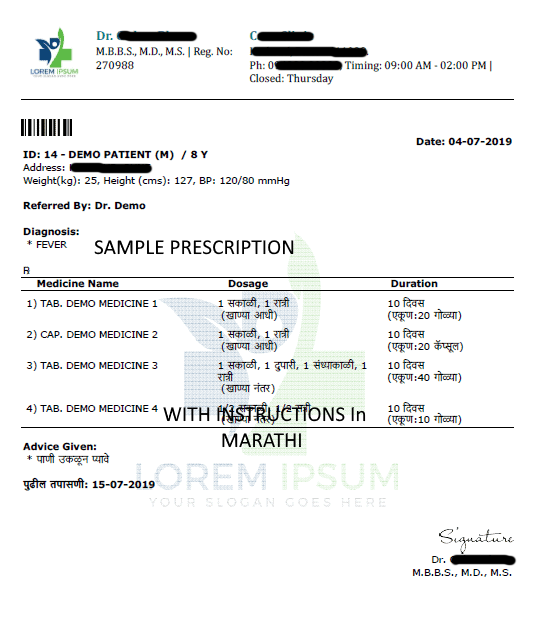
Sample Prescription Marathi

Prescription Format Marathi Rx
Want to print a similar Marathi prescription? Signup at https://www.myopd.in/ or Download the app on Google Play or Check Quick E-Prescription. Check the help articles of MyOPD Clinic Software. Have questions? WhatsApp Us.

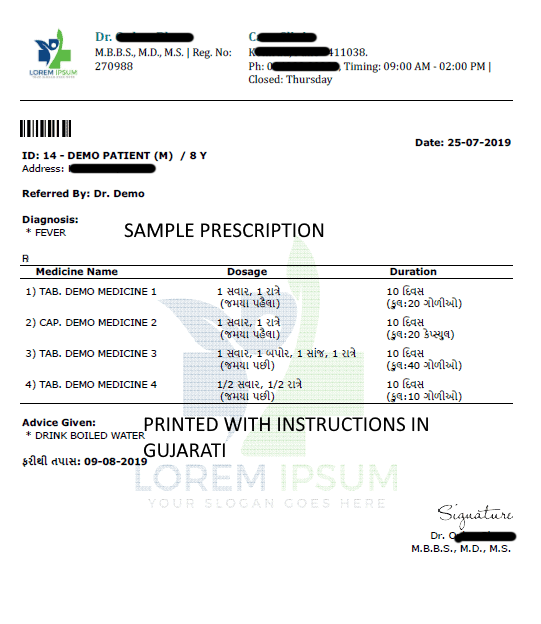
Sample Prescription Gujarati

Prescription Format Gujarati Rx
Want to print a similar Gujarati prescription? Signup at https://www.myopd.in/ or Download the app on Google Play or Check Quick E-Prescription. Check the help articles of MyOPD Clinic Software. Have questions? WhatsApp Us.

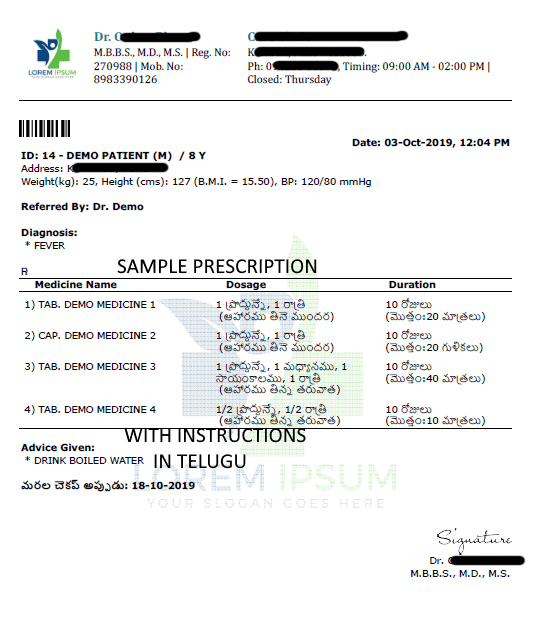
Sample Prescription Telugu

Prescription Format Telugu Rx
Want to print a similar Telugu prescription? Signup at https://www.myopd.in/ or Download the app on Google Play or Check Quick E-Prescription. Check the help articles of MyOPD Clinic Software. Have questions? WhatsApp Us.

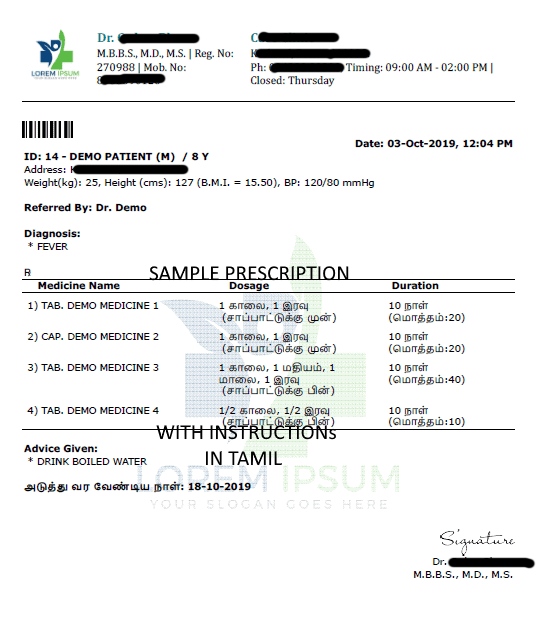
Sample Prescription Tamil

Prescription Format Tamil Rx
Want to print a similar Tamil prescription? Signup at https://www.myopd.in/ or Download the app on Google Play or Check Quick E-Prescription

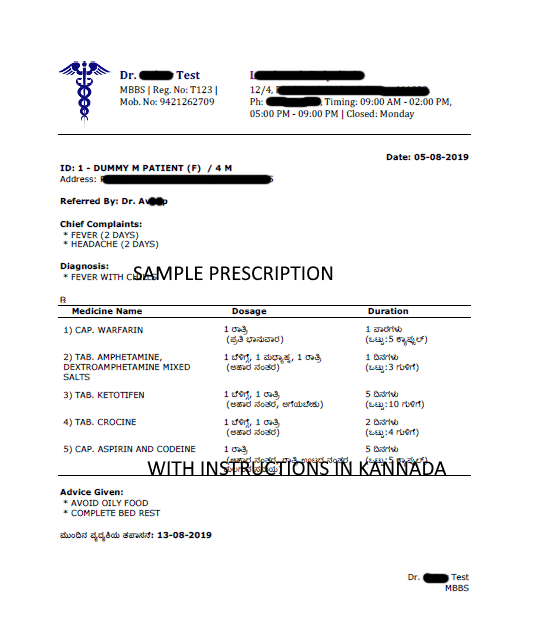
Sample Prescription Kannada

Prescription Format Kannada Rx
Want to print a similar Kannada prescription? Signup at https://www.myopd.in/ or Download the app on Google Play or Check Quick E-Prescription

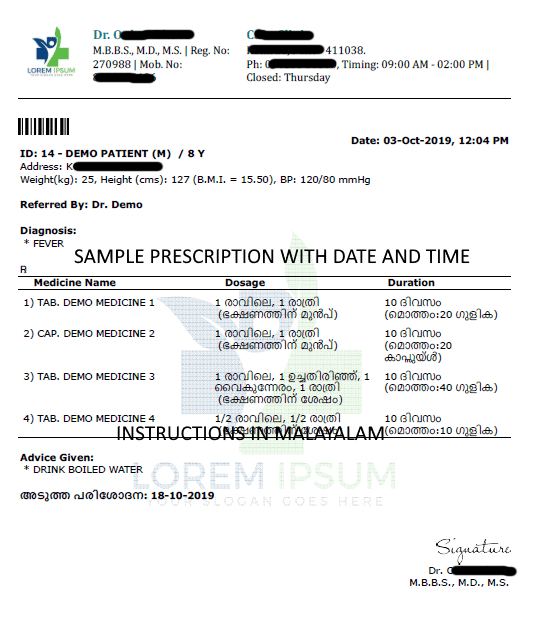
Sample Prescription Malayalam

Prescription Format Malayalam Rx
Want to print a similar Malayalam prescription? Signup at https://www.myopd.in/ or Download the app on Google Play or Check Quick E-Prescription

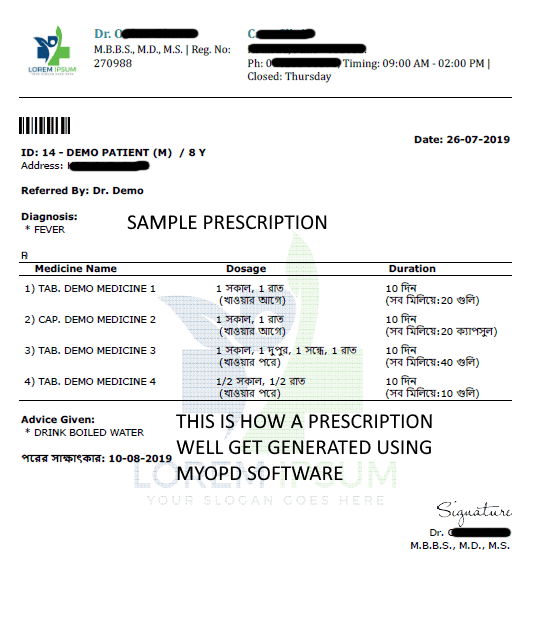
Sample Prescription Bengali

Prescription Format Bengali Rx
Want to print a similar Bengali prescription? Signup at https://www.myopd.in/ or Download the app on Google Play or Check Quick E-Prescription. Check the help articles of MyOPD Clinic Software. Have questions? WhatsApp Us.

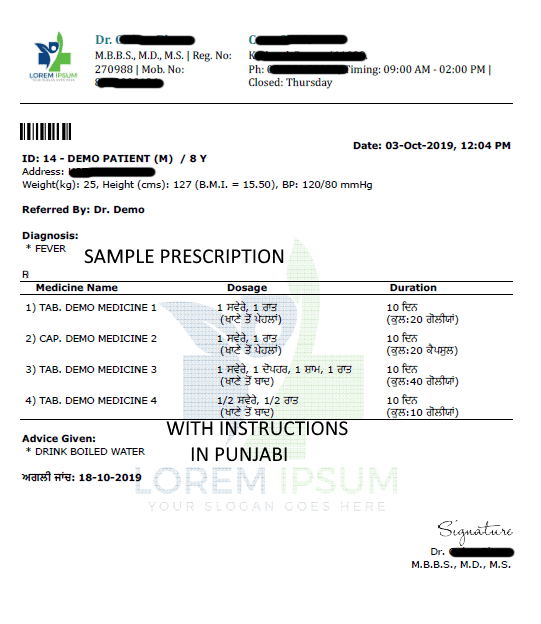
Sample Prescription Punjabi

Prescription Format Punjabi Rx
Want to print a similar Punjabi prescription? Signup at https://www.myopd.in/ or Download the app on Google Play or Check Quick E-Prescription. Check the help articles of MyOPD Clinic Software. Have questions? WhatsApp Us.

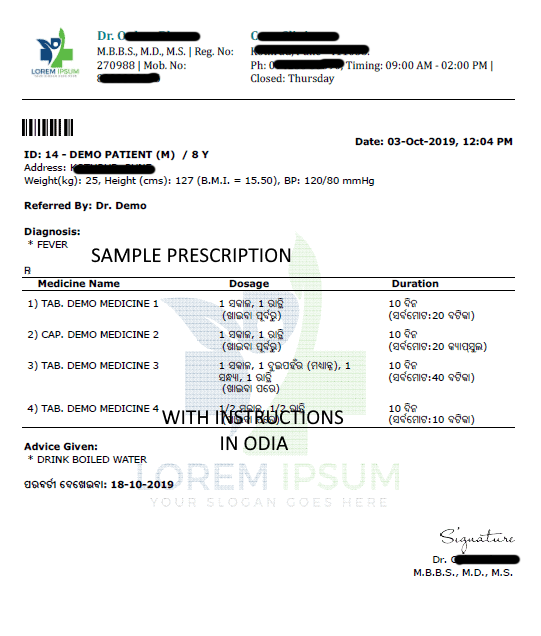
Sample Prescription Odia

Prescription Format Odia Rx
Want to print a similar Odia prescription? Signup at https://www.myopd.in/ or Download the app on Google Play or Check Quick E-Prescription. Check the help articles of MyOPD Clinic Software. Have questions? WhatsApp Us.

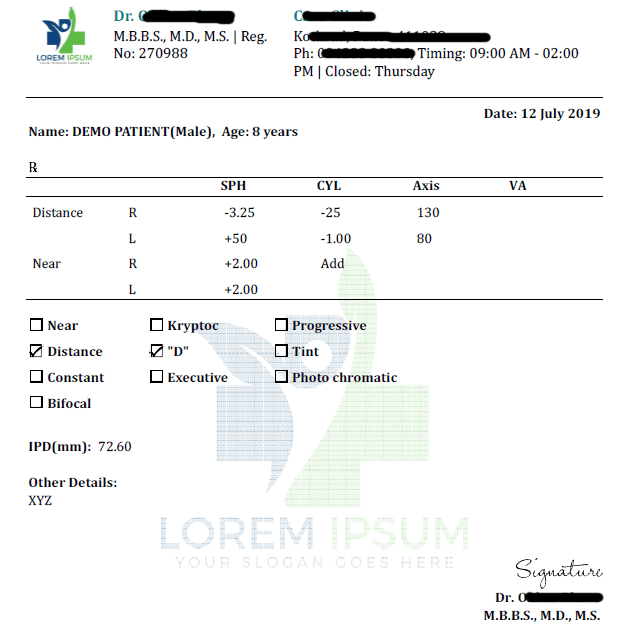
Sample Eyeglass Prescription

Prescription Format Eyeglass Rx

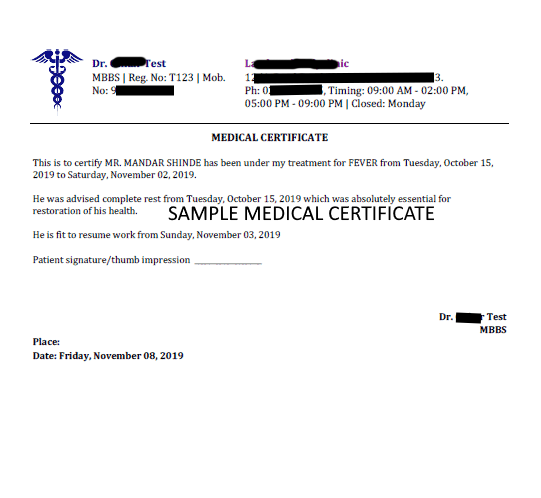
Sample Medical Certificate

Prescription Format Medical Certificate
Want to print a similar certificate? Signup at https://www.myopd.in/ or Download the app on Google Play.

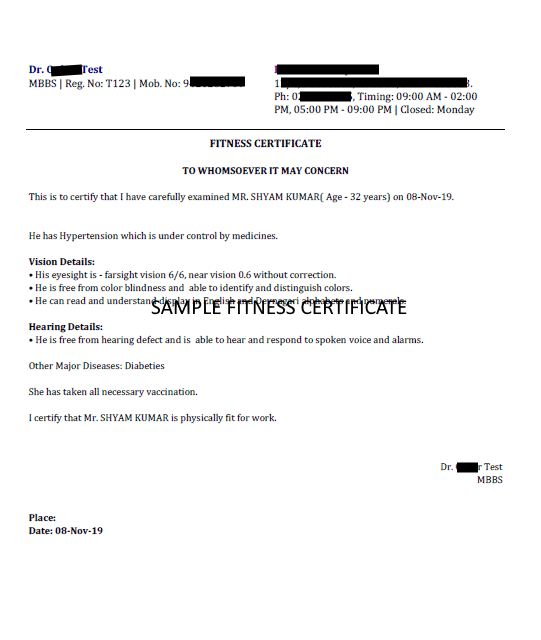
Sample Fitness Certificate

Prescription Format Fitness Certificate

Are you interested in MyOPD Clinic Software? The software is free to try.
Signup at https://www.myopd.in/ or Download the app on Google Play. Check the help articles of MyOPD Clinic Software. Have questions? WhatsApp Us.

Sample Prescriptions and other Documents Read More »

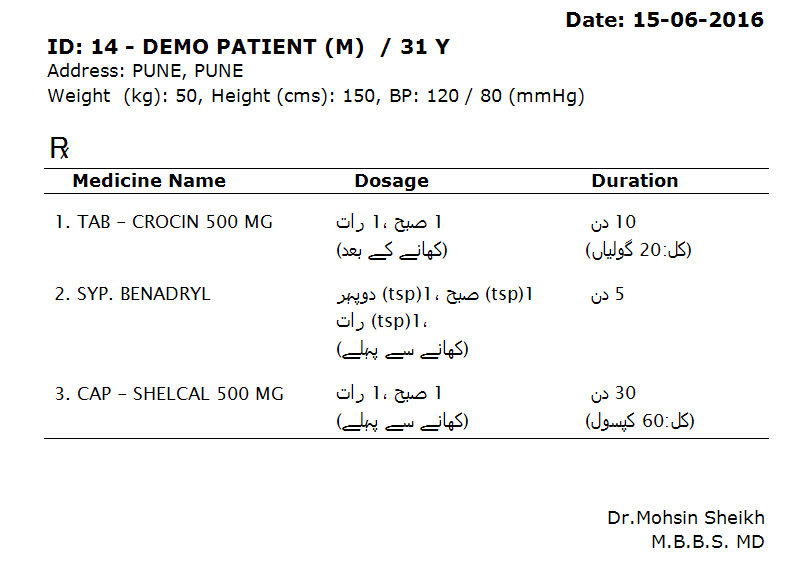
MyOPD with Urdu Prescriptions

Team MyOPD is excited to announce the availability of Urdu Prescriptions in the Holy month of Ramzan.

Here is a sample of how Urdu Prescriptions generated from MyOPD look:

Urdu Prescriptions
Sample Prescription in Urdu

MyOPD with Urdu Prescriptions Read More »

Clinic Software Telugu Version

MyOPD clinic software Telugu version

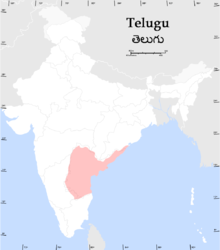
Telugu
Telugu (image source https://en.wikipedia.org/wiki/Telugu_language#/media/File:Teluguspeakers.png)

On the occasion of Navratri, we are happy to announce the availability of MyOPD prescriptions in Telugu. Doctors can now take prescriptions in Telugu language for their Telugu speaking clients.

Read why local language based prescriptions are important here

Below is a sample print of Telugu prescription:

Clinic Software Telugu Version Read More »

Changing EMR Software

So you are thinking of migrating your existing software to a newer software.

You should talk to your new vendor to see how much of existing data can be transferred to the new EMR. Your new software should be able to capture all or part of existing –

  • Patient Details (Name, Address, Phone number) 
  • One or more visits for Patient
  • Existing Drug Database
  • Prescription for each Visit
  • Investigations recommended in each visit along with investigation reports for those investigations
  • Charges
  • Procedures done on Patient

Steps in Migration 

  1. Provide Existing Sample Data: You would have to provide sample data from your existing software so that the import to new software can be verified. Existing sample data can be in a XML or CSV format
  2. Developing Migration Software: Based on your existing sample data, a migration software can be developed. You may be charged by your new vendor for this activity.
  3. Migration Verification: Once the migration of sample data completes, you should be able to see old data in the form of new software. Make sure the data provided matches exactly with what was provided. For e.g: Patient details (Name, Date of birth etc) should be exactly the same in the new software. Visit Dates, Prescriptions for visits should match. Consider matching random details for patient by comparing existing and new software. If you find a mismatch, ask the vendor to correct it. If it cannot be corrected, get satisfactory explanation on why it cannot be corrected. Understand the risk of not having certain items transferred to the new software.

Once you are fully satisfied that the data can be successfully migrated, let go of your old software. Till then, you can keep using it if data is important to you.

Post Migration Support

Check if the team helping you with migration is capable of providing you post migration support. This is important as you may hit an unforeseen issue as a result of migration activity. In such situation, you need a helping hand with you.

In the end, you don’t want to pay for migration services only to discover few months down the line that the migration did not happen properly and shows wrong data for your patients.

You can consider getting data from your existing software to MyOPD. Get in touch with us to find more about how this can be done.

So what are you waiting for? Start you free trial on MyOPD by signing up HERE

About MyOPD: MyOPD is a Software for Doctors in India. You are always welcome to see ifMyOPD satisfies your requirement. You can download the software directly from 
http://www.myopd.in/product-pricing.php and try it out. Drop a mail to [email protected]and we will be happy to help.

Changing EMR Software Read More »
Trust comes with time

Will you be in business 2 years from now?

Handshake
We are there for you
Image source: https://openclipart.org/

A very common question we were asked when we started MyOPD in late 2011. Our company became Private Limited in July 2012. Answering these questions have become easy for us in 2015 than in the year 2012 when we were not even an year old.

The question was pertinent though.  Doctors had gone through some rough experiences while dealing with some providers in the past. Particularly the Doctors we met faced these issues from their vendors:

  • Were promised everything that was asked by the sales person. Once the money was paid, no promises were kept
  • Gave really basic Software and kept asking more money for customization
  • Vendors were college students/friends/relatives doing part time projects. No serious dedication to make things better for Doctors over a period of time.

How different are we?

  • MyOPD sells directly through the internet. We do not visit Doctor’s office simply because it is not required. This way, we reduce our operating costs and pass the monitory benefit to you. Mobiles are bought these days over the internet, why can’t clinic software?

Trust comes with time Read More »