In this article we will explore why Hospital Bill Modification is crucial in modern Hospital Billing Solutions.
MyOPD Hospital Software allows Hospital Staff to create an up to date bill of Patient’s stay in the Hospital.
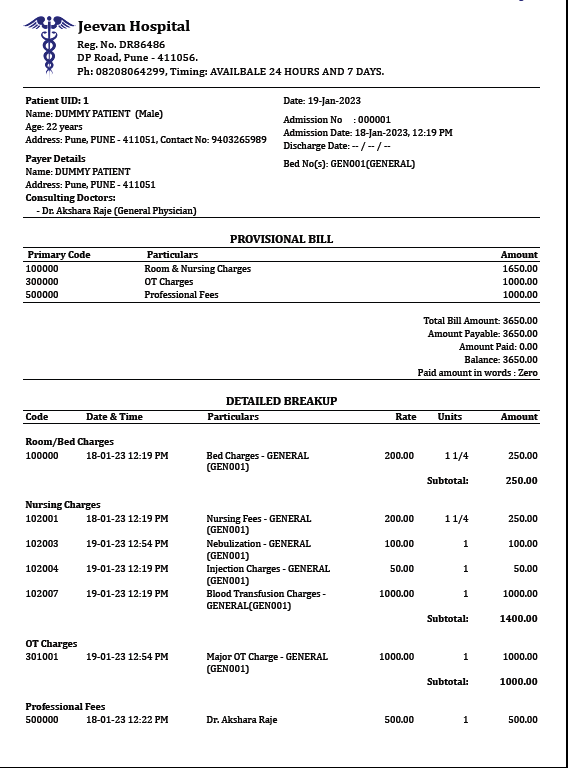
Here is a sample Bill for a patient which can be printed on Existing Hospital Letterhead or by adding your own Hospital Logo and Name.
Staff of Hospital can create a bill of Payment using MyOPD Hospital Software. However, at times there are some practical problems after the bill gets created:
An item that was to be included in the bill was missed.
Amount paid by the patient in advance was incorrectly recorded.
An amount which was to be entered as Rs. 1500 was accidentally entered as Rs. 15000!
Such issues are practice problems that do happen in a busy setup. While MyOPD allows different ways to avoid such errors from happening (See how at the video at the end), MyOPD still allows the Admin of the Hospital to correct these mistakes by introducing the bill modification feature.
With the Hospital Bill Modification feature, MyOPD allows admin staff to change / add / delete items in the original bill to correct such a situation. This has been a long requirement of many Doctors who use MyOPD Hospital Software and we are happy to have included that as a part of our product feature.
Check how you can create a quick bill using MyOPD Hospital Software below:
This feature is available in the Paid version of MyOPD Clinic and Hospital Software.
Have you checked out free trial of MyOPD Software? If not, Download the free trial of MyOPD Clinic Software from our website www.myopd.in
Please note, the free trial has features of only Clinic Version. If you want to know more about the MyOPD Hospital Software then feel free to schedule a demo . Contact us via WhatsApp.
Choosing the right Hospital Management System (HMS) / Hospital Software is crucial for efficient operations and improved patient care. But with so many options available, particularly cloud-based solutions, you might be wondering if a traditional, on-premise system like MyOPD is still relevant.
This blog post dives into a key comparison between MyOPD’s Hybrid Software and standard Cloud-Based HMS to help you make an informed decision.
Here’s why MyOPD Hospital Software might be the perfect fit for your hospital
Performance: MyOPD is a Hybrid Software. This means it functions offline, so you can keep working even during internet outages. Unlike cloud-based systems, MyOPD’s speed doesn’t rely on internet connection. Whether it’s heavy rains or unforeseen circumstances, your hospital operations continue seamlessly.
Data Ownership and Security: With MyOPD, you own your data. All information is stored locally on your system, ensuring complete control and security. Cloud-based providers might restrict access to your data if your subscription lapses. While some offer data exports, these may not be as user-friendly as working with the original software. MyOPD takes an additional step to securely backup your data to the Cloud. This ensures that even in case of a hard drive failure or computer crash, your valuable patient information can be recovered quickly and efficiently.
Focus on Your Patients: MyOPD is not in the business of doctor marketing. Our software is designed to support your existing patient base without any bias towards promoting specific doctors.
Continuous Improvement: MyOPD is constantly evolving. We regularly update our software based on valuable feedback from the medical community. This ensures MyOPD remains at the forefront of providing an exceptional user experience for both staff and patients.
In Conclusion:
While cloud-based systems offer undeniable advantages, MyOPD’s Hybrid Software provides a unique combination of offline functionality, data ownership, patient-centric focus, and ongoing development. This makes MyOPD a compelling choice for hospitals that prioritize uninterrupted operations, data security, and a commitment to their existing patients.
Want to use a lighter version of Clinic Software on your Android Phone / Tablet? Check MyOPD ZIP Android app.
Please note, MyOPD ZIP App works on Android Phones/Tablet and does not have the Hospital Module.
If you are interested to function with a Windows Desktop / Laptop or want to use the Hospital Module, choose MyOPD Clinic & Hospital Software Windows Version. Download Free trial of MyOPD Windows Version from our website www.myopd.in
Many times, patients demand a Hospital Bill in the middle of treatment to get an idea of the expense on the treatment till that time. Such a bill given by Hospital is known as Provisional Hospital Bill.
Reasons to give a Provisional Hospital Bill
Patient’s demand: The patients can demand a Provisional Hospital Bill midway during the stay to understand the charges incurred so far on the treatment.
Transparency in Billing: Giving a provisional bill when required by the patient brings about a transparency in the Hospital operations. Patients know exactly what they are being charged for on a day to day basis.
Hospital billing process: Certain Hospital follow billing process where they present the patients with a Provisional Bill everyday to proactively give patients an idea of the treatments done till date.
How does a Provisional Bill Look?
Provisional Hospital Bill
Provisional Hospital Bill looks very similar to a Final Hospital Bill. However, there are some important points to be noted.
Provisional Hospital Bill has a heading as Provisional Bill clearly mentioning that this Bill is a temporary bill and not Final.
Most of the times the patient is still admitted. So Discharge Date is not available on the bill.
Items in Provisional Bill are temporary and Subject to change based on revision by Hospital if required. The Hospital Staff can print a sample bill and get it reviewed from seniors before making it final.
Conclusion
Provisional Hospital Bill is an important document that a Hospital can offer to their patients as required. Having a software that allows Hospitals to print a Provisional Bill is certainly required by Hospitals. MyOPD Hospital Software allows Hospitals to print a Provisional Hospital Bill.
A Discharge Summary is one of the most important document a hospital provides to the patient. Providing a good and clearly written Discharge Summary to the patient is responsibility of the hospital.
In this article, we will explain the various sections that ought to be present in a Discharge Summary.
Watch this video to see How MyOPD Hospital Software can help create a Discharge Summary, really Super Fast!
Now let’s examine section of Discharge Summary in Detail:
1. Discharge Summary Header Section
Discharge Summary should have a top Header Section. This usually has the following information:
Patient UHID (Unique Hospital ID) and Name
Page Age and Gender
Patient Admission Number
Patient Admitted on Date and Time
Patient Address
Patient’s Discharge Status: Discharge Status will capture if the patient was Discharge Normally / Discharged against medical advice / Transferred to Another Hospital etc.
2. Treating Consultant / Surgeon Name and Practice
Discharge Summary should mention the Name of the Doctor under whom the patient is admitted for treatment. The specialty of the Doctor should be mentioned as well.
3. Admission Details Section
In Admission Details Section, following important details are captured:
Provisional Diagnosis at the time of Admission, if any
Presenting Complaints with Duration and the Reason for Admission
Key Findings on Physical Examination at the time of Admission including the Vital Signs
General Findings at the time of Admission related to Eyes, Neck, Throat, Head, Heart etc.
4. Hospitalization Details Section
This section captures the medical information related to patient during the stay in Hospital. It usually includes below sections:
Summary of Key Investigations during Hospitalization
Course in the Hospital including complications, if any
Treatment Given during Hospitalization
5. Surgery Details Section
If the patient has undergone a Surgery, this section should be present in the Discharge Summary. This section typically includes following details:
Surgery Notes
Name of Anesthetist
Type of Anesthesia
If no Surgical Procedure was carried out on the patient, this section can be omitted from Discharge Summary.
6. Discharge Details Section
Discharge Details section captures details at the time of Discharge. These include:
Discharge Status: Indicates whether the patient was stable at the time of Discharge or whether the Discharge was done against medical advice etc.
Final Diagnosis at the time of Discharge
Prescription on Discharge: Includes the medicine course to be adhered to by the patient after discharge.
Advice on Discharge: General advice given to the patient. For e.g: Bed Rest for few days or Physiotherapy etc.
Follow-up Date: In case a follow-up is required, mention the date for the next follow-up.
Emergency Contact Information: Mention the details where patient can contact in case of any emergency.
7. Signoff Section
This section includes the Signatures of
Treating Consultant or Authorized Team Doctor
Patient or Attendant
While signing off the Discharge Summary, make sure the document is thoroughly reviewed by the Doctors and then signed.
If you are a patient, make sure you have clearly understood what is written in the Document. If not, feel free to ask the Doctors and medical staff for information before you sign.
It is a dream of every Hospital Owner to give a neatly printed Discharge summary to the patients. The problem is, most Hospital Management Systems put a hole in your pocket when you try to buy them.
Not anymore. With MyOPD, we work with Doctors who own small Hospitals and Nursing homes. These Hospitals or Nursing Homes range from around 5 Beds to 40 Beds.
Doing so allows us to rightly provide the features such Hospitals need, plus provide it at the right cost that the owners want.
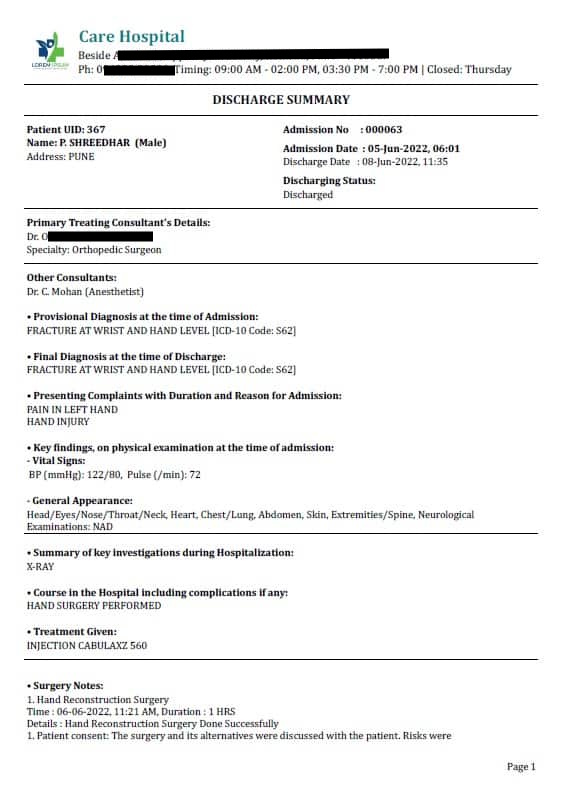
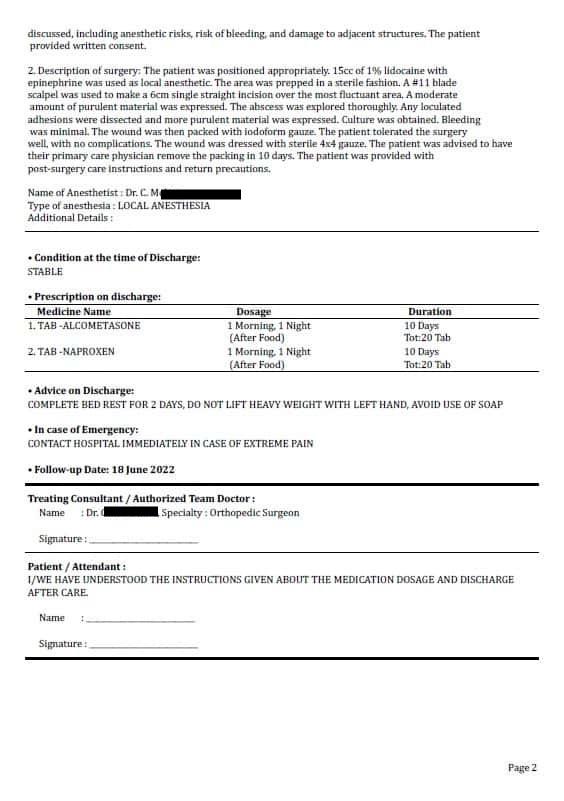
The image is a Discharge Summary printed using MyOPD Software. You can print this on your own letter head or a plain paper.
MyOPD Software products are now available with No Cost EMI i.e. at 0% Interest based EMI on Major Bank Credit Cards of India.
What should you know about this offer?
0% Interest Offer is available on Credit Cards issued in India by VISA and Mastercard.
Offer is applicable on all products of MyOPD Software – Clinic Software on-time versions as well as Hospital Software plans. Offer is not applicable on Subscription plans.
Offer is currently available only for Windows based products.
Offer can be claimed by choosing the EMI option while making the purchase.
0% EMI offer is applicable only when you choose 3, 6, 9 or 12 months EMI option. EMI options more than 12 months can be chosen, however, 0% Interest will not be applicable for them.
Bank Cards covered in this offer are given below. Please check if your card is mentioned:
ICICI Bank Credit Card
HDFC Bank Credit Card
Axis Bank Credit Card
RBL Credit Card
INDUS IND Bank Credit Card
Citi Bank Credit Card
Kotak Mahindra Bank Credit Card
YES Bank Credit Card
Standard Chartered Bank Credit Card
Bank of Baroda Credit Card
HSBC Bank Credit Card
EMI offers are not available on Debit Cards.
Offer applicable for a limited time and can be discontinued in future.
Sample Calculation with NO COST EMI
Example calculation of purchase of Rs. 10,000 under No Cost EMI offer:
Sample EMI Calculation
As seen here, you pay the same amount as the cost of the product with 0% Interest on your credit card. The monthly installments shown are the amounts charged by on the credit card every month. This approach makes the solution affordable as you don’t spend the whole amount in one go.
We are happy to announce that we have completed our first overseas installation of MyOPD Hospital Software in Nigeria.
MyOPD Clinic Software was already being used by Doctors in India, Sri Lanka, Kenya, Oman, Jordan, Iraq, Pakistan, Philippines and Indonesia. However, this is for the first time that MyOPD Hospital software is installed out of India.
We are happy to see the product getting matured over period of time and getting accepted by international clients.
This reinforces our belief that MyOPD Hospital Software can be installed and supported by our team no matter where you are located. All that needs is a match in your requirements and some effort to work with us.
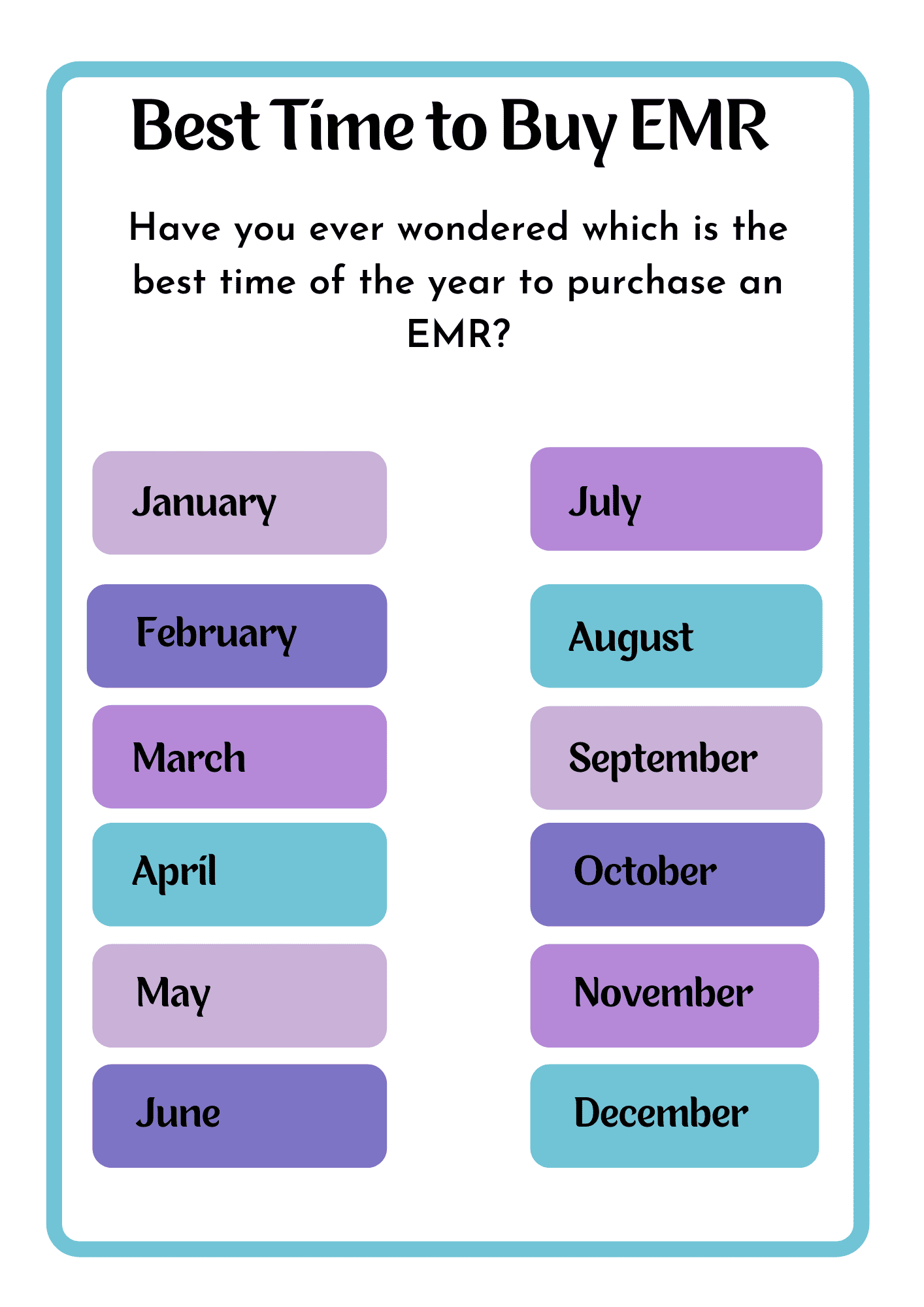
Is there such a thing as a best month to start using an EMR or a clinic management software?
MARCH
Here are 3 reasons why we think March is the best month to start using Clinic Software in your practice.
Reason # 1: Using a new technology when clinic load is less
Traditionally, the Summer months are the months in which people are less sick. As a result, the load in the clinics is less during the months of Summer. In India, the Summer typically starts from March and goes on till mid June. So using this criteria, we could select any of these months, say March, April, May or June to get started. Then why March is still the best?
Reason # 2: Learning time window
When you purchase the clinic software in March, you and your team gets a good 2 months on the software with less loaded clinic. It helps a lot as the team in clinic gets familiar with various features of the software with the help of training and support from the vendor. May and June do not offer that opportunity as there is a rise in patient numbers once the rainy season starts in June. April is still in the race, however, it falls out on the next selection criteria.
Reason # 3: Accounting Year
In India, the financial year starts from April and ends in March. Clinics and Hospitals need to know the counts of patients or billing details during the financial year period. Starting in March allows you to start capturing data from April. If you start in April or May, you may lose the initial set of data which need to be a part of the report.
The same logic of getting started with a clinic software is also applicable for Hospital Software.
Finally, if you are not reading this in March, don’t wait for the next March to come.
Remember the proverb: The best time to plant a tree was 20 years ago. The next best time is now.
And why don’t we provide Hospital Management Software for hospitals with more than 50 Beds?
If you are looking for Hospital Management Software and your setup is anywhere between 5 Beds to 50 Beds, you have come at the right place. You are special for us and we have a product for you.
We get asked a lot many times by Doctors and Hospital Administrators – “Why do we provide software to only those Hospitals having less than 50 Beds?”
Hospitals have multiple sizes. From our experience, Hospital Beds is one of the best criteria to classify hospitals. So you could classify Hospital roughly under below categories based on their beds:
1 – 10 Beds
10 – 30 Beds
30 – 50 Beds
50 – 100 Beds
100 – 500 Beds
500+ Beds
As the Hospital Beds go on increasing, so does
The number of Doctors associated with the Hospital
The number of specialties that the Hospital Caters to
The staff working in the Hospital
The admissions that happen in the Hospital
The computerized systems that will be used in the Hospital
The compliances for the Hospital
So, when a Hospital Management Software caters to Hospitals, the requirements and expectations from the Hospital Management Software go on changing based on the category of the Hospital.
For example
Having a Pharmacy or Laboratory module along with Hospital Management Software
Having it installed on multiple systems in multiple departments
Reports required to give insights about the functioning of the Hospital
Total Cost of Ownership (TCO) of such a solution
Cloud based solution or On Premise solution
Internet Dependent Solution or an Offline option
As seen, there is fundamental difference in the way Hospitals get managed depending on the type of a Hospital. Hence, a Hospital Management System should assist the administrators as closely as possible with respect to their requirements.
At MyOPD, we have perfected the functioning of Hospitals under 50 Beds. So if you have a 5 bedded Hospital or a 50 Bedded Hospital, we got you covered. We have been working regularly with Doctors and administrators managing Hospitals of these sizes.
As a result
MyOPD Hospital Management Software covers the requirements for Hospitals under 50 Beds nicely.
Suites the budget of such Hospitals.
Has well equipped support staff to handle training and support of staff working in such Hospitals.
All this results in fantastic solution for Doctors who run such Hospitals at the prices they can afford. Refer to our pocket friendly hospital management software pricing plans to see it for yourself.
Feel free to download the free trial of the OPD portion of the Hospital Management Software from our Home Page. Book a demo with us if you want to see the entire solution.
MyOPD’s Hospital Management Software includes OPD as well as IPD software. In this post we explain the pricing of MyOPD Hospital Management Software for International clients. MyOPD Software works best for Hospitals having 5 Beds to 50 Beds. It involves modules like OPD Registration with UHID, IPD Admission, Discharge, IPD Billing and so on.
Here are the different plans we have for Hospital Management Software.
Option 1: Unlimited Plan / One-Time Plan
In this plan, there is not restriction on the number of patient admissions in IPD.
You are covered under support plan and you also get software updates in the first year.
There is also no compulsion to pay the yearly AMC to use the software.
You can use the software in IPD without paying the AMC as well.
If you do not pay AMC, you will not get software updates, support and online services like SMS reminders etc.
However, your regular tasks in OPD and IPD will continue offline.
Unlimited Plan, One-Time Plan, Rate
Unlimited Plan
First Year Price
Optional AMC from Next Year
No limit on Patient Admissions
USD 620
USD 90 for 1 year
All prices including taxes
Product Updates and Support are available only if you have an active AMC.
1st Year AMC is covered in the one-time cost of the product
Option 2: Pay As You Go Plans
In Pay As You Go Plan, the OPD portion of the software keeps working without any yearly charge. However, you have to pay yearly charge to use the IPD portion.
So the basic difference between Pay As You Go and Subscription plan is that OPD version works for lifetime.
If you intend to use the software on more than 3 computers, you can choose from Pay As You Go Plan.
Pay As You Go Plan Rates
Pay As You Go Plan Options
First Year Price
AMC from Next Year
250 Admissions for 1 year
USD 340
USD 115/year
All prices including taxes
With Pay As You Go Plan, you get all the benefits of the software (OPD + IPD) at a fixed yearly charge which you need to pay if you want to continue using the IPD portion of the software.
You are free to change your yearly quota during the next AMC recharge. Any unused quota of admissions from last year will be carried forward after the recharge.
OPD portion of the software keeps working without the yearly charge.
Get in touch with us today to understand what will work best for you. Be assured that we will suggest you an option that will work the best for you. In case our solution does not fit your requirements, we will tell you so.
Book you free online demo with us to understand how MyOPD Beds Hospital Management Software Works. Click here to Contact us.