MyOPD Logo MyOPD™ - Software For Clinics and Hospitals

#hospitalsoftware

MyOPD EMR Software – Customer reviews

Electronic Medical Records (EMR) for Global Clients

MyOPD Software Reviews from clients Globally

What Doctors say about using MyOPD Clinic Software for Electronic Medical Records (EMR)
Here are #reviews from our clients across countries. And yes, they all are still our active customers!

Looking for an #EMR that is pocket friendly and still gives you the best?

We are happy that what some of our clients have said 3 years back about our after sales support, still holds true for a review done by our client 2 weeks back!

Download the free trial of MyOPD Clinic Software Today at www.myopd.in

MyOPD EMR Software – Customer reviews Read More »

Hospital Management Systems – 5 Points to help you choose right one

1. Size of the Hospital

This is the most important criteria while selecting a Hospital Management System (HMS). Hospitals are of multiple sizes. A good factor to gauge the size of the Hospital is to check the number of Beds in the Hospital. 

Why is size important? 

Size is important because it defines the complexity involved in running and managing a hospital. A hospital with 500 Beds is a completely different proposition than a hospital with 50 Beds than a hospital with 5 Beds. So requirements of a Hospital with 500 Beds are different than requirement of Hospital with 50 Beds. 

A Hospital Management System built for a 500 Bedded hospital may not necessarily be the right system for a 5 Bedded hospital

Why do we think so?

Because, a bigger Hospital has 

  • Many more Departments
  • Different compliances than a smaller hospital
  • Trained staff readily available for using the software
  • Higher budget than smaller hospitals

So to begin with, identify the size of your Hospital today and possibly for the next few years. 

2. Typical Usage in the Hospital

Hospital Management Systems come with multiple features. This article gives you an overview of those. Understand which features are important for your Hospital.

We have seen some people wanting to use HMS only for billing and nothing else. We have also seen some who want to use HMS also to calculate the staff attendance report and salary management. 

Here are some questions which will help you decide:

  • Who is going to use this system in my Hospital? Doctors, Reception Staff, Billing Staff, Laboratory Staff, Pharmacy Staff and so on.
  • Are Doctors going to operate the system for entering data like patient’s prescription?
  • Is my staff going to give appointments of Doctors via the software? Will patients take appointments online?
  • Do I need to give patients a neatly made, professional looking, Discharge Summary and Hospital bill for insurance claims or otherwise.

Pricing of the system will increase based on the number of features you choose. That is the reason why we mentioned in point # 1 that Hospital size is an important criteria. The features required by a bigger hospital will be more than those of a smaller hospital. If you are a 20 Bedded hospital, ask yourself, do you really need everything that a 200 Bedded hospital is going to use?

3. Cloud Based or On-Premise

Here is a table to differentiate the two options

Sr. No Cloud Based On-Premise
1. System is hosted on a cloud server. System works on a computer in the Hospital. 
2. Requires continous internet connection to operate. Does not require continous internet connection to operate.
3. Data is always with the cloud service provider. Data is on the computer in the Hospital.
4.  Data issues like data loss, corruption can happen only if there is an issue with the cloud service provider.  Data issues like data loss, corruption can happen if there is an issue with the computer in Hospital. 
5.  System can be accessed from anywhere.  Mainly designed to be accessed from within the hospital. However, some on premise systems give ways to access externally as well. 
6. Typically charged as yearly subscription plans. Typically charged as One-Time with Annual Maintenance Contracts. 
7. Using the system requires internet. So internet speed fluctuations can interfere with system performance.  Data is available locally. So these systems typically are faster to respond and operate with the right on premise configuration.
8. Management of Hardware and software is not much an issue as everything is taken care by the vendor. Hardware and software management has to be done locally. 
9. Access to data via software will be lost if you stop working with this vendor. Access to data via software may still continue if you stop working with this vendor.

4. Budget and Pricing

We will now talk about the 4th important point that will help you decide the right Hospital Management System. It is Budget and Pricing. 

Not all hospitals have same budget. Plus, as you add more features and requirements to the software the overall cost of the solution increases. 

Here we will see different ways in which providers charge you money. Based on your comfort level, you can decide which style of pricing woks best for your requirements:

Monthly/Yearly Subscription Model

In this model, you pay for the solution every month/year. If you do not pay, the service stops. So you get access to your data and the services of the vendor for the duration of your subscription. 

One-Time Payment plus AMC Model

In this model, you pay for the solution only once and use it for lifetime. What a lifetime of a software means depends from Vendor to Vendor. So make sure you understand that. Typically, the software can be used without support and updates. If you want support and updates, you have to pay the Annual Maintenance Charge (AMC). This is what we call as One-Time Payment plus AMC model. 

What you need to understand here is, what is the Total Cost of ownership (TCO) for this solution. How much are you going to spend over at least 3 years or 5 years on this solution. Understand that along with other items and decide.

5. Reports

The whole point of using the software is to understand how the entire hospital is functioning. See what kind of reports will you get from the HMS:

  • Patients Currently Admitted in the Hospital
  • Patients Discharged on a particular Day or duration giving details of Discharge (Discharged or Discharged against medical advice)
  • Daily Collection Report (OPD Collection, IPD Collection, Lab Collection, Pharmacy Collection)

And so on…

Reports generated from a Hospital Management System put the data created in the system to real use providing the owner with insights that can be used for better functioning of the Hospital. 

MyOPD Beds Hospital Software is one such Hospital Management System. Visit our Website https://www.myopd.in/


Hospital Management Systems – 5 Points to help you choose right one Read More »

How Much Does MyOPD Hospital Software Cost?

MyOPD Hospital Management Software is built for hospitals and nursing homes with up to 50 beds, covering everything from OPD registration and IPD admissions to discharge, billing, and beyond. Whether you are running a single-specialty clinic or a multi-department hospital, MyOPD is designed to fit your workflow from day one.

What does MyOPD Hospital Software include?

MyOPD is a comprehensive solution that covers:

  • OPD registration with UHID
  • IPD admissions, discharge, and billing
  • Prescription management
  • Cloud backup
  • Access via Windows, Android, and iOS apps

Annual Maintenance from Year 2 keeps your software updated, your support active, and your SMS and WhatsApp notification services running.

How is MyOPD Hospital Software priced?

Option 1: One-Time Price. No Forced Renewals.

One-Time Plan with Optional Yearly AMC

One-Time Plan OptionsLifetime License CostOptional AMC from Next Year
MyOPD Beds Hospital VersionRs. 70,000 (One-Time)Rs. 10,000/year (optional)
All prices include 18% GST.
  • With One-Time plans, the software keeps working without any yearly charge. First year Annual Maintenance Charge (AMC) is covered in the Lifetime License cost.
  • Yearly payment after the first year is only required if you are interested in AMC. AMC is required if you want
    • MyOPD Software updates
    • Remote Support
    • MyOPD All In One Android app and MyOPD All IN One iOS app
    • SMS / WhatsApp Services. These services are available currently in select countries only. Please check with MyOPD team regarding this feature. 1000 SMS are added to your account when you purchase the product or renew the AMC. These credits are valid for 1 year.
    • Cloud Backup

With One-Time plans, the Windows Software keeps working without any yearly charge. First year Annual Maintenance Charge (AMC) is covered in the cost. Yearly payment after the first year is only required if you are interested in AMC.

Option 2: Subscription Plan

  • Subscription plan allows you to start using the Hospital software with a lower initial investment and an yearly charge.

Subscription Plan Charge

Subscription Plan Options1st Year PricingFrom 2nd Year Onwards
MyOPD Beds Hospital VersionRs. 36,800/yearRs. 25,000/year
All prices include 18% GST.
1st Year Breakup:
  • Yearly Subscription Charge: Rs. 25,000
  • Initial Setup and Configuration Charge: Rs. 11,800
  • Total 1st Year: Rs. 36,800
From 2nd Year Onwards:
  • Yearly Subscription Charge: Rs. 25,000 (provided there is no break in subscription)
  • With the Subscription plan, you get all the benefits of the software at a manageable yearly charge.
  • Yearly payment is necessary to keep using the software.
  • The Initial Setup and Configuration Charge of Rs. 11,800 is a one-time charge applicable only in the first year.
  • From the 2nd year onwards, only the yearly subscription charge of Rs. 25,000/year applies, provided there is no breakage in the subscription.
  • Subscription plan includes the AMC charge for each year too!

Get in touch with us today to understand what will work best for you. Be assured that we will suggest you an option that will work the best for you. In case our solution does not fit your requirements, we will tell you so.

How do I get Free online demo?

An online demo helps you understand the solution first before investing into it. Simply get in touch and we will respond promptly.

You can reach us in any of the following ways:

Watch MyOPD Hospital Software in action

Want to checkout the videos in your own time? You are welcome to explore a full walkthrough of MyOPD Hospital Software on YouTube:

Watch Super Fast Discharge Summary Generation

Watch Quick Bill Generation

Watch MyOPD Hospital Software Full Demo

About MyOPD

MyOPD is a software for doctors, clinics, and hospitals, developed by Catalyze Systems Private Limited. Download the software directly from www.myopd.in Drop a mail to [email protected] and we will be happy to help.

How Much Does MyOPD Hospital Software Cost? Read More »

Hospital Management Software – Train Yourself

One of the important aspects of any Hospital Management Software is the support available for training while using the software.

At MyOPD, we are continuously improving our videos to help you understand the functionality of the software. You can check these while using the software as well as share with your staff so that it is easier for your staff to use it.

Here is a link to our YouTube Tutorials: https://youtube.com/playlist?list=PLvf4pA7qB-L5zSLtoXiuiO8bCPQrsiuiR

Get in touch with us if you are interested! Drop a mail to [email protected]

Hospital Management Software – Train Yourself Read More »

Hospital Management System Sample Documents

MyOPD Hospital Management System


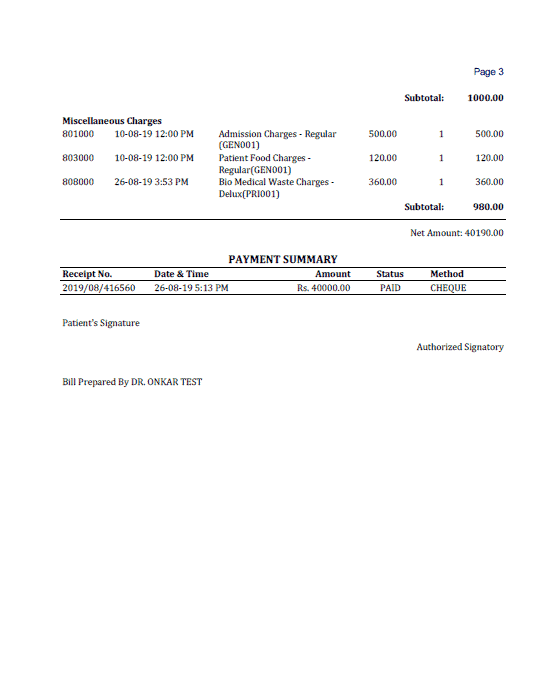
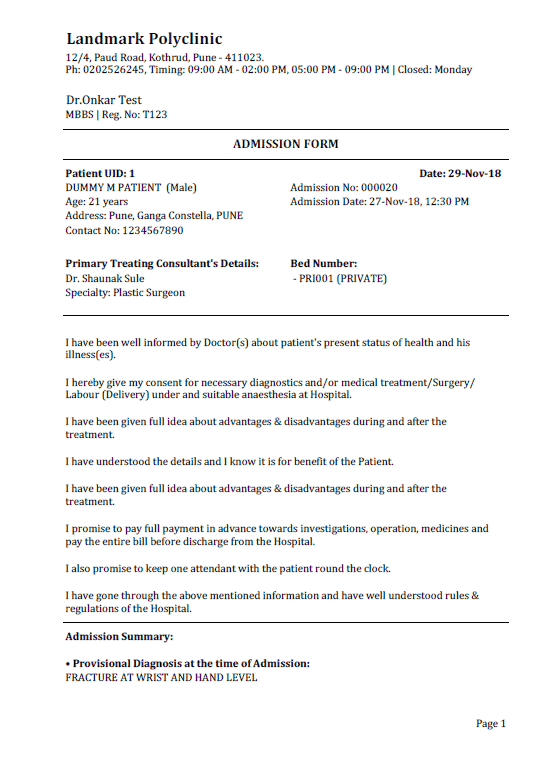
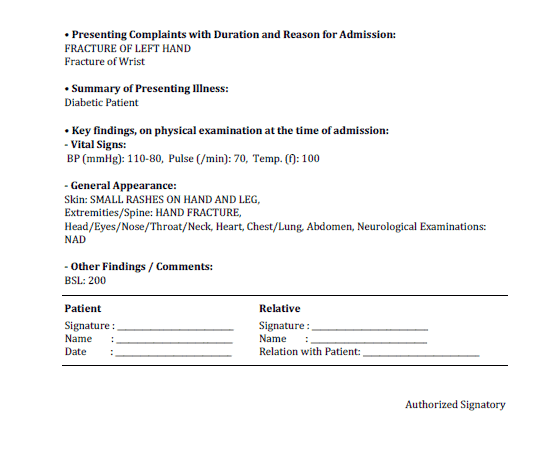
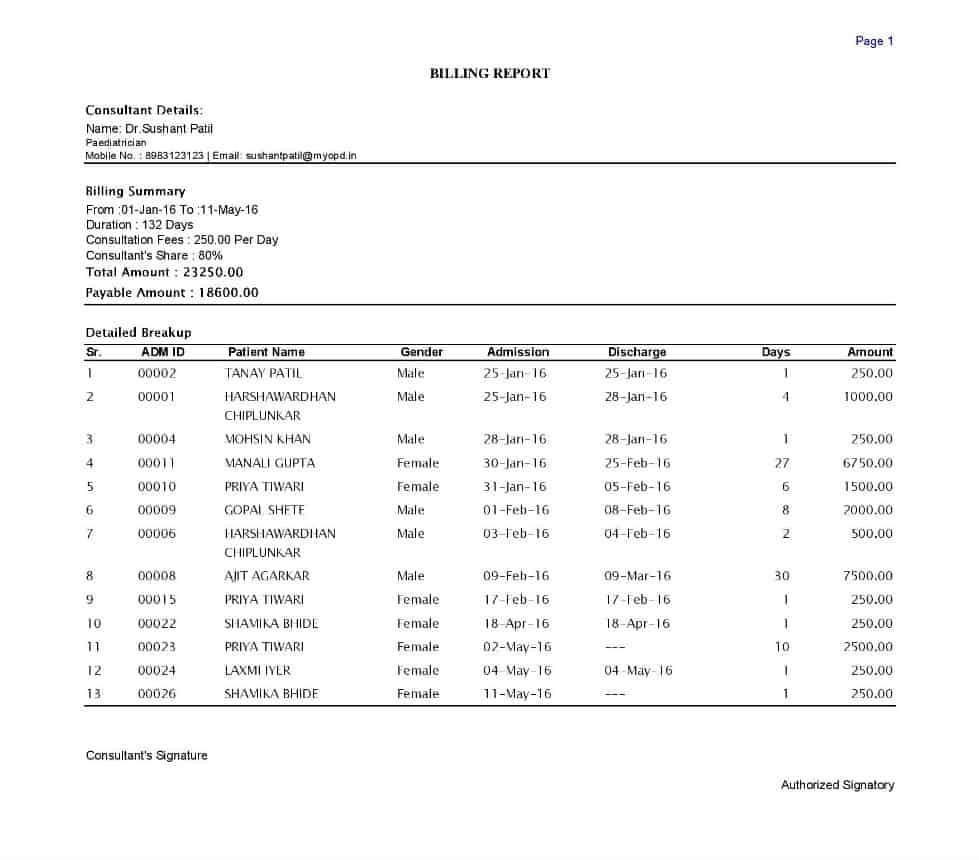
MyOPD Hospital Management System allows Doctors to print a variety of Documents required while operating a Hospital. Below are sample Documents generated from MyOPD Beds Hospital Software. You can print them on a plain paper or your own Hospital Letter Head.


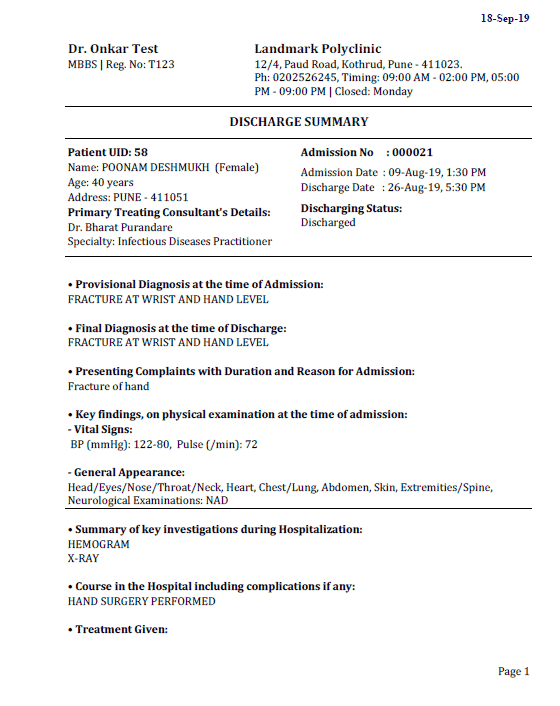
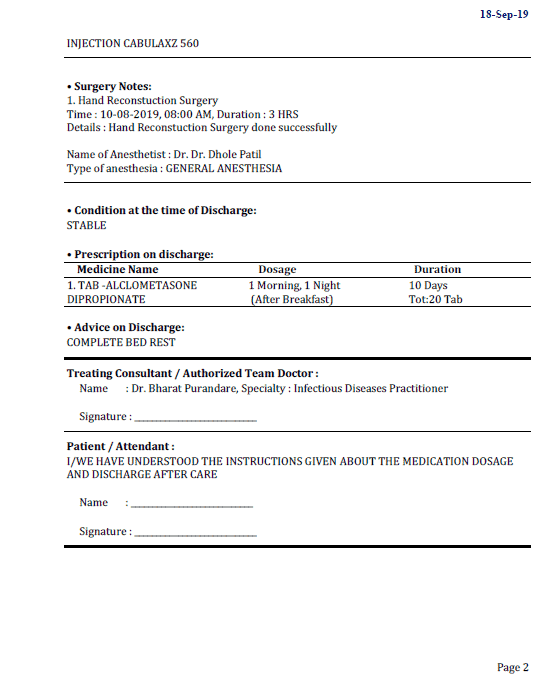
Discharge Summary Sample


Discharge Summary Hospital Management System
Discharge Summary-2 Hospital Management System

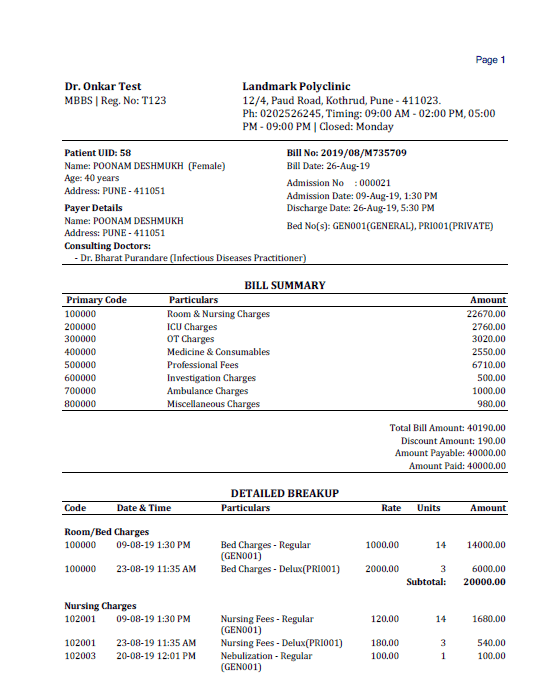
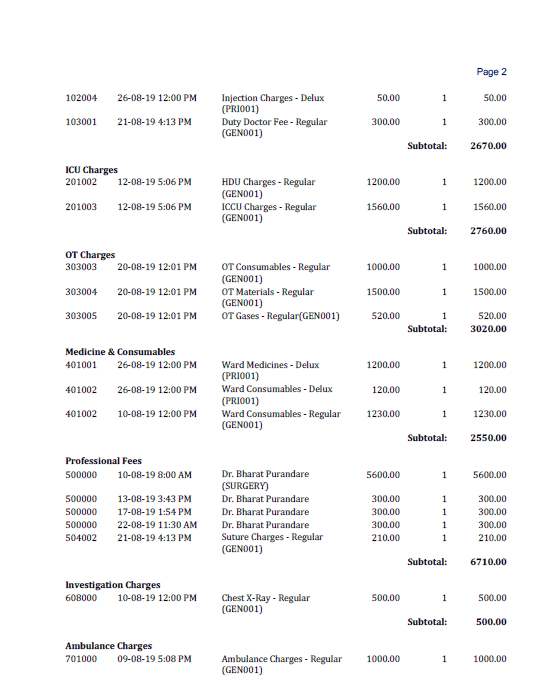
Hospital Bill Sample


Hospital Bill-1 Hospital Management System
Hospital Bill-2 Hospital Management System
Hospital Bill-3 Hospital Management System

Admission Record Sample


Admission Record 1 Hospital Management System
Admission Record 2 Hospital Management System

Visiting Consultant Payment Report Sample


Visiting Consultant Payment Report Hospital Management System

In addition to these forms, you can also Create your own Consent Forms and print them.

Demo Videos


View Demo videos on YouTube to get an idea of the functionality of Hospital Management System.

You can also view the videos by clicking https://www.youtube.com/playlist?list=PLvf4pA7qB-L5zSLtoXiuiO8bCPQrsiuiR

Are you interested in MyOPD Beds Hospital Software?


Download free trial of OPD portion of software at https://www.myopd.in/

Hospital Management System Sample Documents Read More »

Hospital Billing Software and Reports

Hospital Billing Software and Reports Read More »

Does Hospital Software help with NABH compliance?

Hospital Software

A common question we get these days is, whether the MyOPD Beds Hospital Software will assist us in NABH. As Doctors try to get their Hospitals accredited via NABH, this becomes an important decision point while purchasing the software.

For the uninitiated, NABH is National Accreditation Board for Hospitals and Healthcare Providers. With Accreditation, the benefits are immense. It is a recognition that the Hospital has defined standards and procedures laid down by NABH.

Think it similar to a Hotel Accreditation system where Hotels are graded as 5 Star, 4 Star and so on…

The Hospital aiming for Accreditation has to prepare for Assessment. This preparedness is termed as Pre-Accreditation Entry Level. Next comes the Progressive Level and finally comes Full Accreditation. You can read more about NABH at https://nabh.co/

Now with the background of NABH, let’s see how MyOPD can assist Hospital administrators function better.

Does Hospital Software help with NABH compliance? Read More »

Hospital Software – Choosing the correct one

choosing-hospital-software

One of the most important decision while running a Hospital is choosing the correct Hospital Software.

Below are the 5 points you should consider to choose the right Hospital Software.

  1. Hospitals are of varying sizes

  2. Hospitals range from 5 Beds to 1000 Beds. A Hospital Software developed for a 1000 bedded Hospital will not suit a 5 bedded Hospital. Why? Well, apart from just the cost factor, the requirements of a 1000 bedded Hospital are vast compared to that of a 5 bedded Hospital. Plus, the staff who operates that software in case of a 1000 bedded hospital is vastly different in skills compared to the staff that operates the software in case of a 5 bedded hospital. Smaller hospitals have lesser computer skilled staff to operate the software. Plus, bigger hospitals have more compliance requirements than smaller ones. The software should help you achieve those.

Hospital Software – Choosing the correct one Read More »

MyOPD Hospital Software

MyOPD Hospital Software is improved on below counts:

  1. New Updates to handle ever growing requirements of our clients
  2. New pricing to cater to hospitals having less admissions/month as well as many

Checkout a short intro video on YouTube

MyOPD Hospital Software Read More »