MyOPD Logo MyOPD™ - Software For Clinics and Hospitals

#clinicmanagementsoftware

Can Clinic Management Software Help You See More Patients?

Know the main reason why many Doctors are reluctant to use Clinic Management Software?

If you run a busy clinic, you already know the bottleneck: you.

Patients are waiting. Your assistant has done the vitals. But every prescription, every diagnosis entry, every follow-up note still has to go through your hands — and your hands are already full. By the time you finish entering data for one patient, three more are sitting outside getting restless.

There’s a better way. And clinics are already using it.

The “Doctor + Assistant Doctor” Workflow
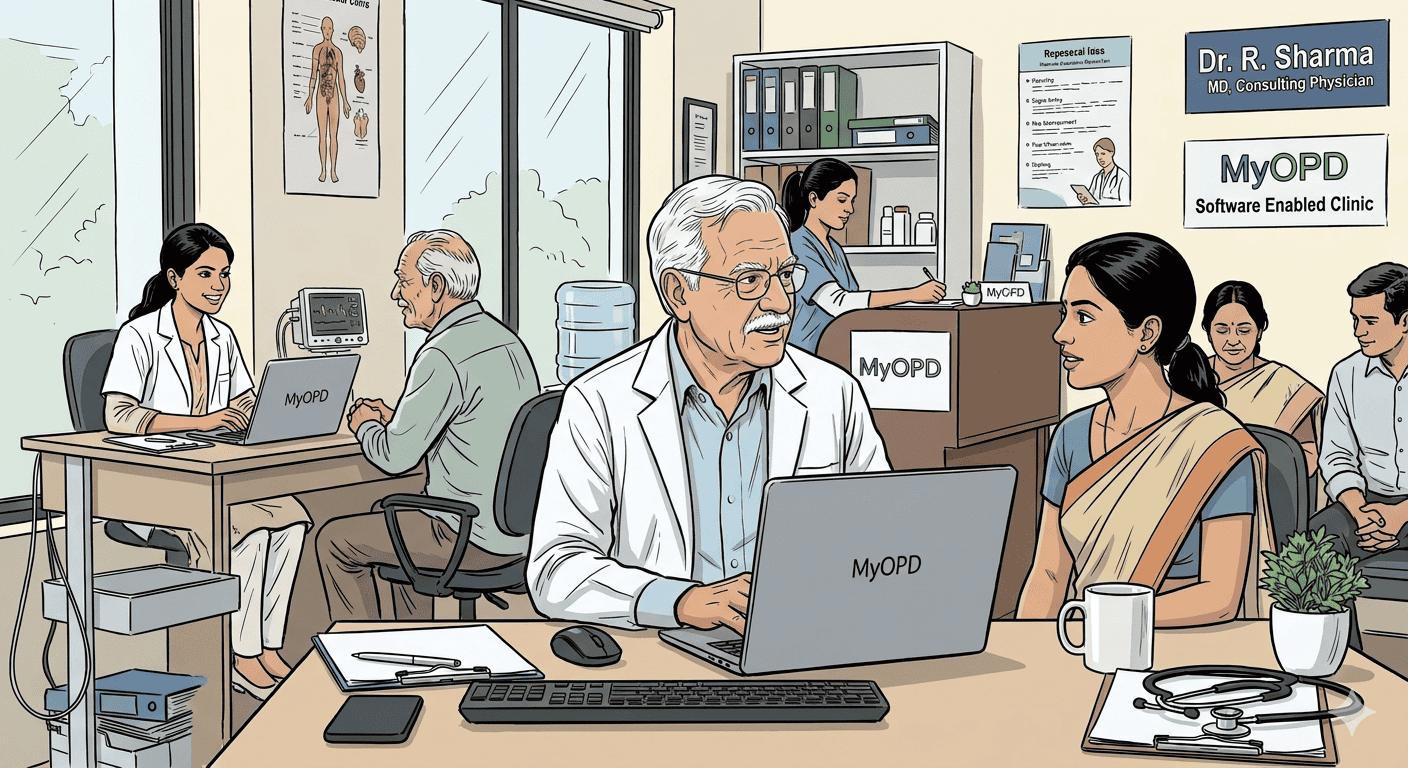
Visual representation: A collaborative Doctor + Assistant workflow (AI-generated illustration).

MyOPD’s clinic management software supports a two-tier consultation model that mirrors how the best hospitals in the world operate — and now brings that same efficiency to your OPD.

Here’s how it works:

Step 1 — The Assistant Doctor sees the patient first. Your junior doctor or assistant handles the initial consultation. They record the patient’s chief complaints, take the history, note vitals, and enter all the preliminary findings directly into MyOPD. Everything is documented, structured, and ready.

Step 2 — You step in as the decision-maker. By the time you sit across from the patient, the groundwork is done. You review the assistant’s findings on-screen, apply your clinical judgment, confirm or adjust the diagnosis, and either write the prescription or review the one suggested by your assistant — with a single click.

No repetitive data entry. No starting from scratch. Just the high-value clinical decision that only you can make.

Why This Changes Everything for Senior Doctors

Whether you’re already using MyOPD or exploring ways to modernise your clinic, one challenge remains universal: in a busy OPD, a senior doctor’s time is your most valuable — and most stretched — resource.

As patient volumes grow, more and more of that time goes toward data entry alongside clinical decision-making. The Doctor + Assistant Doctor setup doesn’t change how you practice — it simply ensures that your time and expertise are focused exactly where they matter most: diagnosing, deciding, and caring for your patients.

With the Doctor + Assistant Doctor setup in MyOPD:

  • You spend less time typing, more time thinking. The cognitive work of diagnosis and treatment planning is yours. The administrative load is handled.
  • Your assistant gets meaningful clinical exposure. Junior doctors grow faster when they’re actively participating in consultations, not just filing papers.
  • Patients get faster, better care. Shorter waiting times. A more focused senior doctor. A smoother overall experience.

Built for Real Clinic Workflows

MyOPD’s interface is designed so that the handoff between your assistant doctor and you is seamless. The assistant’s notes appear clearly on your screen. You can accept findings, add to them, or override them — all within the same patient record, in real time.

There’s no duplication of effort. No switching between systems. No printing and re-entering. One software, one patient file, two doctors working in sync.

This is particularly powerful for:

  • Specialist clinics where detailed history-taking (e.g., dermatology, orthopaedics, gynaecology) can be time-consuming but largely protocol-driven — ideal for an assistant to handle.
  • High-volume General Practice where the sheer number of patients makes single-doctor data entry a genuine operational bottleneck.
  • Multi-doctor setups where roles and responsibilities need to be clearly tracked and documented.

The Bigger Picture: Digitising Your Clinic the Right Way

One of the biggest barriers to digitisation in clinics is this: senior doctors, especially those who have practised for decades, find it difficult to adapt to typing-heavy software interfaces.

The Doctor + Assistant Doctor model in MyOPD solves this elegantly. The senior doctor’s interaction with the software is minimal and focused — reviewing, confirming, and prescribing. The heavy lifting of data entry is handled by the assistant. This makes adoption dramatically easier, and the transition to a fully digital clinic far less disruptive.

Your clinic becomes paperless. Your records become searchable. Your prescriptions become legible. And you didn’t have to change how you practice — just how your team supports you.

Ready to Transform How Your Clinic Operates?

MyOPD is trusted by thousands of Doctors to manage their clinics efficiently, accurately, and on their own terms.

Setting up the Doctor + Assistant Doctor workflow takes minutes. The impact lasts every single day.

Visit www.myopd.in to get started, or contact our team for a free demo tailored to your clinic.

MyOPD — Clinic & Hospital Management Software, built for doctors who put their patients first.

Can Clinic Management Software Help You See More Patients? Read More »
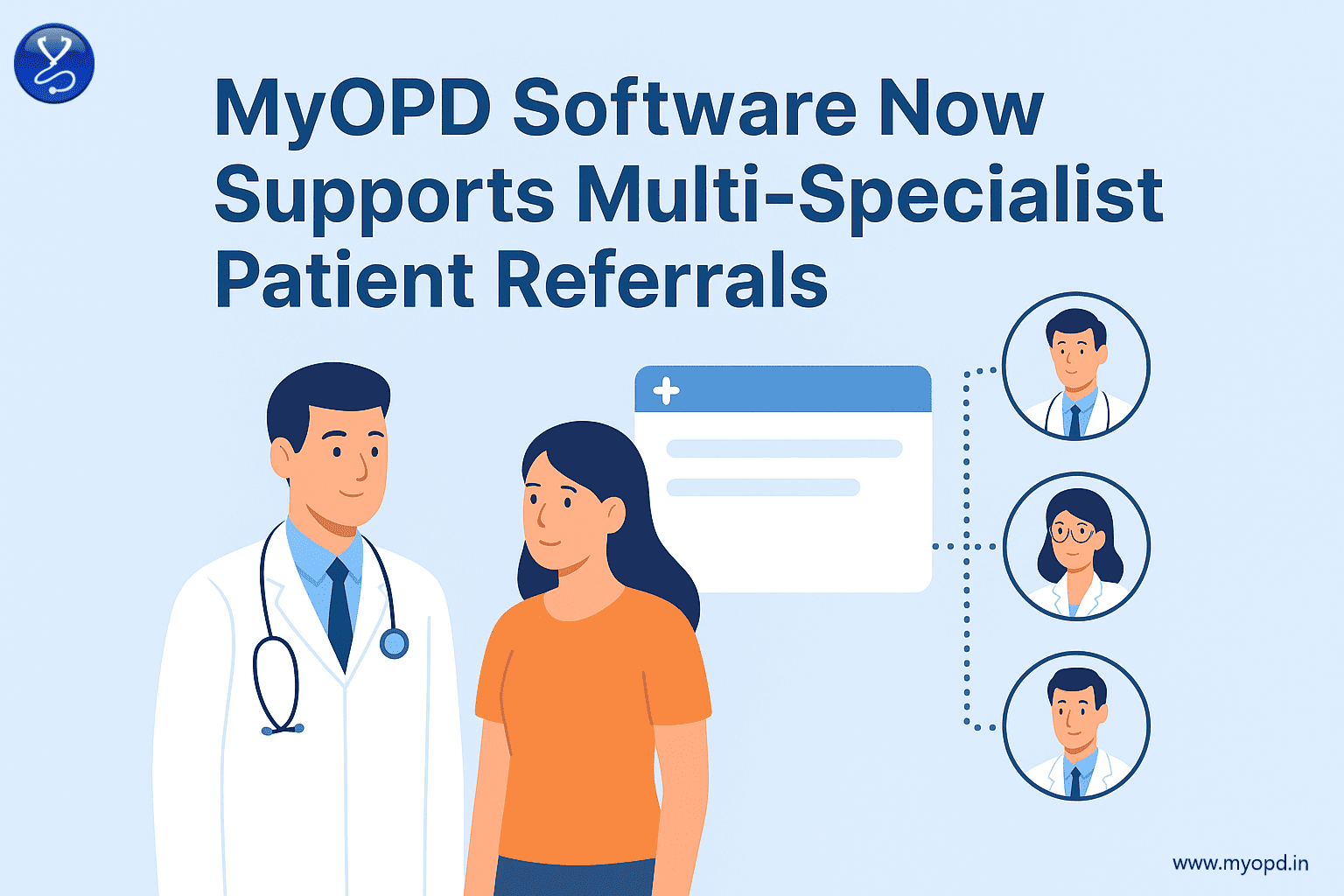
MyOPD Clinic Software Now Supports Multi-Specialist Patient Referrals

Multi-Specialist Referrals using MyOPD Clinic Software

In clinical practice, patient care is rarely limited to a single specialty. A patient might visit a General Practitioner for fever and at the same time need to be evaluated by a Cardiologist for a pre-existing heart condition, or a Diabetic patient may also need guidance from an Ophthalmologist and a Nephrologist.

Till now, MyOPD Software allowed Doctors to refer patients to just one specialist at a time. While this worked in many cases, it sometimes limited the flexibility needed in real-world practice.

With our 8.8 release, we are excited to announce a new feature: Multi-Specialist Referrals.

What does this mean for you?

  • Refer to multiple specialists at once: You can now select and refer a patient to different specialists for different issues in a single step.
  • Improved patient care: Patients get clear directions on which specialists to consult, ensuring better continuity of care.
  • Time-saving for Doctors: Instead of writing multiple referral slips or notes, MyOPD Software simplifies the process by generating referrals efficiently.
  • Notifications: The Doctors you refer your patients to get notified via SMS.

Example in Practice

Suppose a patient visits you with chest pain and also has diabetes-related complications. Now, using MyOPD Software, you can refer the patient simultaneously to a Cardiologist for chest pain evaluation and an Diabetologist for diabetes management.

This ensures the patient gets holistic care, and you save time while ensuring nothing is missed.

At MyOPD, we are continuously working to make healthcare delivery more efficient and patient-friendly. With Multi-Specialist Referrals, Doctors can now streamline patient management like never before.

This feature is available in the latest version of MyOPD Windows based Clinic and Hospital Software. The feature is a part of MyOPD’s 8.8 Release which was released on 25th August, 2025.

You can always start with a free trial of MyOPD Windows based Clinic Software which has this feature. Simply visit our website www.myopd.in and download the free version.

If you are interested in the mobile / tablet based solution, we have an Android based option too. However, as of writing this article, it does not have the multiple referrals option. You may download the trial of this version via Google Playstore by clicking the button below

MyOPD ZIP Android app

MyOPD Clinic Software Now Supports Multi-Specialist Patient Referrals Read More »

Clinic Management App – New Version Released

We are happy to announce the availability of a new version of MyOPD ZIP, our Clinic Management App for Android based devices. The new version 7.6 has features as listed below:

What’s new in 7.6 Release of MyOPD ZIP Android app?

  1. Improvements to Prescription Entry: This release allows Doctors to copy Complaints, Clinical Findings, Prescription, Advice, Investigations, Internal Notes, Diagnosis from any previous visit to the current visit. Read how to use this feature. Before this release, you could copy details from only last visit to the current visit.
  2. Improvements to Patient Payments (India specific feature): In the past release, we implemented a feature where you or your staff can generate a UPI QR code on the mobile. Patients can pay by scanning this QR code. The QR code includes amount to pay so that the patients need not enter the amount to be paid. In this latest release, we allow you to print this generated QR code on the Prescription. Patients can then scan this QR code on the printed prescription and complete the payment. Read more on how to use this feature.

Here is how to upgrade to latest version:

Tap the Google Play button below

If you see Update, click on Update. Make sure you see Last updated on Google Play as 20 March 2025. After upgrade, make sure you see the updated version as 7.6 in MyOPD ZIP app . You will see it in Menu (top left corner) -> Help -> About of MyOPD ZIP app.

In case you have uninstalled the app, you can reinstall the app again to check the app for entering your patient records. Tap on the Google Play button above.

MyOPD ZIP Free Version

While we recommend serious users to go for a paid plan, do you know that MyOPD ZIP has an entirely free plan? Yes, it is free, with certain limitations. Read more about it at https://www.myopd.in/blog/docs/what-do-i-get-in-forever-free-plan/

MyOPD Paid plans start at a price of INR 470/month or about USD 5/month with an option to purchase at one-time cost with no monthly / annual payments!

Clinic Management App – New Version Released Read More »

Budget Friendly Clinic Software, Hospital Software

Are you looking for a Budget Friendly Clinic Software / Hospital Software?

Are you looking for a Clinic Software / Hospital Software that caters to your requirements without hurting your pocket?

Are you looking for a Clinic Software / Hospital Software that really works in the cases you plan to use in your Clinic / Hospital?

Budget Friendly MyOPD Clinic & Hospital Software

Checkout the budget friendly Pricing plans of MyOPD Clinic Software and Pricing Plans for MyOPD Hospital Software.

Want to use a lighter version of Clinic Software on your Android Phone / Tablet? Check MyOPD ZIP Android app.

Please note, MyOPD ZIP App works on Android Phones/Tablet and does not have the Hospital Module.

If you are interested to function with a Windows Desktop / Laptop or want to use the Hospital Module, choose MyOPD Clinic & Hospital Software Windows Version. Download Free trial of MyOPD Windows Version from our website www.myopd.in

Budget Friendly Clinic Software, Hospital Software Read More »

Clinic Management System – 5 Advantages explained with a single prescription!

We have already seen “What is a Clinic Management System?”

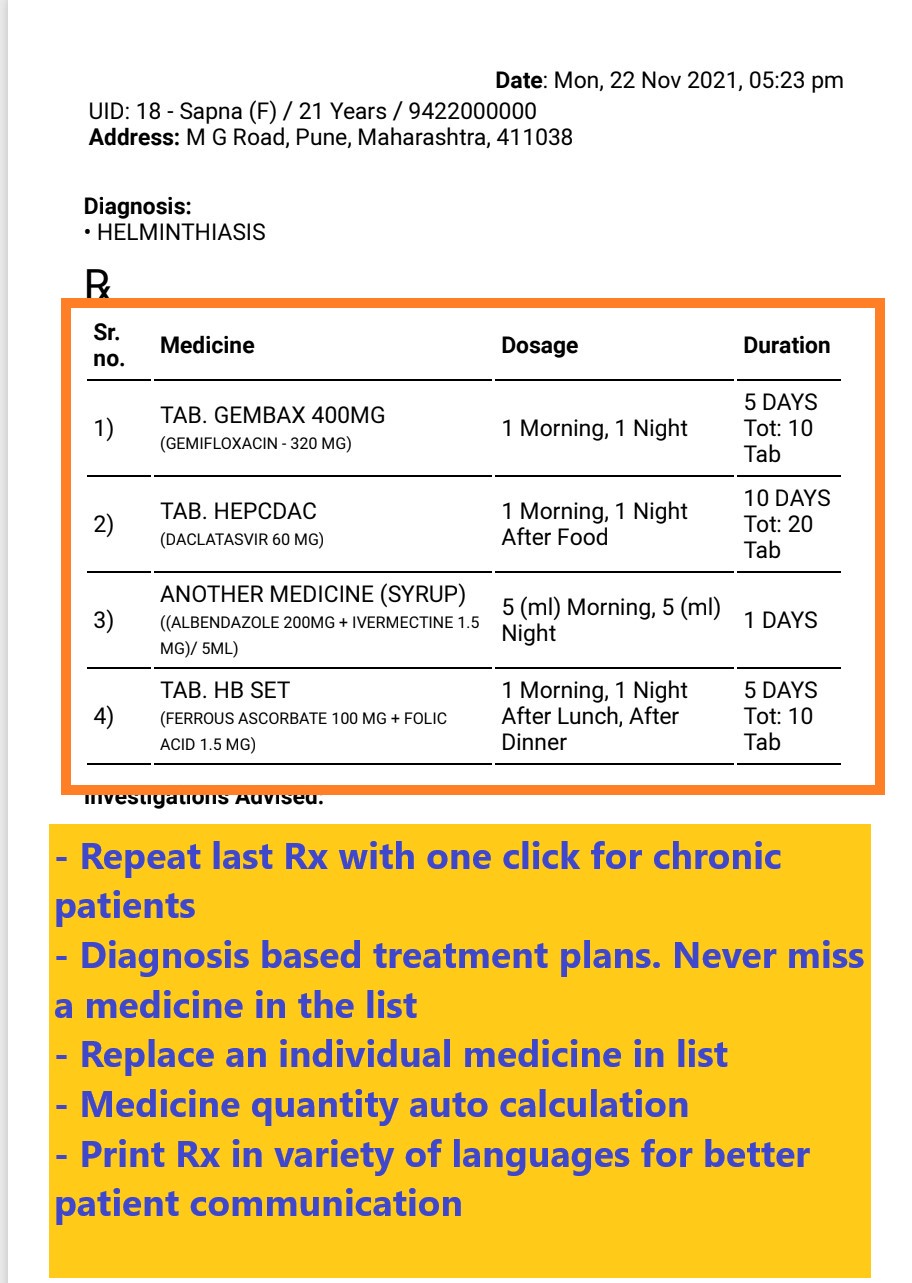
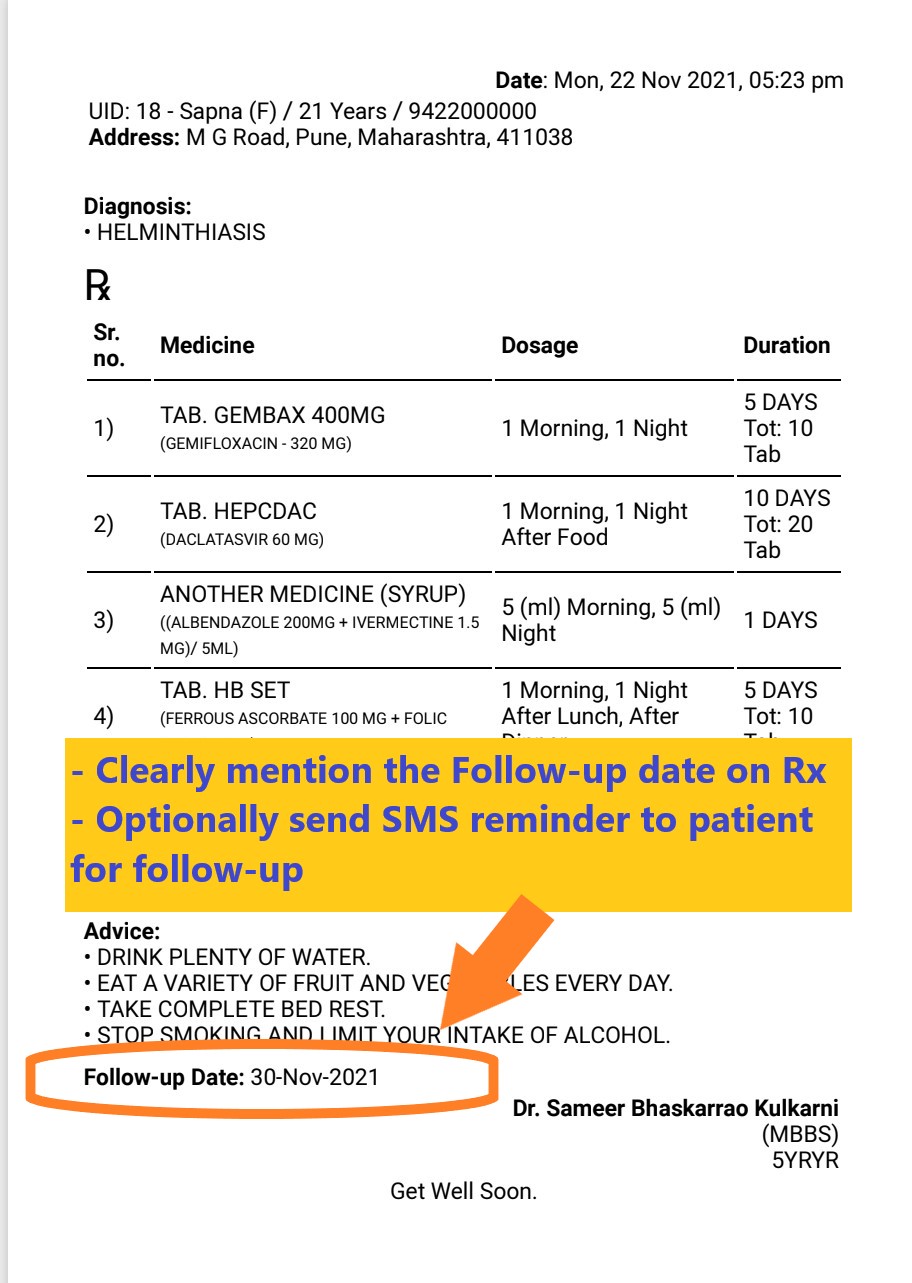
Many Doctors prefer to writing a prescription vs using software. However, there are clear advantages that you gain over time and keep once you master using the software. In this article we explain the 5 advantages of using Clinic Management System with the help of a simple prescription printed using MyOPD.

Advantage #1: Patient details and Address

How many times is the Doctor required to ask the age of the patient, when the patient revisits? Just once while registering the patient. Then, the software automatically shows the current age no matter the patient visits after 1 years or 5 years.

See the image below.

Today’s date, Patient Name, ID, Current Age are all filled up.
  • Date and Time is auto filled
  • Patient Name, Age, Gender, Phone Number is all automatically filled up on the Rx. Software calculates the current age and prints that no matter when the patient visits.
  • Address of the patient once set is included on Rx for accurate patient identification.
  • In addition, MyOPD also allows printing of patient photo on Rx in case you want to do so.

Advantage #2: Fast Medicine Entry

Cleary write medicine name along with generic composition if required. With options to repeat the who Rx in a few clicks, software driven medicine entry will easily beat hand written medicine entry on prescription.

Advantage #3: Use of Investigation Templates

Group various investigations in templates like Diabetic Profile, Kidney Profile and so on…

For example, let’s say Doctor wants to add following tests as Diabetic Profile

  • BSL Fasting and PP
  • HBA1C
  • Lipid Profile
  • Sr. Creatinine

With one click, Doctor can include all these on the Rx for the patient. MyOPD further also allows to print the trend chart of the values of these on the Rx for better patient compliance to the treatment.

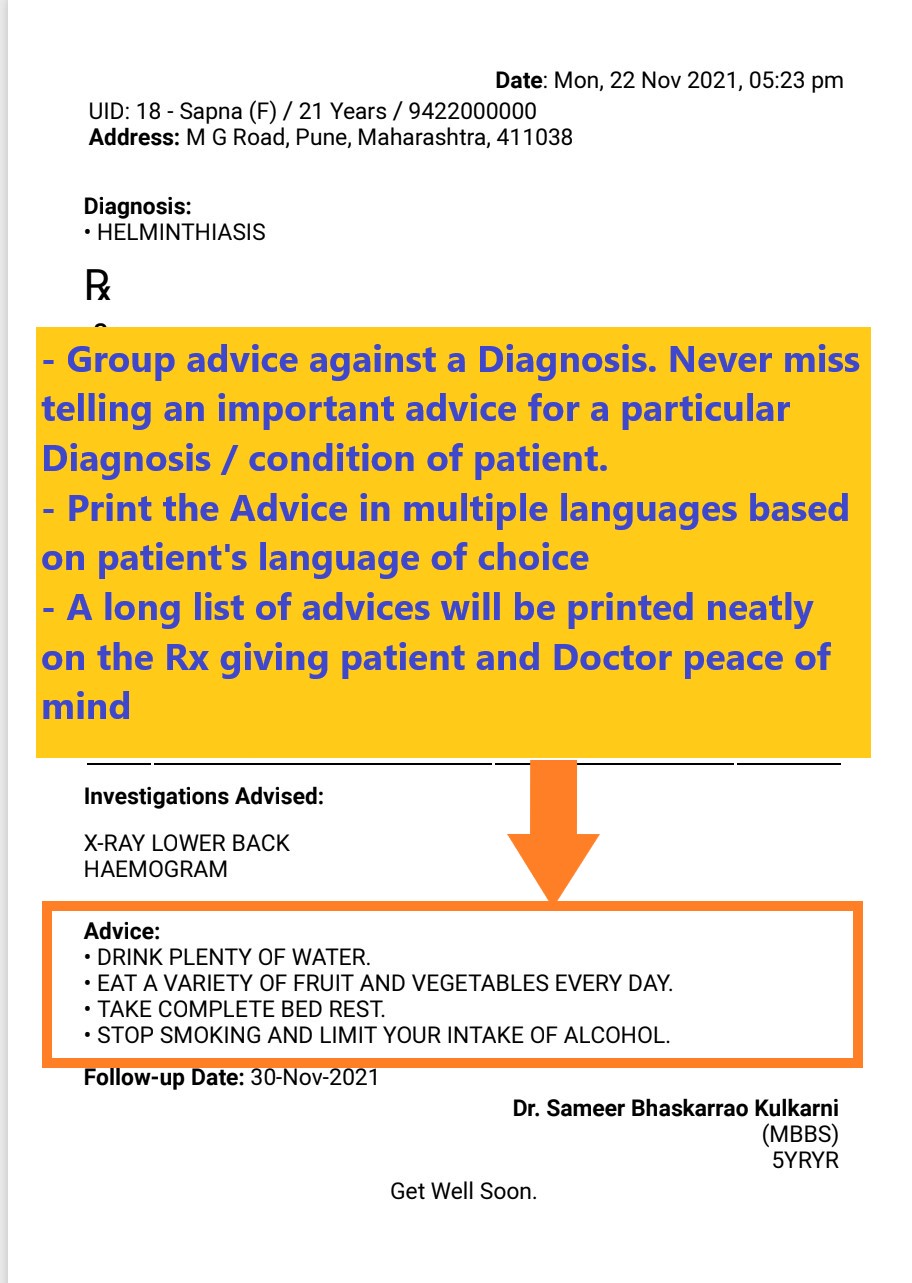
Advantage #4: Never forget an instruction / advice

Every prescription always contains dos and don’ts for the patient. These advices are usually included in the advice section. When there are 10 such things to be told to the patient, imagine writing them every time for every patient. It is such a monotonous task. With MyOPD you can simply include them all in one go using advice templates.

Advantage #5: Systematic Practice one prescription at a time

Discipline is a the key in every facet of life. In addition to allowing Doctors to print Charts & barcodes on Prescription, allowing to print Prescription in multiple languages and make the prescription as informative for the patient, a software driven way instills discipline.

If a follow-up is required, the follow-up date is clearly specified on the Rx. Patient can also get an automated SMS reminder. Helps Doctors to take the service to the next level.

This discipline goes a long way in helping Doctors practice better and manage a clinic with the help of software and handle other aspects of clinic like Billing, Reviews, SMS reminders and so on.

By creating one prescription at a time in MyOPD, Doctors using MyOPD Clinic Management System have created thousands and thousands of Prescriptions.

With that we conclude this article. If you haven’t already tried using a Clinic Management System, download free trial of MyOPD Software on your PC or download the Android app from Google Playstore at https://play.google.com/store/apps/details?id=in.myopd.android.

Like learning any new technology, the start may be slow, however, once you are ready, you will be ready to fly!

Clinic Management System – 5 Advantages explained with a single prescription! Read More »

MyOPD EMR Software – Customer reviews

Electronic Medical Records (EMR) for Global Clients

MyOPD Software Reviews from clients Globally

What Doctors say about using MyOPD Clinic Software for Electronic Medical Records (EMR)
Here are #reviews from our clients across countries. And yes, they all are still our active customers!

Looking for an #EMR that is pocket friendly and still gives you the best?

We are happy that what some of our clients have said 3 years back about our after sales support, still holds true for a review done by our client 2 weeks back!

Download the free trial of MyOPD Clinic Software Today at www.myopd.in

MyOPD EMR Software – Customer reviews Read More »

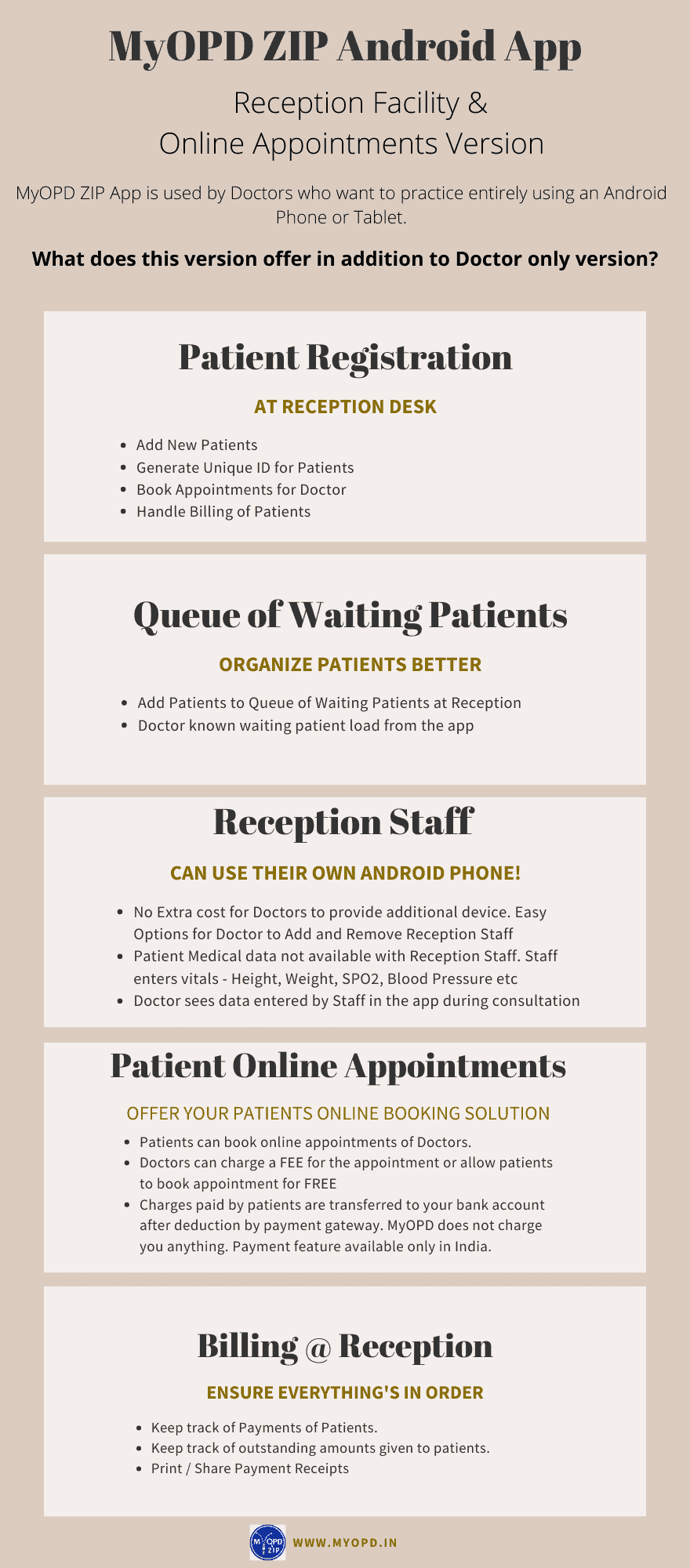
MyOPD ZIP clinic software with Reception

Are you looking for a mobile or Tablet based Clinic Management Software with occasional use on PC? Your search ends here. Read the features of MyOPD ZIP Practice Management App. 

MyOPD ZIP Clinic Management System with Reception Staff support

With Reception version you can do the following:

  1. Save Time as many functions can be handled by your Reception staff.
  2. Invite a Reception staff member to manage your patients and billing
  3. The Reception Staff member can Add Patient, Add initial vital details (Height, Weight, SPO2 etc), Create Appointments and add patients to a queue of waiting patients. No need for an additional device. Reception staff can install the app on their existing Android phone.
  4. Patient health data, like details in Visit, will not be shown to Reception staff.
  5. Flexibility to Add / Remove Reception staff accounts.

Watch this quick video to get started

See how Reception Staff can create Queue of Waiting Patients

Frequently Asked Questions:

  1. Is there a free trial available?
    Yes. MyOPD ZIP with Reception version is available under free trial. You can upgrade and use it for free for the trial period mentioned in the app.
  2. Can the Reception staff work from anywhere?
    Yes. Reception staff can work using their own device from their home, your clinic, basically anywhere where they have access to internet. Reception staff can co-ordinate the job of creating queue of waiting patients in your clinic which you see in real time from anywhere.
  3. I already have paid for Yearly Doctor only plan and have used it for just 2 months. How does the pricing of Reception version affect me?
    Nothing to worry. You can upgrade to Doctor with Reception version at any time during your existing subscription. Let’s say you have just used 2 months of 12 months of Doctor only subscription. So when you subscribe for Doctor with Reception, your remaining amount will be consumed as per the rate of Doctor plus Reception. Once your remaining amount is used up, you will be charged for the Doctor plus Reception amount. So basically, you don’t need to pay anything today until your money on existing plan is utilized.
  4. I have already paid for one-time option. How can I start using Doctor with Reception version?
    When we introduced the app it was introduced as Doctor only version. Since you have already paid one-time charge for Doctor only version, you will be charged less for Reception version than those who subscribe for Doctor plus Reception plan together. Plus, you can use the free trial to decide if Reception version suites your practice.
  5.  Can I downgrade from Reception version to Doctor only version?
    You are free to downgrade at any time. In that case, your plan will be converted to Doctor only version. The amount you have paid will be utilized towards Doctor only version at rates of Doctor only version and will last you longer than your original plan of Doctor plus Reception version giving you complete flexibility.
  6. Is there a Limit on number of Reception Staff members that can be added?
    At the moment, we do not have any such limit. You can add or remove your staff as you practice. However, make sure you add staff members judiciously.
  7. Can this facility be used on iPhone?
    No. This facility is currently available only on Android devices.

Download the free trial today from Google Play https://play.google.com/store/apps/details?id=in.myopd.android

MyOPD ZIP clinic software with Reception Read More »

Should I start using a Clinic Management System?

If you are looking for a Clinic Management System and are confused whether you should start using one or wait, you have come at the right place. 

In our working with Doctors since the year 2012, we have seen ample reasons why Doctors hesitate to decide if they should start using a Clinic Management System.

Common reasons of apprehension include:

#1: Will I be able to use it?

The moment someone mentions software, Doctors think that they cannot use because of patient load. However, a clinic management system has many features that simplify the functioning of your clinic. Use by Doctor is one part of it. You can still implement the system and reap benefits of it by

  • Having your staff handle registration and appointments
  • Having your staff handle payments
  • Tracking outstanding amounts from patients
  • Let the system send automated reminders for follow-up checkups
  • Print visit papers with Patient Name, ID on which you can write the prescription
  • View scheduled appointments on the mobile app
  • See reports of patients visited during particular days. 

As seen, you can use it for many other functions by just being a silent spectator and let your staff use it.

#2: Don’t have enough Patients so don’t need now

Many Doctors think that if they don’t have a lot of patients, there is little use of the system. In fact, this is probably the best time to start learning a new system and getting used to it. Will you practice driving on a crowded street or on a road which doesn’t have traffic? Clinic Management Systems offer far more advantages to you and your clinic in the long term. The earlier you invest on your clinic, the better it is. For e.g: Without a Clinic Management System, it will be extremely difficult to inform your patients of change in the timings of the clinic once your clinic’s patient load improves with time. 

#3: Clinic Management Systems are expensive

Well, this is a thing of past. There are multiple choices now available for you from choose from. For e.g: MyOPD Clinic Management System costs less than a price of an average pizza on a monthly basis. Wouldn’t you spend that much for better functioning of the clinic?

#4: No trained staff to operate

What we have seen is, if the Doctor is willing to install the system, the staff will learn and get used to it. These days, vendors of clinic management systems have made tremedous effort to improve the usability of the system. They also provide sufficient training to you and your staff. What matters is, are you really willing to get started?

#5: I have many requirements of my own which a software cannot handle

You will be surprised that these softwares have now got advanced to such an extent that most of your requirements would be covered. Just ask for a demo or download their free trial to get started. You will be able to compare what you want and what these softwares have already.

Conclusion

To conclude, we would say, in today’s world of digitization, if you are not using technology in your clinic, you are at a huge disadvantage. No matter you are an established Doctor or an upcoming one, a small investment on a clinic management system to keep your clinic in order is a must. 

Wish you Good Luck. 

Photo by Jake Young on Unsplash

Should I start using a Clinic Management System? Read More »

Clinic Software Pricing

Here are the different plans we have for MyOPD Windows based Clinic Software. This software also comes with MyOPD All In One Android / iOS app. Interested in Hospital Software instead? Check Hospital Software pricing HERE

Option 1: One-Time Option

One-Time Plan with Optional Yearly AMC

One-Time Plan OptionsFirst Year PriceOptional AMC from Next Year
MyOPD Clinic Version Rs. 17,700 (Click to Pay)Rs. 5,100/year
All prices include 18% GST.
  • With One-Time plans, the software keeps working without any yearly charge. First year Annual Maintenance Charge (AMC) is covered in the cost.
  • Yearly payment after the first year is only required if you are interested in AMC. AMC is required if you want
    • MyOPD Software updates
    • Remote Support
    • MyOPD All In One Android app and MyOPD All IN One iOS app
    • SMS / WhatsApp Services. These services are available currently in select countries only. Please check with MyOPD team regarding this feature. 500 SMS or 100 WhatsApp are added to your account when you purchase the product or renew the AMC. These credits are valid for 1 year.
    • Cloud Backup
  • The basic difference between One-Time and Subscription plan is that OPD version works for lifetime with the One-Time Plan. Read more about the comparisons at https://www.myopd.in/blog/myopd-one-time-vs-subscription/

With One-Time plans, the Windows Software keeps working without any yearly charge. First year Annual Maintenance Charge (AMC) is covered in the cost. Yearly payment after the first year is only required if you are interested in AMC.

What happens if you do not renew AMC for a very long time?

If you do not renew MyOPD Software AMC for a long time i.e. 3 years between the time of your last renewal date and today’s date, then you will have to purchase the full product all over again. Read the below points to understand this in detail.

  1. Let’s say your AMC has got over on 1st May 2021. This means, your AMC renewal was done in May 2020.
  2. Let’s say the date is 10 May 2024 and you decide to renew the AMC.
  3. So there is a gap of more than 3 years between the time you renewed the AMC i.e. May 2020 and today’s date.
  4. In such cases, you will have to purchase the full product again.

However, if you renew the AMC anytime before May 2023, then you can renew the AMC by just paying the prevalent yearly AMC charge.

Option 2: Subscription Plan

  • Subscription plan allows you to start using the Clinic software with less initial investment and an yearly charge.

Subscription Plan Charge

Subscription Plan OptionsPer Year Pricing
MyOPD Clinic Version Rs. 8,000/year (Click to Pay)
All prices include 18% GST.
  • With Subscription plan, you get all the benefits of the software at a reduced yearly charge.
  • Yearly payment is necessary to keep using the software.
  • Subscription plan includes the AMC charge for each year too!

Get in touch with us today to understand what will work best for you. Be assured that we will suggest you an option that will work the best for you. In case our solution does not fit your requirements, we will tell you so.

Book you free online demo with us to understand how MyOPD Windows based Clinic Software works. Click here to Contact us.

About MyOPD: MyOPD is a Software for Doctors. Start your FREE Trial today! You can download the software directly from http://www.myopd.in/ or Google Playstore at https://play.google.com/store/apps/details?id=in.myopd.android. Drop a mail to [email protected] and we will be happy to help.

Clinic Software Pricing Read More »