
Love using MyOPD ZIP to manage your practice? What if we told you that you could get your next few months (or even years!) of the subscription completely for free?
We’ve made it incredibly easy to earn extra days just by spreading the word to your colleagues and medical circles. Here is your quick guide to unlocking free subscription days.
🎁 The Reward: 30 + 30
When you refer a friend and they make their first purchase:
- You get 30 days added to your active subscription.
- Your friend also gets 30 days added to theirs.
🚀 How to Start Referring in 3 Simple Steps
Getting your personalized link takes less than 10 seconds. Here is how to find it:
- Open the Menu: Tap the Menu icon (the three horizontal lines) in the top-left corner of your MyOPD ZIP app and select “Share with Friends.”
- Access the Invite Page: You will see the “Invite Friends” screen (shown below). This is your dashboard for rewards.
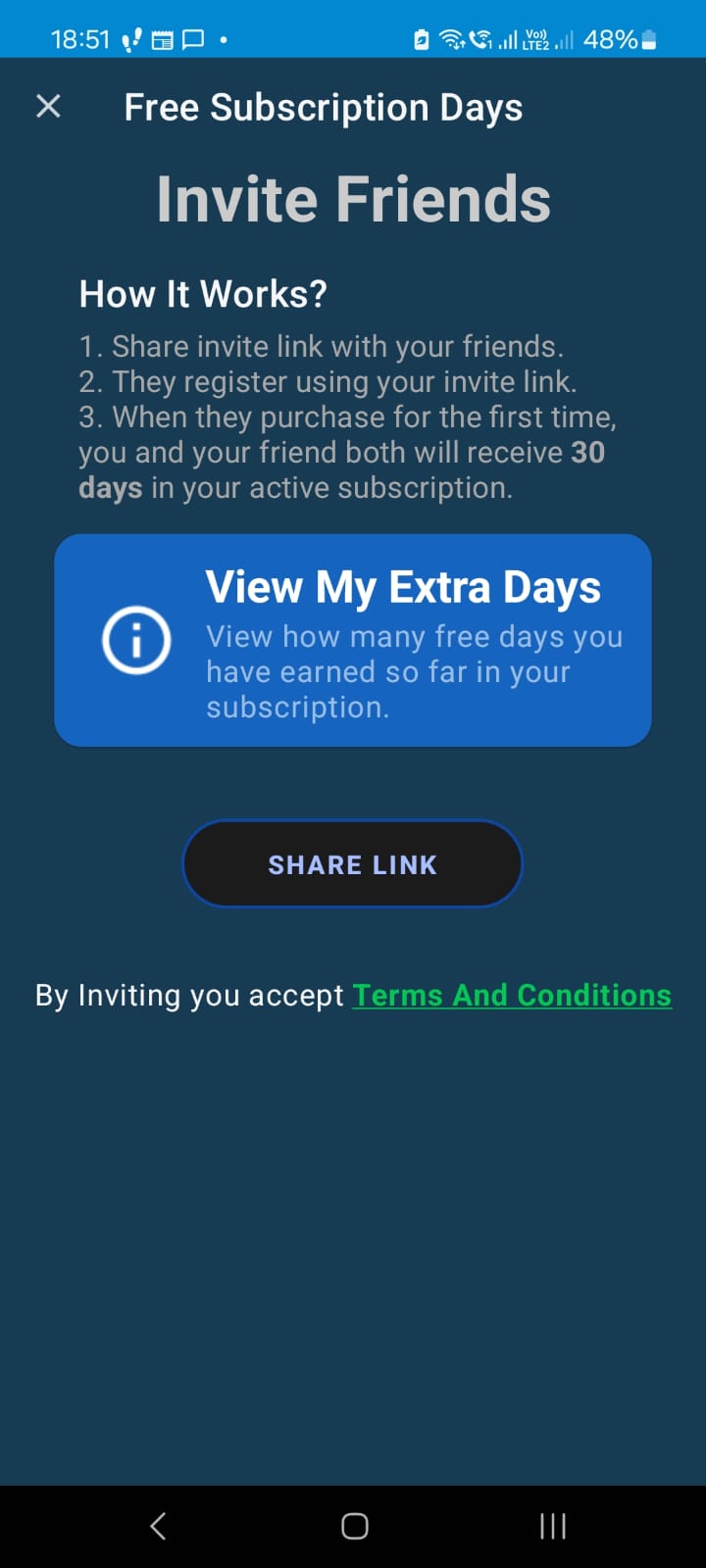
- Share Your Link: Tap the big SHARE LINK button. This allows you to instantly send your personalized invitation via WhatsApp groups, Facebook, Telegram, or Email.
Pro Tip: Don’t just share it once! Post your link in your Batchmate WhatsApp groups or medical association forums. The more colleagues who join, the more free months you stack up.
Why Refer?
There is no limit to how many free days you can earn. If 12 of your colleagues subscribe using your link, you’ve just earned an entire year of MyOPD ZIP for free.
It’s our way of saying thank you for being a part of our growing community of digital doctors.
Ready to extend your plan? Open your app and tap Share Link now!


